
Preview




Description
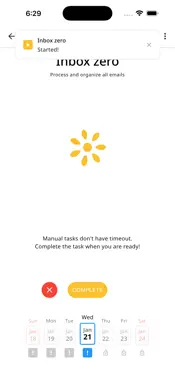
Task Studio helps you turn goals into daily action. End-to-End Encrypted Your tasks are yours. Sensitive private data is encrypted with your passcode of any length and optionally with your biometric key. No one — not even us — can read your tasks. Offline First Works without internet — no loading, no waiting. Your data lives on your device and syncs automatically when you're back online. Always fast, always available. Set meaningful goals and break them down into manageable tasks. Track your progress on any schedule — daily, weekly, monthly, or yearly. Assign tasks to specific days of the week. Stay focused with built-in timers, either manual or duration-based. Plan Your Way Create tasks that repeat daily, weekly, monthly, or yearly. Assign tasks to specific weekdays. Organize everything around your real life. Stay Focused Use manual timers to track open-ended work or set duration timers for focused sessions. See exactly where your time goes. Track Progress Monitor your goal completion over time. Build momentum with consistent daily action. Simple & Flexible No complicated setup. No overwhelming features. Just a clean, focused system that adapts to how you work. Whether you're building habits, managing projects, or staying on top of daily responsibilities — Task Studio keeps everything in one place. Download now and start making progress today. This app uses the standard Apple Terms of Use (EULA) https://www.apple.com/legal/internet-services/itunes/dev/stdeula/
What's New
Version 1.0.52 2026-10-29
Groups and tasks, finally one thing. Please update on all your devices — older versions can no longer sync. The first start converts this device's data once (a... Technical Analysis
Package Overview Basic metadata
Bundle ID
dev.titov.tasks Current Version 1.0.52
Minimum iOS 15.6
Package Size App Store Size
Package Metadata 0 / 29 version records
Detailed binary, privacy manifest, framework, and Info.plist results have not been indexed for this package yet. The verified App Store and archive metadata above remains available.
Developer Information
Known Version Records
0 version records with stored package metadata • 29 known version records
Stored metadata does not guarantee a package is currently available to download.
| Details | Version / IDs | Version date | Action |
|---|---|---|---|
| Not archived | App Store ID: 888015677 | Unknown | Request Version |
| Not archived | App Store ID: 887462076 | Unknown | Request Version |
| Not archived | App Store ID: 887299037 | Unknown | Request Version |
| Not archived | App Store ID: 887210542 | Unknown | Request Version |
| Not archived | App Store ID: 887205448 | Unknown | Request Version |
| Not archived | App Store ID: 886247709 | Unknown | Request Version |
| Not archived | App Store ID: 886098751 | Unknown | Request Version |
| Not archived | App Store ID: 885898128 | Unknown | Request Version |
| Not archived | App Store ID: 885290241 | Unknown | Request Version |
| Not archived | App Store ID: 885126150 | Unknown | Request Version |
| Not archived | App Store ID: 885067533 | Unknown | Request Version |
| Not archived | App Store ID: 884687263 | Unknown | Request Version |
| Not archived | App Store ID: 884593382 | Unknown | Request Version |
| Not archived | App Store ID: 884553462 | Unknown | Request Version |
| Not archived | App Store ID: 884284298 | Unknown | Request Version |
| Not archived | App Store ID: 884203687 | Unknown | Request Version |
| Not archived | App Store ID: 883778825 | Unknown | Request Version |
| Not archived | App Store ID: 883757868 | Unknown | Request Version |
| Not archived | App Store ID: 883719306 | Unknown | Request Version |
| Not archived | App Store ID: 883566954 | Unknown | Request Version |
| Not archived | App Store ID: 883490535 | Unknown | Request Version |
| Not archived | App Store ID: 883335162 | Unknown | Request Version |
| Not archived | App Store ID: 883161172 | Unknown | Request Version |
| Not archived | App Store ID: 883141620 | Unknown | Request Version |
| Not archived | App Store ID: 883076902 | Unknown | Request Version |
| Not archived | App Store ID: 882474487 | Unknown | Request Version |
| Not archived | App Store ID: 882452531 | Unknown | Request Version |
| Not archived | App Store ID: 882416683 | Unknown | Request Version |
| Not archived | App Store ID: 881866878 | Unknown | Request Version |