Preview



Description
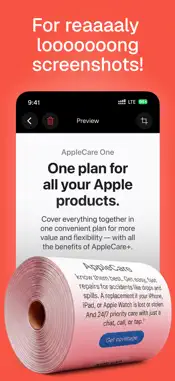
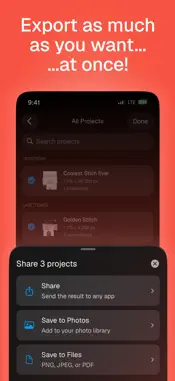
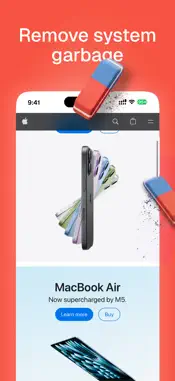
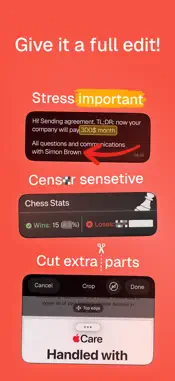
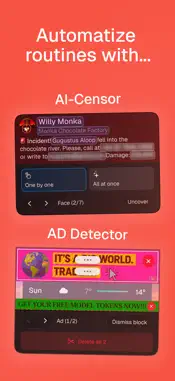
A long chat, article, feed or web page won't fit on one screen – so you take a stack of screenshots. Then you're stuck stitching them by hand: hunting for where one frame meets the next, trimming edges, lining things up. It eats your time, the seam still shows, and the image comes out crooked. Lanky gets it right in seconds – one clean image with no visible seams, no repeated bars and no scrollbar. THREE WAYS TO MAKE A LONG SCREENSHOT • Import screenshots – pick them in the app or send them straight from Photos with Share, and let the app do the rest • Web Capture – paste a link or share a page from Safari, and Lanky grabs the whole thing • Scroll Capture (Pro) – start a screen recording, scroll through a chat, feed or article, and the app turns the video into one long screenshot. Already have a recording? Send it from Photos WHY YOU CAN'T SEE THE SEAM Lanky finds exactly where two frames overlap and joins them right there. It auto-aligns the images, removes repeated headers and toolbars, and hides the scrollbar, the Dynamic Island and the home indicator. A REAL EDITOR • Hide what's private before you share: blur, pixelate or drop a solid box over names, numbers and personal details • Point things out: arrows, a brush and text • Trim what you don't need – at the edges and even from the middle AI THAT DOES THE BORING PART • AI-Censor finds names, phone numbers, emails, card numbers, amounts and faces, and hides them one by one or all at once • Ad Detector finds ads in your stitch and cuts them out PRIVATE BY DEFAULT Stitching, editing, AI-Censor and Ad Detector all run right on your device. Your screenshots are never uploaded, and no account is required. Import and Scroll Capture don't need the internet at all – works on a plane, works offline. Anonymous usage statistics can be turned off in Settings. FEATURES • Stitch up to 350 images – a stitch too tall for one image is split into parts automatically • Crop the edges and cut out what's in the middle • Automatic scrollbar, Dynamic Island and home indicator removal • Redaction: blur, pixelate, solid box • Arrows, brush and text for emphasis • AI-Censor – automatically finds and hides names, phone numbers, emails, card numbers, amounts and faces • Ad Detector – automatically finds ads and cuts them out • Export to Photos or to PNG, JPEG and PDF files. JPEG quality is adjustable, and a long PDF can be split into pages • Export several projects at once • Project history, auto-delete for old stitches and removal of the originals (optional) • Import screenshots, screen recordings and links from the share sheet • Live Activity – leave the app while a really long stitch is being made FREE AND PRO Free: stitches up to three screens long, saved to Photos with a small Lanky mark, blur, arrows, a brush, trimming at the edges and up to 5 projects in history. Lanky Pro: stitches of any length – up to 350 screenshots, Scroll Capture, PNG, JPEG and PDF files, AI-Censor and Ad Detector, pixelate, solid box, text, every arrow & brush style, cutting from the middle and unlimited history. TERMS Lanky Pro is available as a weekly auto-renewable subscription or as a one-time lifetime purchase. Payment is charged to your Apple ID when you confirm the purchase. The subscription renews automatically unless cancelled at least 24 hours before the end of the current period. You can manage or cancel it in your App Store account settings. Terms of Use: https://www.apple.com/legal/internet-services/itunes/dev/stdeula/ Privacy Policy: https://gist.github.com/Owlinc/10556a78b60cb7acdd71b894eebf2bdf Long screenshots. No pain.
What's New
Version 2.3 2026-11-23
A small update ahead of a big one! 1. Four new languages: Japanese, Korean, Traditional Chinese and Spanish. Lanky now speaks 15 languages 2. Better stitching...A small update ahead of a big one! 1. Four new languages: Japanese, Korean, Traditional Chinese and Spanish. Lanky now speaks 15 languages 2. Better stitching of screen recordings. Pauses and parts of the interface that stay still could cut a stitch short – so in the end only part of the scroll made it in. Lanky now recognizes these moments and stitches the whole recording 3. Folders, and more you can do with several stitches at once. Select a few to export them, move them to a folder, delete or censor them all in one go 4. Small fixes: the Pro purchase screen and the export sheets no longer open twice, and you can share up to 350 screenshots from Photos at once – Lanky used to drop out of the share sheet past 50 Technical Analysis
Package Overview Basic metadata
Bundle ID
com.pink-glassed.Stitcher Current Version 2.3
Minimum iOS 17.0
Package Size App Store Size
Package Metadata 0 / 0 version records
Detailed binary, privacy manifest, framework, and Info.plist results have not been indexed for this package yet. The verified App Store and archive metadata above remains available.
Known Version Records
0 version records with stored package metadata
Stored metadata does not guarantee a package is currently available to download.
| Details | Version / IDs | Version date | Action |
|---|