
Preview





Description
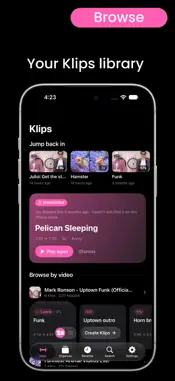
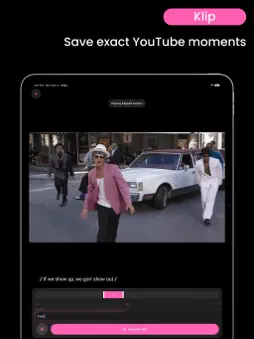
Klips - Save the Best Moments from Any YouTube Video Find it. Klip it. Keep it. When YouTube removed its Clips feature, the easiest way to save and revisit the exact moments disappeared with it. Klips was built to bring it back. Klips is a free app that lets you trim any YouTube video down to the precise second, organize your Klips your way, and share them with anyone. No more scrubbing through long videos to find that one perfect part. Save it once, and it's always a tap away. ADD ANY YOUTUBE VIDEO Paste a link or open a video straight from the YouTube app using the Share menu. Klips drops you right into the moment, ready to save. Share a video with Start at turned on, and Klips opens it at that moment. KLIP THE EXACT MOMENT Two ways to capture exactly what you want, down to the second. Tap Set Start and Set End to mark your Klip as the video plays, or use Quick Klip to instantly drop a Klip of your preferred length, then grab the draggable timeline to fine-tune both points by hand. Lock in the punchline, the highlight, the lesson, or the song. MERGE INTO SUPER KLIPS Combine several moments from the same video into a single Super Klip that plays every part back to back. Build a highlight reel, string together the key steps of a tutorial, or line up every chorus in a song, and it all plays as one seamless Klip. ORGANIZE YOUR KLIPS Sort your Klips into folders and groups so everything stays exactly where you expect it. Build collections for recipes, workouts, study notes, music, or anything else. BROWSE YOUR LIBRARY Jump Back In keeps the Klips you opened most recently at the top, and every video you have Klipped gets a shelf of its own, so all the moments from one source sit together. Open any shelf for that video's full timeline, with each of your Klips marked along it. And when something has been sitting untouched for a while, Rediscover brings one back. AUTOPLAY Sit back and let your Klips play one after another. Pick a folder, your most recent Klips, or your most played, and Autoplay runs through them hands-free in landscape. IMPORT AND SHARE Share your Klips with friends through a simple link that opens right in Klips, where they can watch your Klip and import it into their own collection, or choose to play it directly on the share site. Send a single Klip, pick several to share at once, or hand off an entire folder as one link. And when friends send you their Klips, import them in a tap. REVISIT INSTANTLY Your recents and saved Klips are always close by, so the moments you care about are never more than a tap away. And because every Klip stays linked to its source, you can jump from any Klip straight into the full video whenever you want the whole story. KLIPS PLUS Made for heavy Klipping. Klips Plus is an optional online account that keeps your whole library in one place, so a Klip made on one device is on all of them right away. Make Klips right from the share sheet, and turn YouTube Clip links into Klips. Sign in with Apple, or with your email and a one-time code. Your plays and watch time from every device add up together. And if you ever leave, download your Klips and keep everything you made. BUILT FOR iPHONE, iPHONE DUO, iPAD AND MAC A clean, native experience designed to feel right at home on every device. On iPhone Duo, fold it like a laptop: the video plays up top while the controls sit on the bottom half. Without Klips Plus, optional iCloud sync and backups keep your Klips with you everywhere. Klips is free to use. Klips Plus is an optional monthly or yearly auto-renewable subscription. Terms of Use: https://www.prgrmrfx.app/klips/terms/ Privacy Policy: https://www.prgrmrfx.app/klips/privacy/
What's New
Version 5 2026-11-05
What's new in Klips 5 (Optional) KLIPS PLUS Your Klips, in an online account. Your library stays in step across your devices in real time, with stats from all ... Technical Analysis
Package Overview Basic metadata
Bundle ID
prgrmrfx.Klips Current Version 5
Minimum iOS 18
Package Size App Store Size
Package Metadata 0 / 0 version records
Detailed binary, privacy manifest, framework, and Info.plist results have not been indexed for this package yet. The verified App Store and archive metadata above remains available.
Developer Information
Known Version Records
0 version records with stored package metadata
Stored metadata does not guarantee a package is currently available to download.
| Details | Version / IDs | Version date | Action |
|---|