Preview


Description
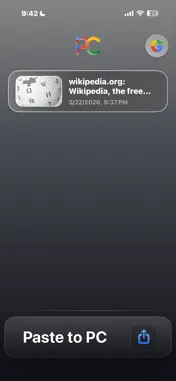
iPC — Instantly Share Links Between Your iPhone & PC How It Works On your iPhone, click share on any link then 1 click the iPC icon in the share sheet. On your PC, use the 1 click iPC Chrome Extension while on any website or manually paste a link in the iPC Windows app. Links arrive on your iPhone & PC in real-time with rich previews showing the page title, thumbnail, and timestamp. Tap any link to open it directly. Key Features • Instant delivery — links arrive in seconds • Rich link previews — see the page title, thumbnail, and time received • Two-way sharing — send links from your iPhone to PC & PC to iPhone • Swipe actions — swipe to delete or share links you've received • Privacy-first — your links are stored securely in your own Google account • Waits while offline — links patiently remain idle until each device is online Your Data, Your Control iPC stores links in your personal Google account using the app-specific data folder. No third-party servers ever see your data. Only you can access your links. Getting Started Sign into a Google account on your iPhone & PC. Install the free Chrome Extension or Windows app from niccolon.com/ipc Start sharing links instantly
Technical Analysis
Package Overview Basic metadata
Bundle ID
com.icechilla.iPC Current Version 1.0
Minimum iOS 16
Package Size App Store Size
Package Metadata 0 / 1 version records
Detailed binary, privacy manifest, framework, and Info.plist results have not been indexed for this package yet. The verified App Store and archive metadata above remains available.
Developer Information
Known Version Records
0 version records with stored package metadata • 1 known version records
Stored metadata does not guarantee a package is currently available to download.
| Details | Version / IDs | Version date | Action |
|---|---|---|---|
| Not archived | App Store ID: 883014682 | Unknown | Request Version |