
Preview



Description
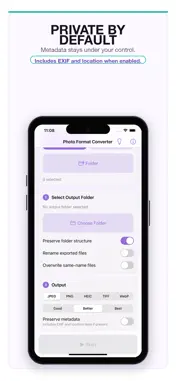
Photo Format Converter is a focused image conversion utility for Apple devices, built for people who want their files converted without ads, subscriptions, accounts, or confusing upsells. Add photos, open supported image files from compatible apps, or scan a folder, choose an output folder, select a target format, choose a quality preset when the output supports compression, then start the conversion. The app is designed for private, local workflows. It does not require an account, does not use analytics, does not show ads, and does not upload your photos to a server. By default, exported files remove embedded metadata; you can choose to preserve metadata when you need it. Key features: - Convert HEIC, HEIF, JPEG, PNG, TIFF, and WebP photos. - Batch convert selected photos. - Open supported image files from compatible apps through the iOS share/open-in flow. - Recursively import supported files from folders. - Export converted files to a folder you choose. - Choose Good, Better, or Best quality for lossy output formats. - Keep folder structure, rename recursively, or overwrite same-name files when needed. - Strip metadata by default for a more private export. - Use a simple first-run guide and built-in About page. Photo Format Converter is intentionally minimal: no cloud account, no subscription, no ads, and no tracking.
What's New
Version 1.1 2026-06-02
Version 1.1 adds a faster way to bring files into Photo Format Converter from other apps. - Open supported image files from compatible apps through the iOS shar... Technical Analysis
Package Overview Basic metadata
Bundle ID
com.nibrwr.PhotoConverter.ios Current Version 1.1
Minimum iOS 18.0
Package Size App Store Size
Package Metadata 0 / 0 version records
Detailed binary, privacy manifest, framework, and Info.plist results have not been indexed for this package yet. The verified App Store and archive metadata above remains available.
Known Version Records
0 version records with stored package metadata
Stored metadata does not guarantee a package is currently available to download.
| Details | Version / IDs | Version date | Action |
|---|