
Preview




Description
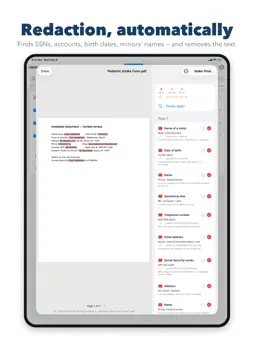
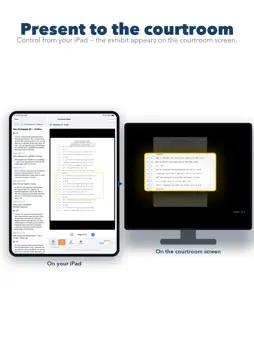
Case Linker turns a folder of PDFs into a linked case file: briefs that jump to their exhibits, an outline that jumps to the record, a courtesy copy a judge can navigate — and redactions that really remove the text. Built by a trial attorney, for trial attorneys. HYPERLINK A BRIEF AUTOMATICALLY Point Case Linker at a brief and it finds every exhibit citation, every court-decision cite with its pinpoint page, and every table-of-contents entry, wiring each to the right page — an afternoon of a paralegal's work. Then read the Audit Report: every link made, every cite skipped, and why — so you approve the work rather than trust it. ORGANIZE BY ISSUE, NOT BY DOCUMENT Name the issues you are litigating — scienter, causation, damages — and tag highlights and bookmarks with them as you read. Case Linker builds your outline under those headings, each entry carrying your note, the passage, and a cite to the page. SEARCH IT, EVEN IF IT WAS SCANNED Search a folder and every match is listed with how often the word appears — you know which deposition to open first. Recognize Text writes the words into a scanned PDF, so it can be searched, highlighted and quoted, and exports searchable. REDLINE AN OUTLINE WITH CO-COUNSEL Send an outline to another Case Linker user — AirDrop, mail, anything — and it arrives with its structure, authorship and comments intact. The first version is the original and is never marked, so a draft reads clean under its author's hand. The moment somebody else edits it, their paragraphs carry their initials and every later change is marked for everyone. Comments sit beside the document, not on top of it. When it comes back from three offices, combine every copy in one pass; you are asked only about a paragraph two of them changed differently. Group reviewers by office, one colour each, and export the Change Report — every change with its page, section, office and person — as a spreadsheet. Send your subject issues or your work product — highlights, notes, links — in files that hold no documents, only where the marks sit; each is fingerprinted against the other copy, so a mark never lands on a guess. Or export a folder with its links intact, or one combined PDF. BATES AND EXHIBIT STAMPING Bates-number a production, or run an exhibit series — 1, 2, 3 or A, B, C — across many files, with sub-numbers for multi-part exhibits. Stamped copies keep their links. REDACT AUTOMATICALLY Tell it what a filing must not carry — Social Security and account numbers, birth dates, minors' names, addresses, your own names — and it sweeps a whole folder. You see every proposal first. Make Final rebuilds the page under each bar: the text is gone, not covered, and the copy is read back to prove it. Originals are untouched; a report lists what went and what stayed. PRESENTER MODE Put an exhibit on the courtroom screen while your outline stays with you. Tap an entry to change what the room sees; write as you go on a pane the room never sees — laser, magnifier, highlighter, blackout. WRITE, THEN LINK A full editor — block quotes, footnotes, case captions, signature blocks, California pleading-paper line numbers, automatic Tables of Contents and Authorities. YOUR CASE FILES STAY ON YOUR DEVICE Case Linker collects nothing. Your documents, notes, redactions and work stay on your iPad or Mac; only what you deliberately send ever leaves. Privilege is not something to take chances with. PRICING Every feature is free for 14 days, no payment method. Then Case Linker Pro is $50 a month or $500 a year; one subscription covers Mac and iPad. Export your files at any time, subscribed or not. Payment is charged to your Apple Account at confirmation of purchase. Subscriptions renew automatically unless cancelled at least 24 hours before the period ends; manage or cancel in App Store settings. Terms of Use (EULA): https://www.apple.com/legal/internet-services/itunes/dev/stdeula/ Privacy: https://suttonapps.com/caselinker/privacy.html
What's New
Version 1.6.1 2026-09-17
A correction. The reference to many courts' redaction rules is at suttonapps.com/caselinker/court-rules.html. Version 1.6 printed a wrong address for it — in Se...A correction. The reference to many courts' redaction rules is at suttonapps.com/caselinker/court-rules.html. Version 1.6 printed a wrong address for it — in Settings › Redaction, in Help, and in the User Guide's Redaction chapter. All three now point to the right page. To get the corrected guide, open Help and choose Restore User Guide. New in 1.6, if you missed it: automatic redaction that actually removes the text. Tell Case Linker once, in Settings › Redaction, what a filing must not carry, and it sweeps a whole folder, shows you every proposal, and writes redacted copies beside the untouched originals — with a report that is safe to file. Everything runs on your iPad or Mac. Nothing is uploaded. Technical Analysis
Package Overview Basic metadata
Bundle ID
com.vasilescu.CaseLinker Current Version 1.6.1
Minimum iOS 26.5
Package Size App Store Size
Package Metadata 0 / 0 version records
Detailed binary, privacy manifest, framework, and Info.plist results have not been indexed for this package yet. The verified App Store and archive metadata above remains available.
Developer Information
Known Version Records
0 version records with stored package metadata
Stored metadata does not guarantee a package is currently available to download.
| Details | Version / IDs | Version date | Action |
|---|