Preview


Description
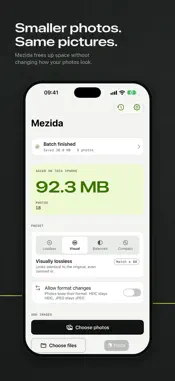
Mezida makes your photos smaller without making them look worse. Choose photos, pick a preset, and Mezida finds the smallest file that still matches the original. Then it checks the whole picture before keeping anything. SMALLER FILES, SAME PICTURE For every photo, Mezida searches for the smallest safe size at your preset and measures the result against the original. If the new file isn't smaller and just as good, your original stays exactly as it was. No guessing, no "quality 80" slider. FOUR PRESETS, IN PLAIN WORDS • Lossless: every pixel stays exactly the same; only the file is repacked. • Visually lossless (default): looks identical to the original, even zoomed in. • Balanced: smaller files; differences only show up close. • Compact: smallest files for sharing and archiving; fine detail can soften. SEE THE PROOF Every result shows before and after sizes, the percentage saved and a visual match score. Drag the compare slider across the original and the optimized photo, pinch to zoom, or hold to see the original. Each file gets a receipt of exactly what was done. KEEPS YOUR FORMAT HEIC stays HEIC, JPEG stays JPEG, PNG stays PNG. If you want even smaller files, you can allow format changes, such as WebP, in Settings. YOUR ORIGINALS ARE SAFE By default Mezida saves optimized copies and keeps your originals. Replacing originals is a separate step with a confirmation; replaced originals go to Recently Deleted in Photos, where you can recover them for 30 days. NOTHING LEAVES YOUR DEVICE Mezida has no servers and makes no network requests. Photos are optimized on your iPhone, iPad or Mac, and your history stays there. No accounts, no analytics, no ads. ASKS ONLY FOR WHAT IT NEEDS Choosing photos needs no library access. Saving copies asks to add photos only. Full access is requested only if you choose to replace originals. CALM ON YOUR DEVICE Mezida processes one photo at a time, pauses when your device gets warm and resumes when it cools down. You can pause, resume or stop a batch at any time. ON IPHONE, IPAD AND MAC One app for all three. On iPad and Mac, drop images or whole folders into the window, paste images, and use keyboard shortcuts. Available in English and Vietnamese.
What's New
Version 2.0.0 2026-11-10
First release. Optimize photos on iPhone, iPad and Mac with four presets, a before/after compare view and a receipt for every file. Nothing leaves your device. Technical Analysis
Package Overview Basic metadata
Bundle ID
com.ngocdevv.Mezi Current Version 2.0.0
Minimum iOS 17.0
Package Size App Store Size
Package Metadata 0 / 0 version records
Detailed binary, privacy manifest, framework, and Info.plist results have not been indexed for this package yet. The verified App Store and archive metadata above remains available.
Developer Information
Known Version Records
0 version records with stored package metadata
Stored metadata does not guarantee a package is currently available to download.
| Details | Version / IDs | Version date | Action |
|---|