
Preview





Description
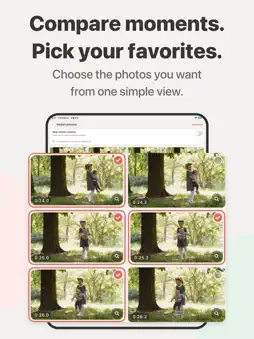
Turn the moments in your kids' videos into photos. FrameGrab makes photo candidates from a video. Set a range and an interval, and the candidates appear in a list in time order. Pick the ones you want to keep, and save them in high quality. ■ Build photo candidates from a video in one go Set a range and an interval of 0.5, 1, or 2 seconds, and FrameGrab lists the candidates for you. Prefer to choose each frame yourself? Use Capture manually to step through the video and capture the moments you want, one by one. ■ Pick the one you keep Enlarge the candidates to compare gestures and little movements side by side. FrameGrab never decides the best shot for you. ■ Skip similar photos Turn on "Skip similar photos" to group nearly identical shots under one cover photo. This runs on your device without AI. ■ Combine selected photos into one image Arrange the photos you picked in time order on a single frame-by-frame sheet with Combine into one image. It's a simple way to share a day's moments in one picture. ■ Save only what you choose, in high quality When you save, FrameGrab recreates each photo from the original video and adds it to your Photos app. You can also carry over the recording date and location if you choose. Share with family right away. ■ Your videos and photos stay on your device Making photos and comparing similar shots both happen on your device. Nothing is sent to a server, and there's no account to create. ■ Save with a short video ad each day Your first save needs no ad. After that, watch one short video ad, and you can save and share as many photos as you like for the rest of that day. ■ FrameGrab Pro Pro removes ads, including the video ad when you save. It also unlocks custom intervals from 0.1 to 10 seconds, up to 2,000 candidates at once, combining up to 30 photos into one image, and saving in highest quality, custom quality, or PNG. Pro is available as a yearly plan or a lifetime plan. The yearly plan is charged when you confirm your purchase. It renews automatically every year unless you cancel at least 24 hours before the renewal date. You can manage or cancel it in your App Store account settings. Terms of Use: https://komadori-nexus.web.app/en/terms/ Privacy Policy: https://komadori-nexus.web.app/en/privacy/
What's New
Version 1.3.0 2026-11-15
・Added the Memories tab. Look back at your saved photos, grouped by video. You can sort them and filter by year, favorites, and more. ・Home now shows your recen...・Added the Memories tab. Look back at your saved photos, grouped by video. You can sort them and filter by year, favorites, and more. ・Home now shows your recently saved photos. ・An ad now appears at the bottom of the Home and Memories lists (not shown with Pro). ・When the app is in English, Korean, or Chinese, the titles of links such as the Terms of Use now appear in that language. ・Updated the Terms of Use and Privacy Policy. Technical Analysis
Package Overview Basic metadata
Bundle ID
net.nexus-inc.komadori Current Version 1.3.0
Minimum iOS 15.0
Package Size App Store Size
Package Metadata 0 / 0 version records
Detailed binary, privacy manifest, framework, and Info.plist results have not been indexed for this package yet. The verified App Store and archive metadata above remains available.
Developer Information
Known Version Records
0 version records with stored package metadata
Stored metadata does not guarantee a package is currently available to download.
| Details | Version / IDs | Version date | Action |
|---|