
Preview


Description
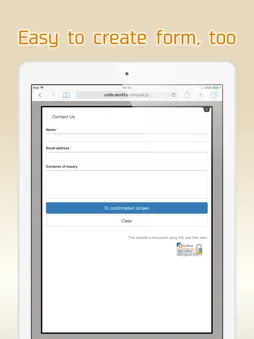
You can create a fully-fledged website and update it with simple operations. Complete the website just by arranging the selected photos, text and maps. You can tap the portion you want to modify or revise while viewing the website and change it on the spot. You can make these websites for stores, companies, groups, unions as well as websites for your hobbies. Many websites are created under the "Free plan", however if you upgrade to the "Paid plan", you will be able to utilize many useful functions. You can also use your own domain. -------------- We recently celebrated our second anniversary. Thank you to all of you. We are getting approximately 6000 new users monthly. -------------- [How to create a website] Arrange the parts and create a website. When writing any text, just place the text parts and set the sentences in those parts. Select font color, background color, font size and design. A screen is also simple to make. When you want to post photos, just select the photo parts and photos taken with your smartphone. Trimming (cutting) and rotation can be done after selecting a photo. You can change the order, or replicate and delete parts that you have placed. [Recommendations] ◊ Contact You can receive queries and contacts from users who are viewing your website. You can use it as an application form for products and services as well. You can easily change and add the input form and use it as a questionnaire as well. ◊ Phone number You can set a phone call button. This is useful in case of contact by phone. ◊ Slideshow You can display multiple images in a specific order. Recommended to use this on the HOME page to make it better. ◊ Map You can easily add a map (GoogleMAP). It is a highly functional map where you can zoom-in/ zoom-out and move with your fingers. ◊ HTML (Paid plan) This part is for advanced users who can write HTML code. You can place a blog part such as Twitter's timeline. [Free plan] With this plan, you can use our service for free. Most websites are available on the "Free plan". [Paid plan](Light) This plan offers you the use of multiple images and pages. You can write HTML code on your own and you can also use Google Analytics. The amount will vary by country. Paid plan subscriptions purchased in-app renew Every 3 months depending. Paid plans are priced at $39.99USD 3 months (pricing may vary in countries other than the U.S.). Payment will be charged to iTunes Account at confirmation of purchase. Subscription automatically renews unless auto-renew is turned off at least 24-hours before the end of the current period. Account will be charged for renewal within 24-hours prior to the end of the current period, and identify the cost of the renewal. Subscriptions may be managed by the user and auto-renewal may be turned off by going to the user’s Account Settings after purchase. [Own domain] If you change to "Paid plan", you can set already owned domains. You can choose a domain by yourself. [Future version-up] We are planning to add many more functions and designs, and improve usability of the management screen. Terms of service https://crayonsite.e-shops.jp/kiyaku_en.html privacy policy https://crayonsite.e-shops.jp/privacy_en.html
What's New
Version 1.5.1 2026-08-31
Bugs fixed Technical Analysis
Package Overview Package analysis available
Bundle ID
jp.co.hands-inc.crayon Current Version 1.5.1
Minimum iOS 14.0
Package Size App Store Size
Package Metadata 1 / 15 version records
FBLPromises
org.cocoapods.FBLPromises v2.1.1iOS 11.0+175.05 KB
FirebaseCore
org.cocoapods.FirebaseCore v10.7.0iOS 10.0+202.06 KB
FirebaseCoreInternal
org.cocoapods.FirebaseCoreInternal v10.7.0iOS 10.0+338.84 KB
FirebaseInstallations
org.cocoapods.FirebaseInstallations v10.7.0iOS 10.0+262.84 KB
FirebaseMessaging
org.cocoapods.FirebaseMessaging v10.7.0iOS 11.0+525.49 KB
GoogleDataTransport
org.cocoapods.GoogleDataTransport v9.2.2iOS 9.0+392.44 KB
GoogleUtilities
org.cocoapods.GoogleUtilities v7.11.0iOS 9.0+304.96 KB
LUKeychainAccess
org.cocoapods.LUKeychainAccess v3.0.0iOS 9.0+89.6 KB
nanopb
org.cocoapods.nanopb v2.30909.0iOS 9.0+83.65 KB
Reachability
org.cocoapods.Reachability v3.2.0iOS 11.0+84.88 KB
SVProgressHUD
org.cocoapods.SVProgressHUD v2.2.5iOS 11.0+205.35 KB
Developer Information
Known Version Records
1 version record with stored package metadata • 15 known version records
Stored metadata does not guarantee a package is currently available to download.
| Details | Version / IDs | Version date | Action |
|---|---|---|---|
 2.45 MB | v1.5.0 App Store ID: 869635995Build: 54 | 2024-10-21 11:51:26 | Get Version |
| Not archived | App Store ID: 856228768 | Unknown | Request Version |
| Not archived | App Store ID: 835546561 | Unknown | Request Version |
| Not archived | App Store ID: 823401738 | Unknown | Request Version |
| Not archived | App Store ID: 822983456 | Unknown | Request Version |
| Not archived | App Store ID: 819937721 | Unknown | Request Version |
| Not archived | App Store ID: 819730635 | Unknown | Request Version |
| Not archived | App Store ID: 816455181 | Unknown | Request Version |
| Not archived | App Store ID: 815371819 | Unknown | Request Version |
| Not archived | App Store ID: 814577051 | Unknown | Request Version |
| Not archived | App Store ID: 813251242 | Unknown | Request Version |
| Not archived | App Store ID: 813122065 | Unknown | Request Version |
| Not archived | App Store ID: 812582469 | Unknown | Request Version |
| Not archived | App Store ID: 812466956 | Unknown | Request Version |
| Not archived | App Store ID: 812234185 | Unknown | Request Version |