Preview




Description
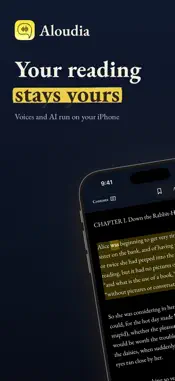
Aloudia reads anything aloud in natural voices, right on your iPhone, iPad and Mac. PDFs, ebooks, web articles and scanned pages become audio you can listen to anywhere. No account, and nothing you read is uploaded. ADD ANYTHING YOU READ • Import PDF, EPUB, Word (DOCX), ODT, RTF, Markdown, HTML and plain text, FB2 and DRM-free MOBI and AZW3 ebooks, and CBZ comics. • Paste a link to add a web article, share a page from Safari, or use the "Read in Aloudia" Safari extension on the page you're on. • Scan printed pages with your camera on iPhone and iPad. The text is recognized on your device. • Explore Ebooks: browse nearly 2,000 classic books in six languages and add one in a tap. PRIVATE, OFFLINE VOICES • Voices in 44 languages: Apple's system voices plus offline voice models you download once. • A free English voice is built in, so you can listen offline from the first launch. • Reads like a person: chapter headings are announced, poems keep their lines, and numbers, dates, addresses and units are read the way you would say them. LISTEN AND FOLLOW ALONG • The sentence is shaded and each word lights up as it is read. • Auto Skip passes over URLs, bracketed text and citations. • Skip forward or back into audio Aloudia has already made, and it plays almost at once. • Speeds mean real pace: 1.5× really reads one and a half times as fast. • Read your way: Light, Dark or Match System, and two pages side by side on iPhone Duo. • Keep listening in other apps and from the lock screen, with Control Center and, on Mac, the media keys. Your place is saved in every document. AI SUMMARIES AND ANSWERS, ON YOUR DEVICE Summarize an article, a chapter or a whole book, and ask questions whose answers quote the text. It all happens on your device: with Apple Intelligence where it is available, or, for English, German and Arabic documents, with Aloudia's own AI model, an optional one-time download. Your documents are never uploaded. FREE, OR ALOUDIA PLUS Aloudia is free to download and use, with a daily listening limit, a daily limit on imports and scans, Apple's system voices and a free offline voice. Aloudia Plus, as a monthly or yearly subscription or a one-time Lifetime purchase, adds: • Unlimited listening • Unlimited imports and scans • The full offline voice library, including the multilingual Supertonic voice (31 languages) and Kokoro voices. Supertonic and Kokoro need an iPhone or iPad with 6 GB of RAM or more; on other devices Plus unlocks every Piper voice, in every language. • Audio export: make an audiobook or podcast-style audio with chapters, title, author and cover. Privacy Policy: https://aloudia.app/privacy Terms of Use: https://aloudia.app/terms Support: [email protected]
What's New
Version 1.6.6 2026-11-16
• Prices with a decimal comma, like “12,50 €”, or a currency sign after the amount, like “100 €”, are now read correctly in German, French, Spanish, Italian, Po...• Prices with a decimal comma, like “12,50 €”, or a currency sign after the amount, like “100 €”, are now read correctly in German, French, Spanish, Italian, Portuguese, Dutch, Turkish, Polish, Russian and Ukrainian. • Abbreviations in Dutch, Swedish, Danish, Czech, Finnish and Polish, like “t.ex.” or “np.”, are read as words, with no pause after them. • On iPad, the selected tab is easier to see in the dark themes. • Small fixes and improvements. Technical Analysis
Package Overview Basic metadata
Bundle ID
com.ossoftware.aloudia Current Version 1.6.6
Minimum iOS 16.0
Package Size App Store Size
Package Metadata 1 / 9 version records
Detailed binary, privacy manifest, framework, and Info.plist results have not been indexed for this package yet. The verified App Store and archive metadata above remains available.
Developer Information
Known Version Records
1 version record with stored package metadata • 9 known version records
Stored metadata does not guarantee a package is currently available to download.
| Details | Version / IDs | Version date | Action |
|---|---|---|---|
| 486.16 MB | v1.4.1 App Store ID: 886552091Build: 1.4.1 | 2026-06-05 18:03:48 | Get Version |
| Not archived | v1.3.4 App Store ID: 884739678Build: 1.3.4 | 2026-04-21 22:09:05 | Request Version |
| Not archived | v1.3.3 App Store ID: 884677909Build: 1.3.3 | 2026-04-20 20:08:11 | Request Version |
| Not archived | v1.3.2 App Store ID: 884656115Build: 1.3.2 | 2026-04-18 23:44:01 | Request Version |
| Not archived | v1.3.1 App Store ID: 884525409Build: 1.3.1 | 2026-04-15 17:39:25 | Request Version |
| Not archived | v1.3 App Store ID: 884417247Build: 1.3 | 2026-04-13 19:07:14 | Request Version |
| Not archived | v1.2 App Store ID: 884218089Build: 1.2 | 2026-04-11 00:11:58 | Request Version |
| Not archived | v1.1 App Store ID: 884130567Build: 1.1 | 2026-04-07 01:34:44 | Request Version |
| Not archived | v1.0 App Store ID: 882672908Build: 1.0 | 2026-03-23 19:52:29 | Request Version |