Preview





Description
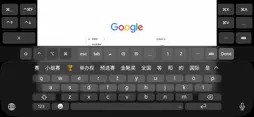
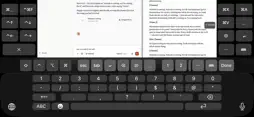
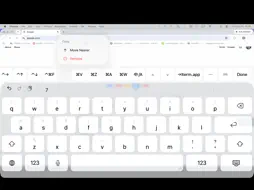
TracePort streams your computer to your iPhone or iPad — and, unlike most remote desktop clients, it lets you actually type once you get there. The stock iOS keyboard has no modifiers, no arrows and no function keys, and it covers the field you are typing into. TracePort rebuilds that part. A KEYBOARD LINE WITH THE KEYS A KEYBOARD HAS Modifiers, esc, tab, return, delete, arrows, home, end, page up, page down, insert and F1-F12, in one scrolling row above the system keyboard. No paging, no hunting. BUILD YOUR OWN KEYS Long-press any key to move it closer or take it off. Add new ones from a menu that walks you through the modifier combination and the key it fires. Group them, tick the ones you want on screen, and they stay put per host. A MACRO PAD IN THE BLACK MARGINS The letterbox either side of a 16:9 stream on a phone is dead space. TracePort puts a short column of your own macros there, out of the picture. LAUNCH APPLICATIONS A macro can open Spotlight, type an application's name and press return — faster than aiming at a dock icon over a video stream. THE PICTURE MOVES SO YOU CAN SEE WHAT YOU ARE TYPING The keyboard covers half the screen, and the field you are typing into is usually in the covered half. TracePort asks the host where its caret is and lifts the picture just far enough to clear it. When the focused application will not report one, it uses the pointer instead. When the host has nothing to offer, the picture stays where it is rather than guessing. CHINESE, JAPANESE AND KOREAN INPUT THAT WORKS An input method offers numbered candidates and the on-screen keyboard cannot reach them, so CJK input never worked properly from a phone. Digits 1-9 sit in front of the arrows. Now it works. MULTIPLE DISPLAYS Switch the host between displays from a key, and pinch to zoom so you can read a corner of a 4K desktop on a phone. EVERYTHING MOONLIGHT DOES, IT STILL DOES This is a fork of Moonlight, not a rewrite. The protocol, the decoder and the streaming path are Moonlight's: H.264, HEVC and AV1, up to 4K120, HDR, low latency, game controllers, and hosts running Sunshine or NVIDIA GameStream. WHAT YOU NEED A computer on your network — or reachable over your own VPN or Tailscale — running Sunshine (free and open source) or NVIDIA GameStream. TracePort talks to that machine directly. Nothing passes through any server of ours, because there isn't one. PRIVACY No analytics, no crash reporting, no account, no telemetry. Nothing leaves your device. FREE SOFTWARE TracePort is GPL v3. The complete source is at github.com/harrison001/traceport — you can read every line and build it yourself.
Technical Analysis
Package Overview Basic metadata
Bundle ID
io.traceone.port Current Version 9.0.2
Minimum iOS 12.0
Package Size App Store Size
Package Metadata 0 / 0 version records
Detailed binary, privacy manifest, framework, and Info.plist results have not been indexed for this package yet. The verified App Store and archive metadata above remains available.
Developer Information
Known Version Records
0 version records with stored package metadata
Stored metadata does not guarantee a package is currently available to download.
| Details | Version / IDs | Version date | Action |
|---|