Preview


Description
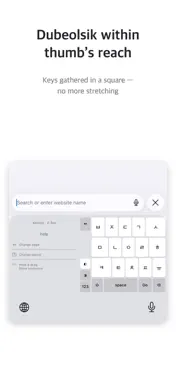
Even if you usually type with both hands, there are moments when only one hand is available. UmgiTab was made for those moments. Reaching across a full-width keyboard with one thumb invites typos, so UmgiTab gathers the keys you need into a compact square within thumb’s reach—putting accurate typing before fast typing, in Korean and English. Add only the layouts you already know, set their order and starting layout, and position the keyboard for your left or right hand. Layouts • Korean Dubeolsik • Korean Cheonjiin • Korean handwriting — available after downloading the model in the app • English QWERTY • English 9-key multi-tap Features • A compact square layout for one-handed typing • Left- and right-handed positions • Keep only the layouts you use, in your order, with your starting layout • Swipe left or right to change pages, up or down to change layouts • Hold and drag Space to move the cursor • Hold a key to repeat input and deletion • Core typing that works without a network connection How to get started 1. Open UmgiTab and choose your layouts, their order, your starting layout, and hand position. 2. Go to Settings > General > Keyboard > Keyboards > Add New Keyboard and add UmgiTab. 3. In a text field, use the globe key to select UmgiTab. The UmgiTab keyboard does not request Full Access. The UmgiTab app downloads the Korean handwriting model, and recognition then runs on your device without a network connection. Privacy UmgiTab does not record or collect what you type. UmgiTab app code does not store or transmit what you type, handwriting strokes, candidates, or cursor context. There is no UmgiTab server to collect them. When you write on the handwriting keyboard, Google ML Kit turns your strokes into text right on your device, without an internet connection. When you use it, Google ML Kit may, on its own, collect diagnostics and usage data—such as device, app, and performance information—and send it to Google. This is done by Google ML Kit, not by UmgiTab, and UmgiTab does not receive this data. The content of your handwriting is not in Google’s published collection list. The system keyboard may appear in secure fields, phone pads, or apps that block custom keyboards.
Technical Analysis
Package Overview Basic metadata
Bundle ID
net.newfrom.umgitab Current Version 1.0.0
Minimum iOS 16.6
Package Size App Store Size
Package Metadata 0 / 0 version records
Detailed binary, privacy manifest, framework, and Info.plist results have not been indexed for this package yet. The verified App Store and archive metadata above remains available.
Developer Information
Known Version Records
0 version records with stored package metadata
Stored metadata does not guarantee a package is currently available to download.
| Details | Version / IDs | Version date | Action |
|---|