
Preview



Description
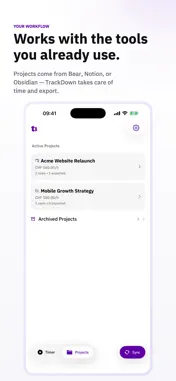
TrackDown is time tracking for project-based work. Use it with the tools you already rely on for notes, planning, or project management. Instead of moving your workflow into a large all-in-one system, TrackDown gives you a focused place to track time cleanly and export it back where your project already lives. With TrackDown you can: - track time per project with an instant-start timer - add notes to each timer entry - view duration as `hh:mm:ss`, decimal hours, and amount - set project hourly rates or mark projects as `Non-billable` - override billing values per timer when needed - export a single timer, a full day, or an entire project - archive exported timers and reopen them later if needed - manage active and archived projects separately - enable optional iCloud sync for data and settings - control running timers on iPhone with Live Activity TrackDown currently supports integrations with Bear, Notion, and Obsidian, and is designed to grow with additional integrations over time. Bear export: TrackDown writes a structured Markdown table with date, duration, hourly rate, amount, and notes back into the linked Bear note. Notion export: TrackDown creates or updates a native table directly on the linked Notion page. TrackDown supports iPhone, iPad, and Mac via Mac Catalyst. The app stays intentionally focused: track time, keep reports clean, and stay close to your existing workflow.
What's New
Version 1.0.6 2026-06-15
You can refresh now your project list right when adding a timer, so your newest projects are always ready to track. Technical Analysis
Package Overview Basic metadata
Bundle ID
com.neverstop.TrackDown Current Version 1.0.6
Minimum iOS 18.0
Package Size App Store Size
Package Metadata 0 / 6 version records
Detailed binary, privacy manifest, framework, and Info.plist results have not been indexed for this package yet. The verified App Store and archive metadata above remains available.
Developer Information
Known Version Records
0 version records with stored package metadata • 6 known version records
Stored metadata does not guarantee a package is currently available to download.
| Details | Version / IDs | Version date | Action |
|---|---|---|---|
| Not archived | App Store ID: 886987313 | Unknown | Paid / Arcade |
| Not archived | App Store ID: 885131789 | Unknown | Paid / Arcade |
| Not archived | App Store ID: 884843500 | Unknown | Paid / Arcade |
| Not archived | App Store ID: 884811456 | Unknown | Paid / Arcade |
| Not archived | App Store ID: 884762579 | Unknown | Paid / Arcade |
| Not archived | App Store ID: 884242852 | Unknown | Paid / Arcade |