Preview

Description
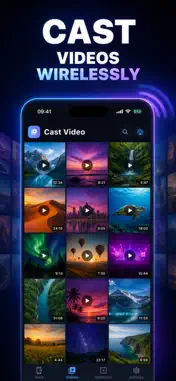
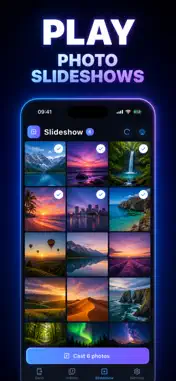
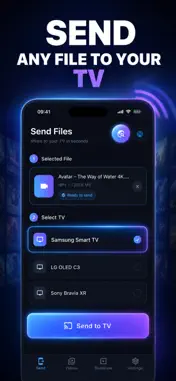
Send Files To TV is the simplest way to share photos, videos, and files from your phone to any smart TV on your WiFi network. No cables. No app store on your TV. No accounts. Just open the app, pick what you want to watch, and tap send. Your file plays on the big screen in seconds. Whether you want to show holiday photos to family, play a downloaded movie on your TV, or run a photo slideshow at a party, Send Files To TV handles it all. The app uses DLNA, the casting standard built into nearly every modern smart TV, so it works straight out of the box on most TVs without any extra software. KEY FEATURES Send any file — photos, videos, audio, and documents Pick any file from your device and send it to your TV in one tap. Send Files To TV supports the formats your TV can play, including MP4, MOV, JPG, PNG, MP3, and more. Your file streams directly from your phone to your TV with no cloud upload, no compression, and no quality loss. Auto-discover TVs on your WiFi The moment you open the app, Send Files To TV scans your local WiFi network and shows every compatible TV it finds. No pairing codes, no QR scans, no setup screens. Turn on your TV, open the app, and your TV is already there waiting. Cast videos from your library Browse your phone's full video library inside the app and cast any clip with one tap. Perfect for home movies, downloaded content, or anything else you want to watch on a bigger screen. Run beautiful photo slideshows Select a batch of photos and Send Files To TV will play them as a slideshow on your TV. Set your own interval — 3 seconds, 5 seconds, 10 seconds — and let the photos auto-advance. Great for parties, family gatherings, or showing off your latest trip. Works with any DLNA-compatible smart TV Send Files To TV uses the open DLNA / UPnP standard, which means it works with the vast majority of smart TVs sold in the last decade. No proprietary protocols, no walled gardens, no extra hardware needed. If your TV is on the same WiFi as your phone, you are ready to cast. Local streaming, total privacy Files never leave your local network. Send Files To TV runs a tiny secure server on your phone and streams the file directly to your TV. Nothing touches the cloud, nothing is uploaded anywhere, and nothing is shared with third parties. Your photos and videos stay yours. Stop, replay, and control playback Pause, stop, or change what is playing right from the app. Whether you are casting a single video or running a long photo slideshow, Send Files To TV gives you full remote control over your TV. Customizable settings Tweak the slideshow interval, change the local server port, or toggle auto-discovery — the app adapts to how you use it. Everything is local, everything is fast. WHY YOU WILL LOVE SEND FILES TO TV No cables. No HDMI adapters, no dongles, nothing extra to plug in. No accounts. Send Files To TV does not require sign-ups, logins, or subscriptions. No cloud. Your files never leave your home network. No ads in the way. The casting flow is clean and uncluttered. No learning curve. Open the app, pick a file, tap send. That is it. PERFECT FOR Sharing vacation photos with family on the big screen Watching downloaded videos in the living room Running photo slideshows at parties or events Casting personal videos without cables or HDMI hassle Showing presentations or PDFs from your phone Playing music from your phone through your TV speakers SUPPORTED FORMATS Photos: JPG, PNG, HEIC, GIF Videos: MP4, MOV, M4V, MKV (subject to your TV codec support) Audio: MP3, WAV, AAC, FLAC Documents: PDF and other formats your TV can render If your TV plays it, Send Files To TV can send it. Stop fighting with cables, paid casting apps, and complicated screen-mirror setups. Send Files To TV gets your content from your phone to your TV in three taps. Download Send Files To TV today and turn your TV into a screen for everything on your phone.
What's New
Version 4.0.0 2026-08-11
Improved the app Technical Analysis
Package Overview Basic metadata
Bundle ID
com.sendfilestotv.sendfilestotvsendfilestotv Current Version 4.0.0
Minimum iOS 15.0
Package Size App Store Size
Package Metadata 1 / 4 version records
Detailed binary, privacy manifest, framework, and Info.plist results have not been indexed for this package yet. The verified App Store and archive metadata above remains available.
Known Version Records
1 version record with stored package metadata • 4 known version records
Stored metadata does not guarantee a package is currently available to download.
| Details | Version / IDs | Version date | Action |
|---|---|---|---|
| Not archived | App Store ID: 887757931 | Unknown | Request Version |
| 36.94 MB | v4.0.0 App Store ID: 887189677Build: 4.0.0 | 2026-08-11 22:40:22 | Get Version |
| Not archived | App Store ID: 886537439 | Unknown | Request Version |
| Not archived | App Store ID: 879644076 | Unknown | Request Version |