
Preview



Description
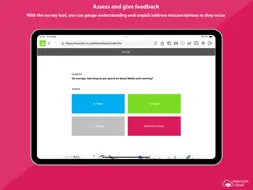
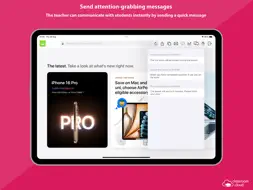
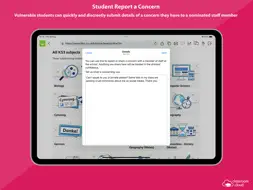
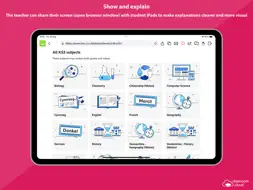
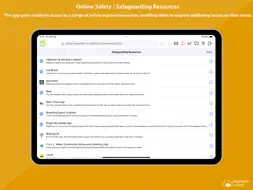
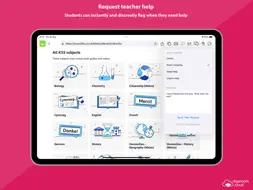
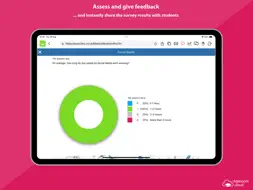
Designed for use within schools and other educational institutions, this Student browser app for iOS is for use with classroom.cloud, the easy breezy, low-cost, cloud-based IT management, online safety and teaching platform for schools. classroom.cloud is a teacher’s dream come true. Incredibly easy to use, it provides a range of teaching tools that can flex to any learning environment – both in school and with remote learners. From real-time instruction and assessment tools, to boosting collaboration and support, as well as helping manage online behavior – it has it all! With the optional online safety toolkit, selected staff can monitor online activity, identify students at risk, and spot concerning trends. And, with its range of IT management tools, school techs can manage teacher and student devices centrally, as well as see at a glance how your technology is being used and how to maximize it – saving you a bunch of time and money! Once your school has registered online with classroom.cloud, the app can be easily deployed by the IT team to student iPads (iOS 14 and above), enabling teachers to connect instantly and securely to the devices from the cloud-based Teacher console and allowing school techs to deliver instant remote support and device management. The classroom.cloud student app can be set as the default browser on devices and offers support for Entra ID and Google authentication, allowing you to force students to sign-in to the app with Microsoft or Google credentials if applicable. Teacher Tools: • Choice of flexible connection methods – connect to a pre-defined group of student devices, a specified list of device or student names, or on the fly using a Class Code. • Easily monitor students’ internet use via crystal-clear thumbnails. Zoom in using Watch/View Mode to take a closer look at activity on a single student device. • Broadcast the teacher’s screen and audio to connected student devices to help show/talk them through explanations and lesson activities. • Lock students’ screens in a single click to gain attention. • Present students with the lesson objectives and their expected learning outcomes. • Chat, send a message, and support your students via help requests – without their peers knowing. • Get a feel for students’ understanding of the topic you have just taught them by sending out a quick survey for them to respond to. • See details of the websites that students are currently viewing to check they are focused on the task at hand. • Restrict internet use by employing ‘approved’ and ‘restricted’ website lists during the lesson. • Save yourself a heap of time by launching a website on the students’ devices. • Recognize good work or behaviour by assigning Rewards to students during the lesson. Admin/Technician Tools: • Retrieve a real-time view of the hardware and software installed on each student device. • Monitor internet usage. • Send instant notifications to student iPads. • Send Acceptable Use Policies (AUPs) to student iPads and track acknowledgements in the Web Portal. Online Safety Tools: • Keyword monitoring - alerts nominated staff when students type or search for any terms that match with those in the classroom.cloud keyword database – providing internet safety indicators for self-harm, bullying, sexual and criminal exploitation, and much more. Language packs are included to ensure your school can monitor concerning activity in students’ first languages. • Report a concern - students who feel vulnerable can use the app to 'report concerns' directly and discreetly to the online safety team. • Online resources - gives students instant access to a list of relevant online agencies should they want to seek external help with a particular problem or concern. The innovation behind classroom.cloud comes from NetSupport, the trusted developer of effective classroom management tools for schools for more than 35 years.
What's New
Version 2.11.0001 2026-07-30
Fixed an issue where the Username field could display on the sign in page when configured to use one of the other sign in methods. Updated validation of MDM con... Technical Analysis
Package Overview Basic metadata
Bundle ID
com.netsupport.cic.student.ios Current Version 2.11.0001
Minimum iOS 14.0
Package Size App Store Size
Package Metadata 0 / 22 version records
Detailed binary, privacy manifest, framework, and Info.plist results have not been indexed for this package yet. The verified App Store and archive metadata above remains available.
Developer Information
Known Version Records
0 version records with stored package metadata • 22 known version records
Stored metadata does not guarantee a package is currently available to download.
| Details | Version / IDs | Version date | Action |
|---|---|---|---|
| Not archived | App Store ID: 888395489 | Unknown | Request Version |
| Not archived | App Store ID: 886616633 | Unknown | Request Version |
| Not archived | App Store ID: 882640172 | Unknown | Request Version |
| Not archived | App Store ID: 879522056 | Unknown | Request Version |
| Not archived | App Store ID: 877645575 | Unknown | Request Version |
| Not archived | App Store ID: 873584183 | Unknown | Request Version |
| Not archived | App Store ID: 870263907 | Unknown | Request Version |
| Not archived | App Store ID: 869308562 | Unknown | Request Version |
| Not archived | App Store ID: 868019098 | Unknown | Request Version |
| Not archived | App Store ID: 864954440 | Unknown | Request Version |
| Not archived | App Store ID: 864902943 | Unknown | Request Version |
| Not archived | App Store ID: 863780588 | Unknown | Request Version |
| Not archived | App Store ID: 858300433 | Unknown | Request Version |
| Not archived | App Store ID: 856475849 | Unknown | Request Version |
| Not archived | App Store ID: 855074579 | Unknown | Request Version |
| Not archived | App Store ID: 849222423 | Unknown | Request Version |
| Not archived | App Store ID: 848157808 | Unknown | Request Version |
| Not archived | App Store ID: 847109573 | Unknown | Request Version |
| Not archived | App Store ID: 846822791 | Unknown | Request Version |
| Not archived | App Store ID: 846396755 | Unknown | Request Version |
| Not archived | App Store ID: 845824772 | Unknown | Request Version |
| Not archived | App Store ID: 844841908 | Unknown | Request Version |