
Preview


Description
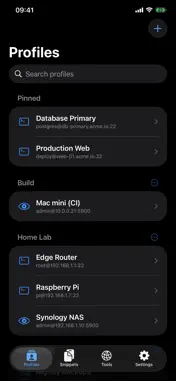
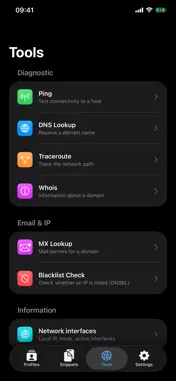
SSHive is a remote access client for iPhone and iPad: SSH, SFTP, RDP, VNC and a built-in VPN client in one private, native app. Manage your servers, open a terminal, transfer files and control remote Windows, macOS and Linux desktops from anywhere. SUPPORTED PROTOCOLS • SSH: full terminal (SwiftTerm), key or password authentication • SFTP: browse, upload, download and manage files • RDP: Remote Desktop to Windows PCs and servers • VNC: screen sharing for macOS and Linux • VPN: connects to your own OpenVPN, IKEv2 or IPsec server before the session opens KEY FEATURES • Touch mouse and keyboard for RDP and VNC, with a trackpad mode • SSH key generation, import and management • Port forwarding (SSH tunnels) • Command snippets, with a history of the ones you ran • Shared credentials reused across profiles • Folders to organize your connections • Optional Face ID / Touch ID before each connection • iCloud sync of profiles, passwords and keys across your devices • Import and export of your connections (.sshive) • Native SwiftUI design for iPhone and iPad, light and dark NETWORK TOOLS • Ping: test host reachability • DNS Lookup: resolve domain names • Traceroute: trace the network path • Whois: domain registration info • MX Lookup: a domain's mail servers • Blacklist Check (DNSBL): see if an IP is blacklisted • Network interfaces: local IP, netmask and active interfaces PRIVACY Your passwords and keys live in the iOS Keychain, and you can require Face ID / Touch ID to use them. Nothing goes through our servers: connections go straight from your device to your servers. FREE & PRO Free: SSH terminal, SFTP, SSH keys, Face ID / Touch ID and the network tools. Limits: 2 SSH sessions at a time, 5 profiles, 1 local tunnel, 3 custom snippets, uploads up to 10 MB. Pro: RDP, VNC, VPN, unlimited SSH sessions, profiles and snippets, remote tunnels and extra local tunnels, shared accounts, session logging, .sshive import and export, iCloud sync and all terminal themes. One Pro purchase, with no subscription, also unlocks Pro in SSHive for Mac from the Mac App Store (Mac with Apple silicon), with the same Apple Account. On the Mac, use Restore purchases if Pro is not active yet. SSHive is made for developers, sysadmins and DevOps engineers who look after servers from an iPhone or iPad.
What's New
Version 1.2.6 2026-10-24
New in 1.2.6: • Ready for iPhone Duo: the app fills the whole inner display, and an open terminal stays on screen when you unfold or fold the iPhone. You also c... Technical Analysis
Package Overview Basic metadata
Bundle ID
com.netmesafe.sshive Current Version 1.2.6
Minimum iOS 17.0
Package Size App Store Size
Package Metadata 1 / 3 version records
Detailed binary, privacy manifest, framework, and Info.plist results have not been indexed for this package yet. The verified App Store and archive metadata above remains available.
Developer Information
Known Version Records
1 version record with stored package metadata • 3 known version records
Stored metadata does not guarantee a package is currently available to download.
| Details | Version / IDs | Version date | Action |
|---|---|---|---|
| 22.91 MB | v1.2.3 App Store ID: 887228925Build: 1.2.3 | 2026-08-18 08:36:22 | Get Version |
| Not archived | App Store ID: 887148467 | Unknown | Request Version |
| Not archived | App Store ID: 883590857 | Unknown | Request Version |