Preview






Description
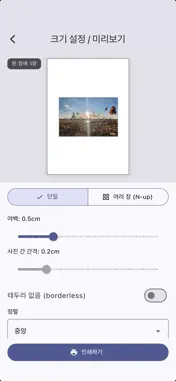
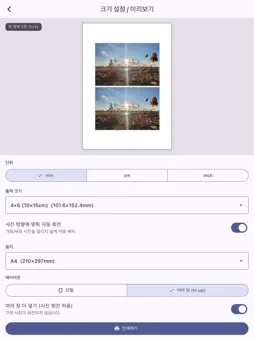
PhotoTrueSize lets you print and save photos at the exact physical size you want — down to the millimeter. Tired of photos that print stretched to fill an A4 page, or at some random size you can't control? PhotoTrueSize puts you in charge. Choose a standard photo size or enter your own dimensions, and the app lays your photo out at precisely that size, ready to print or save. KEY FEATURES • Exact physical sizing — Set the output size in mm, cm, or inches. What you set is what you get. • Standard presets — 4×6, 5×7, 3×5, 8×10, ID/passport photos, and more. • Custom sizes — Enter any width and height for full control. • Fit multiple photos per page — Place several copies on a single A4 sheet to save paper and print cost. • Choose your paper — A4, A5, A3, Letter, and photo paper sizes. • Margins & borderless — Adjust margins or go edge-to-edge. • Live preview — See exactly how your photo sits on the page before printing. • Resolution warning — The app warns you when a photo is too low-resolution for the size you chose, so you avoid blurry prints. • Print or save — Send straight to any AirPrint printer, save as PDF, or export as a high-resolution JPG/PNG image (with print DPI embedded). PRIVACY FIRST Your photos never leave your device. PhotoTrueSize processes everything locally — no uploads, no accounts, no servers. NOTE ON PRINT ACCURACY The app generates output at accurate physical dimensions. Final printed size may vary slightly depending on your printer, paper, and print settings. For best results, choose "Actual size" / "100%" when printing and turn off auto-fit. PhotoTrueSize is free, supported by ads.
What's New
Version 1.1 2026-10-08
이번 업데이트의 새로운 기능 • 출력 영역 조정 — 사진과 출력 크기 비율이 달라도 이제 잘리는 부분을 직접 정할 수 있어요. 미리보기에서 '출력 영역' 버튼을 눌러 드래그로 위치를 옮기고, 두 손가락으로 확대해 원하는 부분만 인쇄하세요. • 기본 배치 변경 — 사진 1장이 기본으로... Technical Analysis
Package Overview Basic metadata
Bundle ID
com.nephritesoft.phototruesize Current Version 1.1
Minimum iOS 15.0
Package Size App Store Size
Package Metadata 0 / 1 version records
Detailed binary, privacy manifest, framework, and Info.plist results have not been indexed for this package yet. The verified App Store and archive metadata above remains available.
Developer Information
Known Version Records
0 version records with stored package metadata • 1 known version records
Stored metadata does not guarantee a package is currently available to download.
| Details | Version / IDs | Version date | Action |
|---|---|---|---|
| Not archived | App Store ID: 887151326 | Unknown | Request Version |