
Preview


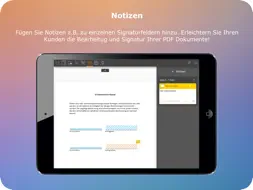

Description
The eDocBox app allows users to access the eDocBox document management system. Users require an eDocBox account to use this app. No more printing! - Service reports, contracts, invoices, confirmation slips, receipts, purchase orders, declarations of intention, etc. Sign the iPad directly. Digital signature and PDF form compatibility: Users can edit PDF form fields and save documents. If the PDF document contains signature fields, the user can sign these fields directly on the iPad. If the PDF does not contain signature fields, the app can be used to add these fields. All documents signed using the eDocBox are expanded to include biometric information and protected to prevent additional changes from being made. eDocBox features: - The eDocBox is an innovative, operation-based online document management system for private, commercial and administrative use. - eDocBox is efficient, secure, paperless and it helps lower costs. eDocBox optimises document processes in the B2B, B2C, C2B and C2C areas. - The eDocBox enables users to interact with PDF documents in a whole new way as a Private Trusted Cloud service. - Documents are managed using operations. Documents can be edited, saved, electronically signed, faxed and securely shared and forwarded between eDocBox users. - Operations and documents can be archived or forwarded to other editing systems (or other eDocBox systems). - eDocBox provides open interfaces which enable users to securely integrate their own IT systems as sources for operations and documents. - Users can take advantage of the whole range of features - on their own or as part of a team, on a PC or using the eDocBox app on the iPad. Operating requirements: - The app requires a stable network connection to the eDocBox server. - Users require an eDocBox account to use this app. - Communication is carried out via a secure SSL connection. - The documents are signed on the eDocBox server. Highlights: - Top security: Documents signed using eDocBox are protected from manipulation and misuse and can be viewed using Acrobat Reader. - Conforms to ISO regulations: PDF/A in accordance with ISO 19005:2005. - Certificates: Supports X.509/PKCS#7 certificates. - Writing characteristics: The app not only saves the picture of the signature in the document, it also stores the biometric information of the signature. Documents are encrypted using the RSA standard and the private key is stored securely with the notary. - Global positioning feature: The GPS data can be integrated into the signature when the global positioning service is activated. - Form fields: Users can fill out these fields and navigate between fields using the tab key. - Gestures: The standard gestures allow users to zoom etc. - Ergonomic handling: Simple and intuitive handling thanks to familiar operating elements. - BiPro: Standard 262 specifies the procedure for supplying signatures on specialised documents for business processes in the insurance industry that require a declaration of intention. - Miniature view: The pages of the document. - Interfaces: In/out function for apps, e.g., Dropbox, mail, etc. New ‘Open with...’ feature ------------------------------------ PDF documents from other applications can be filled out, signed and saved in eDocBox using the ‘Open with...’ feature. After you select ‘Open with...’, a window appears. Here, you can select whether the document is to be opened in eDocBox for a signature only, whether a new operation is to be created or whether the document is to be opened in an existing operation.
What's New
Version 3.5.1 2026-09-28
We have made some preparations for the new version of eDocBox. Technical Analysis
Package Overview Package analysis available
Bundle ID
de.nepatec.edocbox Current Version 3.5.1
Minimum iOS 17.6
Package Size App Store Size
Package Metadata 2 / 53 version records
eDocBoxKit
de.nepatec.eDocBoxKit v3.5.6iOS 14.0+3.23 MB
Developer Information
Known Version Records
2 version records with stored package metadata • 53 known version records
Stored metadata does not guarantee a package is currently available to download.
| Details | Version / IDs | Version date | Action |
|---|---|---|---|
 4.59 MB | v3.5.0 App Store ID: 886281379Build: 3.5.0 | 2026-06-01 14:03:58 | Get Version |
| 2.56 MB | v3.3.2 App Store ID: 873361833Build: 1 | 2025-03-17 18:39:18 | Get Version |
| Not archived | App Store ID: 869786273 | Unknown | Request Version |
| Not archived | App Store ID: 864971690 | Unknown | Request Version |
| Not archived | App Store ID: 862289754 | Unknown | Request Version |
| Not archived | App Store ID: 847083572 | Unknown | Request Version |
| Not archived | App Store ID: 843860616 | Unknown | Request Version |
| Not archived | App Store ID: 843351636 | Unknown | Request Version |
| Not archived | App Store ID: 842298083 | Unknown | Request Version |
| Not archived | App Store ID: 839383592 | Unknown | Request Version |
| Not archived | App Store ID: 835278823 | Unknown | Request Version |
| Not archived | App Store ID: 832556408 | Unknown | Request Version |
| Not archived | App Store ID: 832449628 | Unknown | Request Version |
| Not archived | App Store ID: 831187948 | Unknown | Request Version |
| Not archived | App Store ID: 830984061 | Unknown | Request Version |
| Not archived | App Store ID: 830680767 | Unknown | Request Version |
| Not archived | App Store ID: 828318960 | Unknown | Request Version |
| Not archived | App Store ID: 827952104 | Unknown | Request Version |
| Not archived | App Store ID: 827704516 | Unknown | Request Version |
| Not archived | App Store ID: 825323145 | Unknown | Request Version |
| Not archived | App Store ID: 824473033 | Unknown | Request Version |
| Not archived | App Store ID: 823961332 | Unknown | Request Version |
| Not archived | App Store ID: 823475519 | Unknown | Request Version |
| Not archived | App Store ID: 821163530 | Unknown | Request Version |
| Not archived | App Store ID: 820835313 | Unknown | Request Version |
| Not archived | App Store ID: 815421395 | Unknown | Request Version |
| Not archived | App Store ID: 812064775 | Unknown | Request Version |
| Not archived | App Store ID: 811879000 | Unknown | Request Version |
| Not archived | App Store ID: 811814179 | Unknown | Request Version |
| Not archived | App Store ID: 811176205 | Unknown | Request Version |
| Not archived | App Store ID: 810852989 | Unknown | Request Version |
| Not archived | App Store ID: 796472678 | Unknown | Request Version |
| Not archived | App Store ID: 767962677 | Unknown | Request Version |
| Not archived | App Store ID: 705783346 | Unknown | Request Version |
| Not archived | App Store ID: 591564526 | Unknown | Request Version |
| Not archived | App Store ID: 515422648 | Unknown | Request Version |
| Not archived | App Store ID: 499712644 | Unknown | Request Version |
| Not archived | App Store ID: 475972640 | Unknown | Request Version |
| Not archived | App Store ID: 437722700 | Unknown | Request Version |
| Not archived | App Store ID: 334392653 | Unknown | Request Version |