
Preview


Description
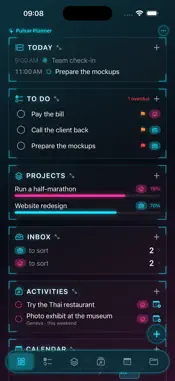
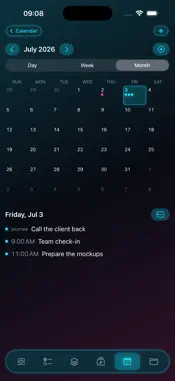
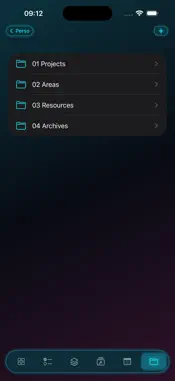
Pulsar Planner is a fast, private planner for both sides of your life. Everything you capture is tagged Work or Personal one tap switches between your two worlds, or shows them side by side, never mixed by force. A DASHBOARD THAT SHOWS EVERYTHING Your home screen is a set of widgets: Today's timeline, To Do, Projects with progress bars, Inbox, Activities to plan, and a mini calendar. Hide, rename and reorder them your dashboard, your rules. CAPTURE IN SECONDS A floating + opens a quick-add card right above the keyboard: title, type (task, event or activity), due date, priority, recurrence done. Snap a photo of a flyer or voucher and on-device intelligence extracts the title, place, dates and price for you. You can even add tasks with Siri, without opening the app. PLAN YOUR DAYS See your week as a clean agenda and your month at a glance. Open any day and time-block it: drag or tap your unscheduled tasks onto the timeline, next to your existing calendar events. Your appointments from Apple Calendar show up read-only; Pulsar writes only to its own dedicated calendars. Tasks can sync both ways with Apple Reminders. PROJECTS WITH REAL GOALS Group tasks into projects with measurable objectives a percentage, a checklist, or a metric like kilometers. Rich mode adds steps, time tracking and checklist templates for the projects that deserve it. YOUR FILES, IN YOUR ICLOUD Files gives every project a folder in your own iCloud Drive, organized with the PARA method (Projects, Areas, Resources, Archives). Drop in PDFs and Markdown notes from the Files app or the Finder, read them anywhere, edit Markdown right in the app. The folder is yours visible in the Files app, and it outlives everything. TWO THEMES Light, a clean native look or Neon, a dark sci-fi HUD with glowing accents. PRIVATE BY DESIGN No accounts, no ads, no tracking, no servers. Your data lives on your device and syncs through your personal iCloud. Photo analysis and text recognition run entirely on-device. We couldn't read your data if we wanted to. Pulsar Planner works fully offline and on its own Calendar, Reminders and iCloud are optional bridges, never requirements. Pulsar Planner is young and evolving fast new features and fixes ship regularly. Spotted a rough edge? Tell us at [email protected] and help shape what comes next. What's New (première release) : Welcome to Pulsar Planner plan work and life in one place, privately. This is our first public release: it's solid, but young. If anything feels rough, tell us at [email protected] updates ship often.
What's New
Version 1.3.0 2026-07-27
A big update: smarter lists, a cleaner look, and files that tidy themselves. • Your to-do list is now grouped by due date - Overdue, Today, Tomorrow, Next 7 da...A big update: smarter lists, a cleaner look, and files that tidy themselves. • Your to-do list is now grouped by due date - Overdue, Today, Tomorrow, Next 7 days - and the dashboard shows tasks due today right on the day's timeline. • Activity checklists: add named groups of items ("Camera bag": charger, spare battery…) and tick them off - progress shows right in the list. • Reminders sync runs automatically and now handles deletions both ways. • Files: search your notes (accent-insensitive, with excerpts) and archive a finished project's folder to "04 Archives" in one tap. • A lighter look: one-bar calendar, tidier month grid, richer project cards. Something feels rough? Tell us at [email protected]. Technical Analysis
Package Overview Basic metadata
Bundle ID
com.nelson.Pulsar Current Version 1.3.0
Minimum iOS 26.0
Package Size App Store Size
Package Metadata 0 / 0 version records
Detailed binary, privacy manifest, framework, and Info.plist results have not been indexed for this package yet. The verified App Store and archive metadata above remains available.
Known Version Records
0 version records with stored package metadata
Stored metadata does not guarantee a package is currently available to download.
| Details | Version / IDs | Version date | Action |
|---|