
Preview





Description
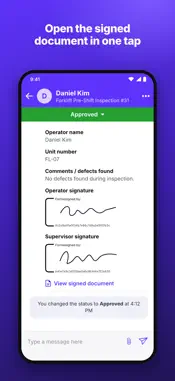
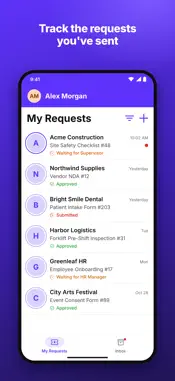
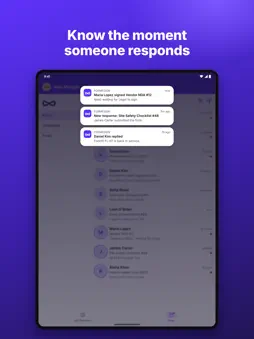
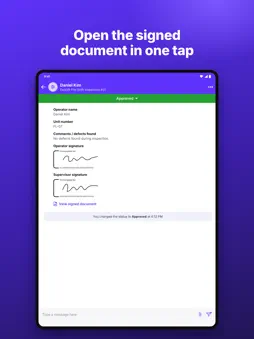
Legally binding signatures in Google Forms, Google Sheets and Google Docs. Every signed form is timestamped, stored and audit-ready, and signatures are compliant with the ESIGN Act, UETA and eIDAS. The Formesign app puts all your requests and signatures in one place: see each response as soon as it arrives, follow every request from signer to signer, and open the signed document in one tap. ALL YOUR REQUESTS AND SIGNATURES, IN ONE PLACE • Inbox: every response to your forms, newest first, with a dot on anything you haven't opened. • My Requests: the forms you've filled in or been asked to sign, and where each one stands. • Filter by form and status to find what needs your attention. • On iPad, your Inbox folders stay open beside the list. KNOW THE MOMENT SOMEONE RESPONDS • Get a notification for new responses and updates. • Tap the notification to open that request straight away. SEE WHO STILL NEEDS TO SIGN • Each request shows its current step and who it is waiting for. • Tap the waiting step to see when the request was sent. • Every status change and message stays with the request. OPEN THE SIGNED DOCUMENT IN ONE TAP • When everyone has signed, open the final signed PDF right from the request. REPLY AND UPDATE STATUS ON THE GO • Message the person who sent the form, share attachments, and move a request to its next status. BUILT FOR GOOGLE WORKSPACE Formesign adds legally binding e-signatures to Google Forms, Docs and Sheets. Describe what you need or upload a PDF, and the signature form is ready in seconds. People can sign on any phone or computer, without a Google account if you choose. Teams use Formesign for safety checklists, patient intake, consent forms, NDAs, onboarding and approvals, from healthcare to construction. GETTING STARTED Sign in with the Google account you use for Formesign. New to Formesign? Create your first signature form at formesign.com and try it free.
What's New
Version 2.0.1 2026-11-07
What's new in 2.0.1: • Now on iPad: your Inbox folders stay open beside the list, in portrait and landscape • Switch between Inbox, Completed and Trash from the... Technical Analysis
Package Overview Basic metadata
Bundle ID
com.formesign Current Version 2.0.1
Minimum iOS 15.1
Package Size App Store Size
Package Metadata 0 / 2 version records
Detailed binary, privacy manifest, framework, and Info.plist results have not been indexed for this package yet. The verified App Store and archive metadata above remains available.
Known Version Records
0 version records with stored package metadata • 2 known version records
Stored metadata does not guarantee a package is currently available to download.
| Details | Version / IDs | Version date | Action |
|---|---|---|---|
| Not archived | App Store ID: 880457840 | Unknown | Request Version |
| Not archived | App Store ID: 878877264 | Unknown | Request Version |