
Preview




Description
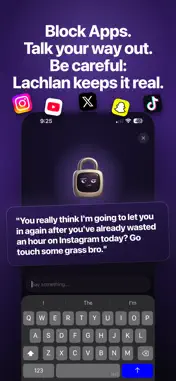
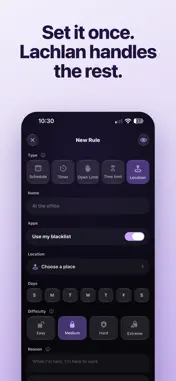
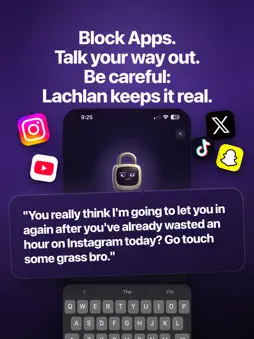
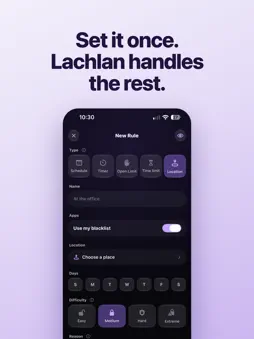
Every app blocker is one tap from off. This one asks why. Lachlan is a small, deeply opinionated padlock who blocks your most distracting apps on a schedule you set, and then makes you explain yourself before he lets you back in. WHY THIS WORKS WHEN NOTHING ELSE HAS Most blockers are a wall you learn to climb in about three seconds. Lachlan is a conversation you have to have with a character who remembers what you said you wanted, and wants to know why you're doing this instead. Most of the time, you find you don't have a good reason to get into these distracting apps. HOW IT WORKS 1. Pick your problem apps. Social media, games, news, whatever's eating your time 2. Set a schedule, time limit, location, or timer to block your apps the way you want. 3. Try to open a blocked app and you'll hit the shield instead. 4. Open Lachlan and make your case. Depending on how good your reason is, he'll grant you 5, 15, or 30 minutes. 5. He keeps score. The fourth unlock of the day does not go like the first. HE ACTUALLY REMEMBERS YOU When you set up, Lachlan asks why you're cutting back and what you'd do with the time you got back. Then he brings it up. "You said you wanted to finish studying" lands very differently at 11pm than a generic productivity notification. He knows your name, your reasons, and exactly how many times you've caved today. Most blockers are stateless. Lachlan is not, and that's the whole difference. ALSO INCLUDED - Trends tab showing you screen time history - Streak system to keep you engaged each day - A home screen widget showing Lachlan's current mood - Custom block screens - Works offline, on a plane, in a tunnel, anywhere Subscription is required for access to the above features. https://www.apple.com/legal/internet-services/itunes/dev/stdeula/
What's New
Version 1.4.5 2026-11-09
- Lachlan chat improvements - Notification before time limit ends - Lots of other minor improvements Technical Analysis
Package Overview Basic metadata
Bundle ID
com.ndenterprises.Lachlan Current Version 1.4.5
Minimum iOS 26.0
Package Size App Store Size
Package Metadata 0 / 0 version records
Detailed binary, privacy manifest, framework, and Info.plist results have not been indexed for this package yet. The verified App Store and archive metadata above remains available.
Known Version Records
0 version records with stored package metadata
Stored metadata does not guarantee a package is currently available to download.
| Details | Version / IDs | Version date | Action |
|---|