
Preview








Description
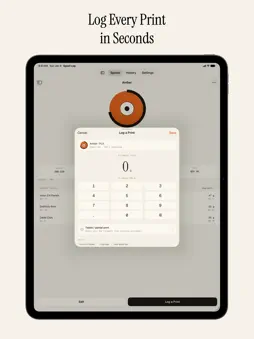
Spool Log is the simplest way to manage your 3D printing filament. Add spools, log prints, and always know how much material is left - down to the gram. Always Know What's Left Each spool shows its remaining weight live, updated every time you log a print. A colour-coded progress ring makes low filament obvious at a glance. Log Prints in Seconds Enter the grams used on a custom keypad, tag a project name, set print time, and attach a photo. The app deducts the usage and shows you what's left instantly. Full Print History Every print you log is stored with project name, date, grams used, duration, and an optional photo. Filter by month or view the complete history with Pro. Features • Visual spool grid - see all your spools with colour rings and remaining weight at a glance • Smart defaults - printer, diameter, and weight pre-filled from your settings • iCloud sync - your inventory stays in sync across all your devices automatically • Custom lists - manage your own brands, materials, and diameters (Pro) • Duplicate spools - copy any spool with one tap (Pro) • Special finishes - Silk, Glow, Clear, Matte, and multi-colour swatches (Pro) • Photo logs - attach a photo to every print entry (Pro) • Full history - access your complete print archive beyond the current month (Pro) • Hex colour picker - match exact manufacturer colour codes (Pro) • Locations - know where every spool lives: AMS, dry box, shelf and more • Cost per print - see what each print costs from your spool price • Scale readings - set what's left by weighing the spool • Failed prints - log only the filament that actually extruded • iPhone, iPad and iPhone Duo - list and details side by side on larger screens No Account. No Subscription. Spool Log works entirely on your device. No email, no login, no cloud account required. iCloud sync uses your existing Apple ID - nothing extra to sign up for. Spool Log Pro Unlock the full toolkit with a single one-time purchase. Unlimited spools, complete print history, photo attachments, special finishes, custom hex, duplicate, and custom lists - all included, no subscription ever. Download Spool Log and stop guessing how much filament you have left. Privacy Policy: https://apps.giguom.com/privacy Terms of Service: https://apps.giguom.com/terms
What's New
Version 1.2 2026-10-20
• Track where each spool lives with Location (AMS, dry box, shelf, and more) • See material cost per print from your spool price • Add a label photo to identify... Technical Analysis
Package Overview Basic metadata
Bundle ID
com.naveencs.filamenttracker Current Version 1.2
Minimum iOS 17.0
Package Size App Store Size
Package Metadata 1 / 2 version records
Detailed binary, privacy manifest, framework, and Info.plist results have not been indexed for this package yet. The verified App Store and archive metadata above remains available.
Developer Information
Known Version Records
1 version record with stored package metadata • 2 known version records
Stored metadata does not guarantee a package is currently available to download.
| Details | Version / IDs | Version date | Action |
|---|---|---|---|
| 8.88 MB | v1.1 App Store ID: 887227107Build: 1.1 | 2026-06-24 06:23:58 | Get Version |
| Not archived | App Store ID: 885359288 | Unknown | Request Version |