
Preview



Description
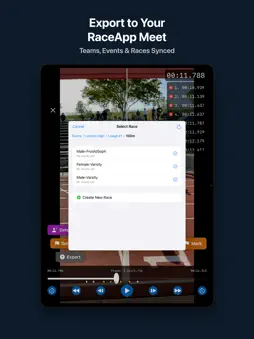
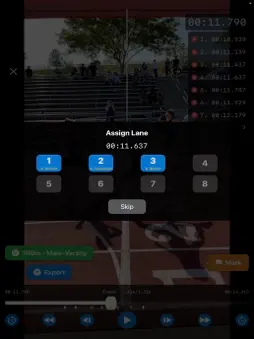
FAT Timer turns an iPad into a finish-line timing system for track and cross country. It records the finish at 240 frames per second, you mark each athlete frame by frame, and the times go to your RaceApp.net meet. HOW IT WORKS 1. Mount the iPad with a clear view of the finish line. 2. Start the race by hand, by the sound of the starter's gun, or with a RaceApp StarterLink start box. 3. Review the video in the app or in a web browser on the same Wi-Fi, and mark each finish. 4. Export the times to your RaceApp.net meet. WHAT YOU GET - Recording at 240 frames per second for timing to about 4 ms (0.004s) - Frame-by-frame scrubbing with a fast-forward mode in the web reviewer - Bib number suggestions read from the video. You confirm every one. - Extra Angle phones: pair other phones as additional cameras and review all angles together - Unattended Mode: a second iPad records the whole meet and bookmarks every gun, so you can assign races afterward - Optional Motion Detection skips stretches of video where nothing moves - Clone Race, to mark and link a finished race a second time - Video stays on your devices START OPTIONS - Sound start listens for the starter's gun through the iPad microphone. - Hand start works with no extra hardware. - StarterLink is a separate start box that sends the exact start time to the iPad over Bluetooth. It is separate hardware, and the app works fully without it. FREE AND PAID Recording, reviewing and marking times are free. Exporting to RaceApp.net is free for up to 3 results per race. Exporting more needs a FAT Export subscription, which you can get at raceapp.net. You need a RaceApp.net account to export. REQUIREMENTS - iPad or iPhone with iOS 17 or later. An iPad is recommended. - A tripod or a steady mount - A RaceApp.net account to export results Questions? raceapp.net/fat-timer/support
What's New
Version 2.0.1 2026-11-14
Fixes a camera problem in 2.0.0: on the main iPad, the finish camera could stop a second or two after opening the app or coming back to it, showing "Camera was ...Fixes a camera problem in 2.0.0: on the main iPad, the finish camera could stop a second or two after opening the app or coming back to it, showing "Camera was interrupted by iOS." The camera now stays on. Technical Analysis
Package Overview Basic metadata
Bundle ID
net.raceapp.RaceFATApp2 Current Version 2.0.1
Minimum iOS 17.0
Package Size App Store Size
Package Metadata 0 / 4 version records
Detailed binary, privacy manifest, framework, and Info.plist results have not been indexed for this package yet. The verified App Store and archive metadata above remains available.
Developer Information
Known Version Records
0 version records with stored package metadata • 4 known version records
Stored metadata does not guarantee a package is currently available to download.
| Details | Version / IDs | Version date | Action |
|---|---|---|---|
| Not archived | App Store ID: 885893522 | Unknown | Request Version |
| Not archived | App Store ID: 883911728 | Unknown | Request Version |
| Not archived | App Store ID: 883304734 | Unknown | Request Version |
| Not archived | App Store ID: 880986228 | Unknown | Request Version |