Preview




Description
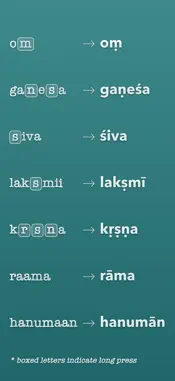
Type in English. Write in Sanskrit. SanskritTypist lets you type Sanskrit directly in any app using your regular English keyboard. Choose between Devanagari and IAST, with helpful letter suggestions as you type. Two Sanskrit Keyboards - Devanagari: Type with English letters and get Sanskrit script automatically. For example, type "raama" to get "राम". - IAST: Type Sanskrit with diacritics like ā, ṇ, and ś without switching between characters. Easy Sanskrit Typing - Letter Suggestions: See suggested letters as you type. Tap any suggestion to add it. - Easy Vowels: Type aa for आ, ii for ई, ai for ऐ, or au for औ. - Long Press: Hold down keys to access additional Sanskrit characters. - Automatic Vowel Signs: The keyboard handles vowel signs and consonant combinations for you. - Easy Corrections: Delete a vowel sign without removing the consonant, so you can quickly change what you've typed. - Typing Examples: See how to type different Sanskrit letters and words right in the app. Use Sanskrit Anywhere Write Sanskrit in messages, notes, documents, and other apps without copying and pasting. Whether you're studying Sanskrit, teaching yoga, writing mantras, or taking notes, you can use either keyboard wherever you type. Made for iPhone, iPad, and iPhone Duo Both keyboards are designed to fit your screen, including the iPhone Duo when folded or open. Private and Offline SanskritTypist works entirely on your device. It doesn't require an internet connection or collect your data. Easy Setup 1. Open Settings > General > Keyboard > Keyboards. 2. Tap Add New Keyboard and enable the SanskritTypist keyboards. 3. Use the globe key to switch to Devanagari or IAST whenever you want to type Sanskrit. Type Sanskrit directly in your favorite apps, without switching apps or copying and pasting.
What's New
Version 2.7 2026-11-05
Typing Sanskrit is now easier and smoother! Here's what's new: - Long vowels: Type aa for आ, ii for ई, or uu for ऊ without holding down a key. - ai and au: Typ...Typing Sanskrit is now easier and smoother! Here's what's new: - Long vowels: Type aa for आ, ii for ई, or uu for ऊ without holding down a key. - ai and au: Type ai for ऐ and au for औ. You can also type kai for कै and kau for कौ. - Better backspace: Delete a vowel sign without deleting the consonant, so you can easily type another vowel. - Better shift key: Both keyboards now handle shift and caps lock more naturally. - More space for suggestions: Suggested letters are easier to tap on iPhone. - iPhone Duo improvements: The keyboard now makes better use of the screen when folded. - More reliable typing: Fast typing works better, with fewer missed keystrokes. Plus a few smaller fixes and improvements! Technical Analysis
Package Overview Basic metadata
Bundle ID
com.natashatherobot.SamskritKeyboard Current Version 2.7
Minimum iOS 26.0
Package Size App Store Size
Package Metadata 1 / 10 version records
Detailed binary, privacy manifest, framework, and Info.plist results have not been indexed for this package yet. The verified App Store and archive metadata above remains available.
Known Version Records
1 version record with stored package metadata • 10 known version records
Stored metadata does not guarantee a package is currently available to download.
| Details | Version / IDs | Version date | Action |
|---|---|---|---|
| 20.11 MB | v2.5 App Store ID: 875863640Build: 2.5 | 2026-09-09 19:15:26 | Paid / Arcade |
| Not archived | App Store ID: 875812467 | Unknown | Paid / Arcade |
| Not archived | App Store ID: 860673241 | Unknown | Paid / Arcade |
| Not archived | App Store ID: 860644146 | Unknown | Paid / Arcade |
| Not archived | App Store ID: 860551953 | Unknown | Paid / Arcade |
| Not archived | App Store ID: 858243518 | Unknown | Paid / Arcade |
| Not archived | App Store ID: 858045783 | Unknown | Paid / Arcade |
| Not archived | App Store ID: 857976155 | Unknown | Paid / Arcade |
| Not archived | App Store ID: 857948644 | Unknown | Paid / Arcade |
| Not archived | App Store ID: 857874492 | Unknown | Paid / Arcade |