
Preview




Description
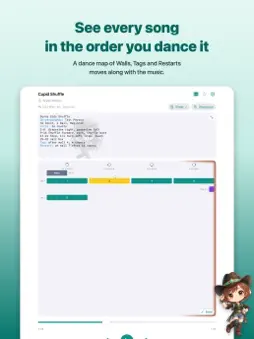
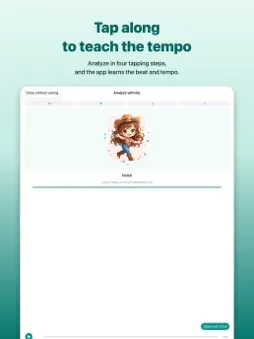
LineDanceQ is a music player made for line dance practice and class nights. It shows every song in the order you dance it. ■ Dance map Tap along with the beat while listening (Analyze), import the step sheet, and you get a dance map of wall blocks. Columns are facings (12, 9, 6 and 3 o’clock), rows are laps. During playback the current wall turns yellow and a ping-pong ball bounces on every count. Tap a block to play from just before it (pre-roll). ■ Find it with Shazam Can’t recall the name of the song playing at class, even though it must be in your library? Tap the Shazam button by the search field. It identifies the song and filters your library by its name, and finds the dance even when its name differs from the song, using the “Music:” line of the step sheet. ■ Construction Set Tags, Restarts and direction changes are never guessed. You place them yourself while reading the original sheet, or simply tap “Tag here” while the song plays. Long-press a block to make it a “racket” and loop just that section for practice. ■ Adding songs Bring in audio files from your device, songs received by LINE or Mail, and songs from the Music app (bought on iTunes or imported from CDs). Add artwork and the artist from Apple’s song search, and open the song in Apple Music or Spotify. ■ Step sheets Open CopperKnob, LineDance.com, Linedancer, BootStepper and Dancing Texas inside the app and import straight from the dance page. PDF and pasted text work too. The original text is always one tap away. ■ Videos Keep YouTube links and your own videos with each song. Videos on a CopperKnob page are listed with their titles, so adding one is a single tap. The in-app player shows only the video. For your own videos, the Q button loops the last few seconds, and once you mark the dance start the dance map follows the video. ■ Dance Session A big control screen that plays a playlist in order, with just a display and a wheel. Swipe the display between the song order, the dance map and the step sheet. It stops after each song and waits, so you can explain the next dance first. “Request Other Dance” lets you play any song in between. ■ Handover and backup Bundle songs, analyses, sheets and video links into one file and pass it to a friend’s LineDanceQ by AirDrop or LINE; the receiver only adds what is missing. Full library backup and restore, with NAS (WebDAV) support. ■ Hands-on control Besides the lock screen and earphone buttons, a keyboard-type remote such as the 8BitDo Micro can select blocks and cue playback. ■ Simple pricing Free for up to 20 songs with every feature. Buy LineDanceQ Pro, a one-time purchase, only if you want to manage more. No subscription. ■ Compatibility iPhone and iPad. Japanese and English. VoiceOver supported. Please respect copyright for music and likeness rights for videos, and use the app for personal enjoyment within your group. User guide: https://poor.boy.jp/bonbokohamburg/linedanceq/en/
What's New
Version 1.2.7 2026-10-28
• Step sheets: closed the gaps in imported text (blank lines between “Count:” and its value, counts stuck to the steps). Saved sheets are tidied too. • When you... Technical Analysis
Package Overview Basic metadata
Bundle ID
jp.naokiito.LineDanceQ Current Version 1.2.7
Minimum iOS 16.6
Package Size App Store Size
Package Metadata 0 / 0 version records
Detailed binary, privacy manifest, framework, and Info.plist results have not been indexed for this package yet. The verified App Store and archive metadata above remains available.
Developer Information
Known Version Records
0 version records with stored package metadata
Stored metadata does not guarantee a package is currently available to download.
| Details | Version / IDs | Version date | Action |
|---|