Preview




Description
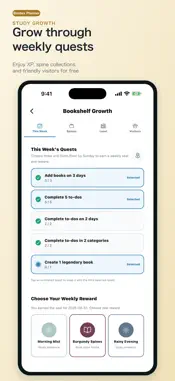
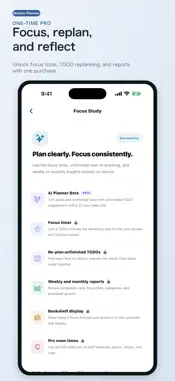
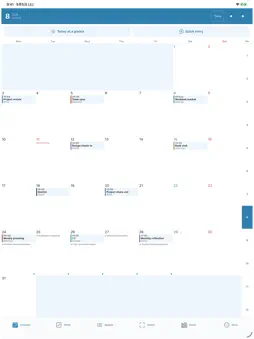
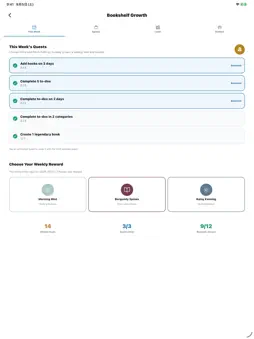
Dax Planner brings your paper planner and iPhone schedule together in one place. Beyond managing events and TODOs, it turns your daily progress into books and grows a personal study as you keep going. FIVE CLEAR TABS • Calendar: Switch between a color-coded month and an event list • TODO: Switch between a month and all months; organize by date, priority, category, duration, and subtasks • Import: Capture a paper planner and create editable event candidates • Bookshelf: Store the days you open the app and your TODO progress as books • More: Access Focus Study, anniversaries, passwords, settings, and backup tools IMPORT YOUR PAPER PLANNER Take a photo or choose one from your library. On-device OCR reads the text and creates editable event candidates. For monthly-block planner pages, Dax Planner reads the date grid and turns what you wrote in each day's box into candidates for that day. Pages with an uncertain month are not saved until you confirm the month, and candidates with an uncertain date or time are marked Needs review. Save pending skips them until you tap Mark as checked. • Check and correct candidates side by side with the original photo • Use the import history for each photo to resume unsaved candidates or undo what you saved • Images are not sent to cloud AI. Only after your explicit consent can recognized text be sent to an external AI service to format dates, times, and titles. You can keep processing on device only. A BOOKSHELF THAT GROWS FOR FREE Each day you open the app can become a book, with its design reflecting your TODO progress. Weekly quests, study levels, spine collections, and a growing room make consistency rewarding. Progression does not require a purchase. TODO AND FOCUS STUDY Core TODO management remains free. The one-time Pro purchase adds Import multiple pages (choose up to 12 planner photos and read them one at a time on your device; photos and recognized text are not sent), a TODO-linked focus timer, Live Activities, batch replanning for unfinished TODOs, weekly and monthly reports, bookshelf display integration, and extra room items. Importing one photo at a time is free. FIND AND ADD QUICKLY • Search: Find events, TODOs, and notes on your device without a network connection, filtered by date range, type, and TODO status • Saved templates: Save events and TODOs you use often and add them again quickly (stored on your device) • Apple Shortcuts: Run Add TODO, Start focus timer, and Open today from the Shortcuts app. A TODO is not created until you save it on the review screen (the focus timer requires Pro) AI PLANNER BETA AI Planner Beta turns goals and unfinished TODOs into actionable TODO suggestions. On devices that support Apple Intelligence with iOS 26 or later, suggestions are created on your device and your goals and TODOs are not sent anywhere. On other devices it is a limited beta (time, users, and uses) that requires sign-in and sends your goal and selected TODOs to an external AI service only with your consent. It may be closed or paused. SHARING, INTEGRATIONS, AND USEFUL TOOLS • Apple Calendar integration • Optional account-based shared calendars for family or teams • Weather and a Home Screen widget • Anniversaries, password storage, backup, and image sharing Supports Light, Dark, and System themes, adjustable text size, and VoiceOver. Personal events, TODOs, and notes are stored on your device by default. To provide account sign-in and sync, shared calendars, Pro purchase verification, push notifications, weather, external calendar integrations, and optional AI features, required data—such as account and purchase information, push tokens, approximate location, shared content, or recognized text—may be sent to the relevant service providers. We do not sell personal data or use it for advertising tracking. See the Privacy Policy for details.
What's New
Version 1.17.1 2026-11-19
Event entry is now easier. • Fixed an issue opening the anniversaries list from More. • Jump to a year and month in Quick Entry. Time-wheel changes update the ...Event entry is now easier. • Fixed an issue opening the anniversaries list from More. • Jump to a year and month in Quick Entry. Time-wheel changes update the draft; adding an event or TODO still requires your confirmation. • Quick Entry now shows the save result. • When drafting an event in the day view, check gaps or overlaps with nearby events. • Clarified which personal data stays on the device after signing out. Existing Pro purchase access and read-only Google Calendar permissions are unchanged. Google integration is free. Sync is manual: review added, updated, and removed events before applying changes. Dax Planner never creates, changes, or deletes events on Google. Credentials are stored in device-only Keychain storage. Technical Analysis
Package Overview Basic metadata
Bundle ID
com.bindexplanner.app Current Version 1.17.1
Minimum iOS 17.0
Package Size App Store Size
Package Metadata 0 / 9 version records
Detailed binary, privacy manifest, framework, and Info.plist results have not been indexed for this package yet. The verified App Store and archive metadata above remains available.
Known Version Records
0 version records with stored package metadata • 9 known version records
Stored metadata does not guarantee a package is currently available to download.
| Details | Version / IDs | Version date | Action |
|---|---|---|---|
| Not archived | App Store ID: 886308917 | Unknown | Request Version |
| Not archived | App Store ID: 886219805 | Unknown | Request Version |
| Not archived | App Store ID: 886122541 | Unknown | Request Version |
| Not archived | App Store ID: 884912943 | Unknown | Request Version |
| Not archived | App Store ID: 884675402 | Unknown | Request Version |
| Not archived | App Store ID: 884608865 | Unknown | Request Version |
| Not archived | App Store ID: 884412006 | Unknown | Request Version |
| Not archived | App Store ID: 884372599 | Unknown | Request Version |
| Not archived | App Store ID: 883795605 | Unknown | Request Version |