Preview


Description
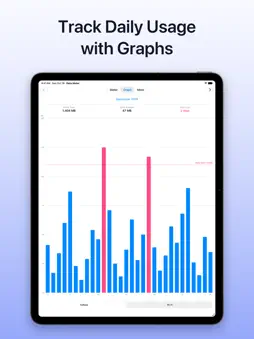
Data usage, at a glance — every day. Data Meter shows how much cellular and Wi-Fi data your iPhone or iPad uses. Check today’s usage, look back at daily changes in a graph, and keep your data under control if you’re worried about going over. [Key Features] ■ Cellular and Wi-Fi, shown separately See your usage for today, the last 3 days, and this month. For cellular data, a meter also shows how much of your limit you’ve used. ■ See your remaining data in widgets Add widgets to your Home Screen (small and medium) and Lock Screen to see your remaining cellular data and the percentage used this month. The medium widget also shows the days left until your cutoff date. On devices without cellular, widgets show your Wi-Fi usage. ■ Review daily usage in a graph A monthly bar graph shows your usage for each day. See the monthly total, the daily average, and the number of days over your limit as you look back at past usage. ■ Get notified before you use too much Choose a network and period, and get notified when your usage passes the amount you set. For cellular data, you can also set the alert as a percentage of your limit. While you set it up, you can see the alert conditions and your current usage. ■ Usage on the app icon badge Show the usage for the network and period you choose on the app icon badge. ■ Match the period to your plan Monthly usage can be counted from your plan’s cutoff date. For the last 3 days, you can choose whether to include today. ■ Support for larger text and VoiceOver The app stays readable with larger text sizes, and VoiceOver reads your usage aloud. ■ Add-on to remove ads Remove ads with an in-app purchase. If you’ve already bought it, you can restore your purchase, for example after switching to a new device. [Before You Use] The usage shown is an estimate based on values from your device. It may differ from the usage your carrier uses for billing or speed limits. For your exact usage under your plan, check with your carrier. Recording, notifications, badges, and widgets don’t update in real time. Updates and notifications may be delayed depending on how iOS is running and on network conditions. To keep recording in the background, turn on Background App Refresh in the Settings app. Recording may stop in situations such as Low Power Mode. If you swipe up to close the app in the App Switcher, the app stops recording in the background until you open it again. If you’ve added a widget, recording continues when the widget updates (iOS decides how often it updates). To use notifications and badges, allow notifications and badges for this app in the Settings app. Restarting your device or similar events can cause errors in the usage. Before and after a restart, or if you haven’t opened the app for a while, open the app to update your usage. [Requirements] iOS 16.0 or later, iPadOS 16.0 or later *Lock Screen widgets on iPad require iPadOS 17 or later.
What's New
Version 1.16 2026-10-24
Bug fixes and performance improvements. Technical Analysis
Package Overview Basic metadata
Bundle ID
com.nanawork.LineTrafficChecker Current Version 1.16
Minimum iOS 16.0
Package Size App Store Size
Package Metadata 1 / 15 version records
Detailed binary, privacy manifest, framework, and Info.plist results have not been indexed for this package yet. The verified App Store and archive metadata above remains available.
Developer Information
Known Version Records
1 version record with stored package metadata • 15 known version records
Stored metadata does not guarantee a package is currently available to download.
| Details | Version / IDs | Version date | Action |
|---|---|---|---|
 7.74 MB | v1.14 App Store ID: 862060198Build: 1 | 2024-10-27 07:19:57 | Get Version |
| Not archived | App Store ID: 862027432 | Unknown | Request Version |
| Not archived | App Store ID: 862012696 | Unknown | Request Version |
| Not archived | App Store ID: 862004421 | Unknown | Request Version |
| Not archived | App Store ID: 849264390 | Unknown | Request Version |
| Not archived | App Store ID: 848133113 | Unknown | Request Version |
| Not archived | App Store ID: 847467585 | Unknown | Request Version |
| Not archived | App Store ID: 837581822 | Unknown | Request Version |
| Not archived | App Store ID: 835066643 | Unknown | Request Version |
| Not archived | App Store ID: 824254841 | Unknown | Request Version |
| Not archived | App Store ID: 818208903 | Unknown | Request Version |
| Not archived | App Store ID: 817842735 | Unknown | Request Version |
| Not archived | App Store ID: 817253616 | Unknown | Request Version |
| Not archived | App Store ID: 817210391 | Unknown | Request Version |
| Not archived | App Store ID: 817137122 | Unknown | Request Version |