
Preview




Description
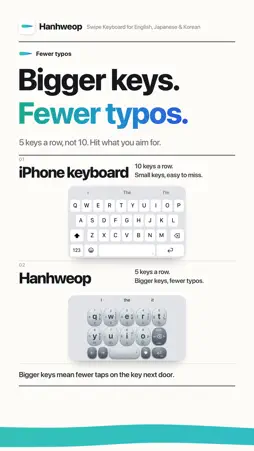
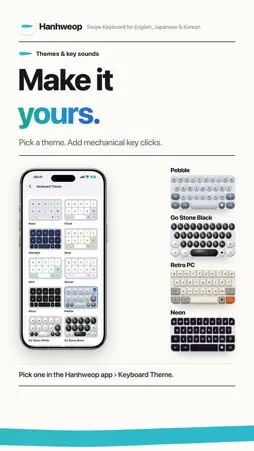
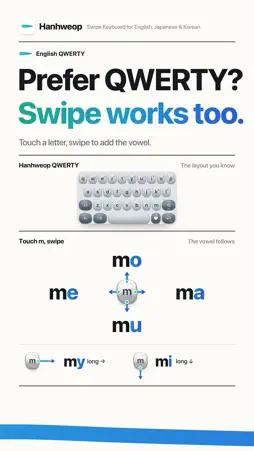
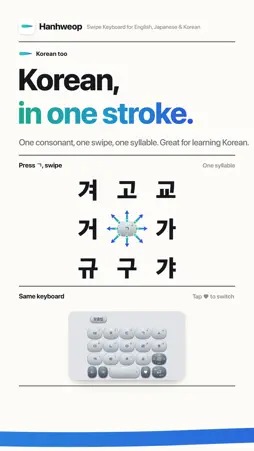
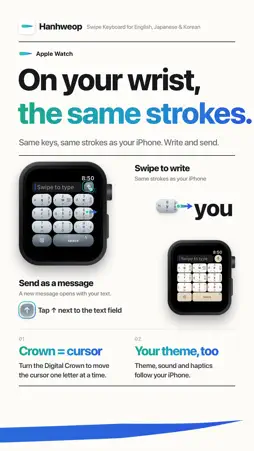
Phones keep getting bigger. Your thumb doesn't. Hanhweop is a one-handed swipe keyboard: press a key, swipe once, and you get the letter you want. Before you hit send, one tap and AI fixes your spelling. ■ Big phone, one hand On an iPhone Duo or iPhone Pro Max, reaching the far keys with one hand means stretching your thumb and shifting your grip, with the phone's weight on your fingers. Hanhweop puts every key within thumb reach. Set the width and position to fit your hand, and type all the way through without changing your grip. ■ Press and swipe. One letter. No more hunting for the next row. Tap a key for its top letter, swipe left for the middle row, swipe down for the bottom row, and swipe right for a common word. Fewer taps, a less tired thumb. In a few days, your hand remembers the moves. ■ Tired of typos? 5 big keys a row instead of 10 small ones. Bigger keys mean fewer taps on the key next door. Typing, deleting, and typing again. You can stop doing that now. ■ Before you send, check your spelling "i cant beleive its friday" becomes "I can't believe it's Friday." When you're done, tap the Spelling button and AI fixes it. Before you text someone you like, or post in the team chat, give it one tap. Don't let a typo kill the mood. Works on iPhone with Apple Intelligence turned on. ■ Make it yours Your phone is all set up just the way you like it. Now your keyboard can be too. Pick a theme and add mechanical key clicks with every tap. Emoji suggestions pop up right as you type. ■ Prefer QWERTY? The layout you know is here too, and swiping works on it as well. ■ Korean, in one stroke Hanhweop started as a Korean keyboard. Press a consonant and swipe once for a full syllable. Great for learning Korean or texting in Hangul. ■ On your Apple Watch, too Type on your watch with the same keys and the same swipes as your iPhone. Your hand already knows them, so there's nothing new to learn. Send what you write as a message right from your wrist. ■ Getting started Settings → General → Keyboard → Keyboards → Add New Keyboard → Hanhweop In any text field, tap the globe key to switch to Hanhweop. ■ Pay only for the languages you use Hanhweop includes English, Korean, and Japanese keyboards. Buy the full version only for the languages you type in. Try every feature free for your first 7 days.
What's New
Version 2.1.0 2026-11-02
• Optimized for iPhone Duo. • Added thumb correction to reduce typos. • New Japanese keyboard (Japanese Full Version) • Number pad setting: put 1 2 3 on the top... Technical Analysis
Package Overview Basic metadata
Bundle ID
com.nami.keyboard Current Version 2.1.0
Minimum iOS 17.0
Package Size App Store Size
Package Metadata 0 / 0 version records
Detailed binary, privacy manifest, framework, and Info.plist results have not been indexed for this package yet. The verified App Store and archive metadata above remains available.
Known Version Records
0 version records with stored package metadata
Stored metadata does not guarantee a package is currently available to download.
| Details | Version / IDs | Version date | Action |
|---|