
Preview



Description
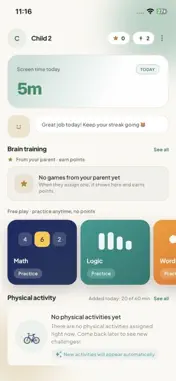
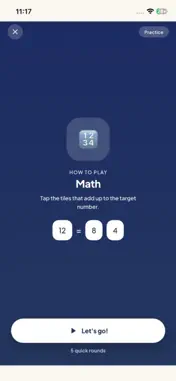
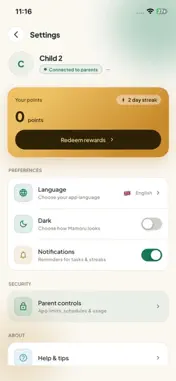
Mamoru Kids is the companion app for Mamoru, a parental-control app for families. A parent installs it on their child’s iPhone or iPad and pairs it with their Mamoru account. IT DOES NOTHING ON ITS OWN Mamoru Kids only works once a parent pairs it with a code from the Mamoru parent app. Without that pairing there is nothing to see and nothing is recorded. WHAT YOUR CHILD SEES The rules that apply right now: which apps are limited or paused, how much screen time is left today, and which zones are set. When an app is blocked, the block screen says so plainly. TASKS, POINTS AND REWARDS Homework, reading and chores appear as tasks. Your child completes one, submits it, earns points and redeems rewards the parent has chosen. BRAIN GAMES Short brain-training exercises that a parent can set as tasks. STEPS AND ACTIVITY Daily step count, so time on the device is balanced against time moving. BUILT ON APPLE SCREEN TIME App limits and blocking use Apple’s Family Controls and Device Activity frameworks, so supervision stays inside the protections Apple provides. Web filtering uses an encrypted DNS resolver. WHAT THE PARENT CAN SEE App usage and screen time, requested websites, device location and safe-zone arrivals, and task activity. That is the whole list. WHAT NOBODY CAN SEE Mamoru does not read messages, record calls, capture screenshots or listen through the microphone. GET STARTED 1. A parent installs "Mamoru: Parental Control" and creates an account. 2. Install this app on the child’s device. 3. Enter the pairing code from the parent app and allow Screen Time access when asked. Support: [email protected] Privacy Policy: https://mamoru-web-xi.vercel.app/privacy Terms of Use: https://mamoru-web-xi.vercel.app/terms
What's New
Version 1.0.20261108 2026-11-10
• Screen time today now lives in Settings, next to your points • New step-by-step guides for allowing Screen Time, Notifications, Motion and App Selection • Pai... Technical Analysis
Package Overview Basic metadata
Bundle ID
com.trymamoru.child Current Version 1.0.20261108
Minimum iOS 16.6
Package Size App Store Size
Package Metadata 0 / 0 version records
Detailed binary, privacy manifest, framework, and Info.plist results have not been indexed for this package yet. The verified App Store and archive metadata above remains available.
Developer Information
Known Version Records
0 version records with stored package metadata
Stored metadata does not guarantee a package is currently available to download.
| Details | Version / IDs | Version date | Action |
|---|