
Preview






Description
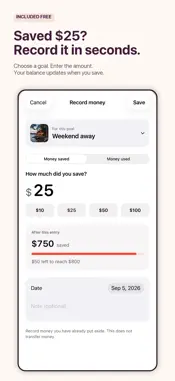
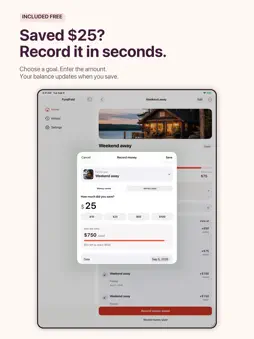
See what you have saved and what is left to reach each goal. FundFold keeps your savings goals in one place. Add a goal for a trip, Christmas gifts, car repairs or another expense. Choose a photo, enter a target and record the money you put aside. When you use some of that money, record it against the same goal. Your balance and history update together. INCLUDED FREE • Create savings goals with a name, target amount and photo. Use your own picture or choose one provided in the app. • Record money saved and money used. Add a date and an optional note to each entry. • See each goal’s saved amount, target and remaining amount, plus the total saved across your active goals. • View your full savings history. • Choose a target date and see the amount to set aside weekly, every two weeks or monthly. • Tap Penny, the animated pig, for encouragement. Turn encouragement after saving on or off. EXPANSION PACK — ONE PERMANENT PURCHASE The optional Expansion Pack adds eight capabilities. There is no subscription. • iCloud sync: Keep goals, photos, saved amounts and history updated across your iPhone and iPad using the same Apple Account. • Face ID protection: Require Face ID, Touch ID or your device passcode before opening your savings information. • Savings reminders: Set a weekly or monthly reminder for an individual goal. Choose the amount, day and time. • Home Screen widgets: Display a goal’s saved amount, target and remaining amount without opening FundFold. • Monthly savings reports: See money added, money used and the resulting change for one goal or all goals in a calendar month. • Goal categories: Organize goals under Travel, Family, Emergency savings or your own categories. Filter the homepage to see a category’s saved and remaining amounts. • Spreadsheet export: Save your savings history as a CSV file for Excel or Numbers. Each entry includes its date, goal, amount and note. • Goal archiving: Move completed or inactive goals off the homepage while keeping their photos, balances and history. Restore them when needed. YOU RECORD THE MONEY FundFold does not connect to your bank, hold money or move money. Reminders prompt you to act; they do not make transfers or create savings entries for you. Your records are stored on your device. If you enable iCloud sync, they also sync through your private iCloud account. Optional usage and diagnostic sharing is off until you agree. You can use the free and purchased features without agreeing to analytics. Terms: https://www.myworkingmemory.ai/fundfold-terms.html Privacy: https://www.myworkingmemory.ai/fundfold-privacy.html
What's New
Version 1.1 2026-09-09
FundFold now has a simpler homepage with goal photos, saved amounts and the amount left to reach each target. The free version includes photo goals, money save...FundFold now has a simpler homepage with goal photos, saved amounts and the amount left to reach each target. The free version includes photo goals, money saved and used, balances and full savings history. The optional Expansion Pack adds iCloud sync, Face ID or passcode protection, savings reminders, Home Screen widgets, monthly reports, categories, CSV export and archiving. One purchase. No subscription. Penny, the animated pig, offers optional encouragement when you save. Technical Analysis
Package Overview Basic metadata
Bundle ID
ai.myworkingmemory.fundfold Current Version 1.1
Minimum iOS 17.0
Package Size App Store Size
Package Metadata 0 / 0 version records
Detailed binary, privacy manifest, framework, and Info.plist results have not been indexed for this package yet. The verified App Store and archive metadata above remains available.
Price History (USA store)
2 recorded price change points. These are historical observations, not a guarantee of the current price.
| Recorded at | Price | Currency |
|---|---|---|
| 0.99 | USD | |
| 0.0 | USD |
Developer Information
Known Version Records
0 version records with stored package metadata
Stored metadata does not guarantee a package is currently available to download.
| Details | Version / IDs | Version date | Action |
|---|