
Preview



Description
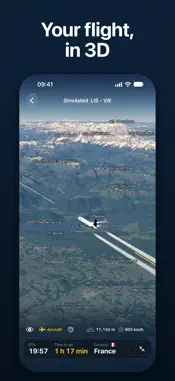
A window seat, somewhere over the world. A river shines below, then a lake, a town you have never heard of, a mountain in the snow. FlyETA shows you where you are: your place in the sky, on a 3D map of the whole planet, with the names of what you see and the time you land. FlyETA is an offline flight tracker and in-flight map for passengers. It runs from your own phone's GPS, in airplane mode. The whole planet is already inside the app, so it works with no cabin Wi-Fi and no download at all. WHAT IS DOWN THERE Look out, find it on the globe and read its name. Towns, lakes, rivers, peaks with their heights, borders and the countries under you are named as you fly over them, from more than 470,000 places that come with the app. Mountains, valleys and coasts are drawn in 3D. With a connection before you fly, FlyETA can add sharper terrain for your route. WHEN YOU LAND Your arrival time, the time to go and the distance to go. You see them on the Lock Screen and in the Dynamic Island too. On routes with recent flights, the forecast follows the past flight most like yours: FlyETA collects these flights every day from open flight-tracking data, and loads your route's when you set up the flight with a connection. Without them it uses a general flight model, which cannot see wind or holding. THE VIEW Follow the airplane from behind, circle around it, or pinch in to the cockpit and look out at the wing, its engines turning and its lights flashing. Contrails at cruise height, and the stars and the Milky Way when you zoom out into space. The globe stops drawing when nothing moves, to save your battery. KEEP EVERY FLIGHT Tap Start following and FlyETA records the flight, with the screen locked too. After you land: - Find it in History and replay it at home, up to 300x - Collect a stamp for every airport and a page for every country in your Passport - Add a flight you took but did not record; it replays as a labelled simulation - Keep every recording as a readable file in the Files app FOR THE CURIOUS Altitude above sea level, ground speed and vertical speed from your phone's GPS, cabin pressure altitude, a turbulence reading, and GPS tools with every accuracy figure. Metric, imperial or aviation units, in 10 languages. TRY IT ON THE GROUND Pick any two of more than 4,000 airports and tap Simulate to watch the flight on the globe. A simulation is labelled Simulated, and values only a phone in the air can measure show "--". HONEST ABOUT WHAT IT SEES Position, height and speed come from your phone's own GPS, not from the aircraft, and a window seat gives it a better view of the sky. FlyETA follows the flight you are on: it shows no gates, delays or other aircraft. When it does not know a value, it shows "--" instead of a guess. FREE, AND YOURS Every feature is free: no ads, no account, no in-app purchases, no subscription and no limit on flights. FlyETA never sends your position and uploads no flight. With a connection it sends only what its lookups need: a flight number you type, your route's two airport codes, the map squares the route crosses, and the app and system version. In airplane mode it sends nothing. REQUIREMENTS iPhone 15 or newer, or an iPad with an A13 chip or newer, on iOS 26 or iPadOS 26 or newer. Live following needs GPS: an iPhone or iPad Wi-Fi + Cellular. A Wi-Fi-only iPad can simulate and replay flights. FlyETA is a personal project by Nick Bubelich. He loves to fly, and on every flight he wanted to know what was down there and when he would land.
What's New
Version 2.0.2 2026-11-14
Clearer readouts during a flight: - The arrival time is the moment the aircraft touches down - When the GPS signal drops, the flight screen shows -- instead of ...Clearer readouts during a flight: - The arrival time is the moment the aircraft touches down - When the GPS signal drops, the flight screen shows -- instead of old values and asks you to keep the phone near a window - If FlyETA cannot tell when you landed, it shows "Landed" with no time - The top turbulence band is now "strong", and it shows -- while the phone moves in your hand - The flight screen tells you when the phone cannot save the recording - When you stop a flight and nothing was saved, FlyETA says so - A finished replay plays again from the beginning - Smaller fixes Technical Analysis
Package Overview Basic metadata
Bundle ID
app.flyeta Current Version 2.0.2
Minimum iOS 26.0
Package Size App Store Size
Package Metadata 0 / 0 version records
Detailed binary, privacy manifest, framework, and Info.plist results have not been indexed for this package yet. The verified App Store and archive metadata above remains available.
Developer Information
Known Version Records
0 version records with stored package metadata
Stored metadata does not guarantee a package is currently available to download.
| Details | Version / IDs | Version date | Action |
|---|