
Preview





Description
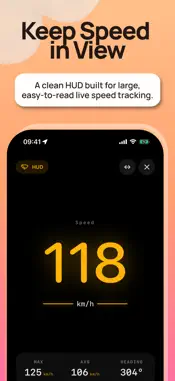
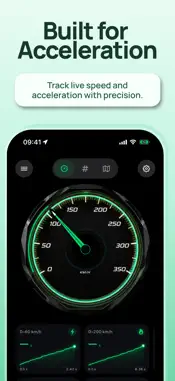
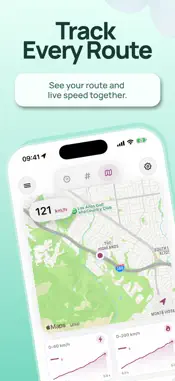
Turn your iPhone into a customizable GPS speedometer for everyday driving, performance testing, and clear real-time driving data. Cuspart: GPS combines live GPS speed tracking, automotive-inspired gauges, HUD mode, drive history, acceleration tests, and detailed trip records in one focused dashboard. LIVE GPS SPEEDOMETER • View your current GPS-based speed in km/h or mph • Monitor maximum speed, average speed, heading, distance, duration, and live telemetry • Choose from 26 automotive-inspired gauge designs • View your speed data alongside a live map • Enjoy smooth needle animations and clear digital readouts • Configure the dashboard around the information you want to see PERFORMANCE TESTING Measure acceleration and distance-based performance with built-in tests: • 0-60, 0-100, and 0-200 km/h • 60-100 and 100-200 km/h • 0-60, 0-100, and 0-130 mph • 40-60 and 60-130 mph • 100 m, 200 m, 400 m, and 1,000 m • 1/4 mile, 1/2 mile, and 1 mile Save completed results and review your recorded performance over time. DRIVE HISTORY Review your recorded drives with: • Route maps • Speed graphs • Distance and duration • Maximum and average speed • Saved acceleration results • Today, weekly, and all-time history filters • Detailed summaries for recorded sessions HUD MODE Switch to a clean, high-contrast heads-up display with a large live speed readout. Mirror or rotate the HUD to suit different mounting positions and windshield setups. CUSTOMIZE YOUR DASHBOARD Make Cuspart: GPS your own with: • 26 automotive-inspired gauge designs • Multiple needle styles • Customizable digital fonts • Light, dark, and system appearance modes • Customizable accent colors • Alternative app icons • Configurable gauge telemetry • Flexible dashboard layouts CUSPART: GPS+ Cuspart: GPS is free to use, and the core features are available without a subscription. Cuspart: GPS+ is an optional subscription that unlocks additional premium features and an ad-free experience while your subscription is active. Premium features include access to the full gauge collection, detailed speed charts, and additional dashboard customization options. Cuspart: GPS+ is available through monthly and yearly auto-renewable subscription plans. The subscription period and localized price are displayed in the app before purchase. Payment will be charged to your Apple Account when you confirm your purchase. Your subscription renews automatically unless canceled. You can manage or cancel your subscription in Settings > your name > Subscriptions. If you cancel, access to GPS+ features continues until the end of your current paid period. GPS ACCURACY & SAFETY Cuspart: GPS uses GPS and other available device location data to provide speed, distance, route, and performance information. Results may vary depending on your device, GPS signal quality, location, surroundings, and other conditions. Performance measurements are provided for general informational purposes and are not certified timing results. Set up the app and any performance test before you begin driving. Secure your iPhone appropriately, keep your attention on the road, follow local traffic laws, and never interact with the app while driving. Use acceleration and performance testing only in safe and lawful conditions. PRIVACY POLICY https://www.cuspart.com/cuspart-gps-privacy-policy/ TERMS OF USE https://www.cuspart.com/cuspart-gps-terms-of-use/
What's New
Version 1.33.4552 2026-08-17
A cleaner and more polished driving experience with improved dashboard visuals, refined light and dark mode colours, smoother gauge animations, better drive his...A cleaner and more polished driving experience with improved dashboard visuals, refined light and dark mode colours, smoother gauge animations, better drive history details, and improved overall stability. Technical Analysis
Package Overview Basic metadata
Bundle ID
com.gps-speed.Gps-Speed6161-a-cuspart-deneme Current Version 1.33.4552
Minimum iOS 17.0
Package Size App Store Size
Package Metadata 1 / 6 version records
Detailed binary, privacy manifest, framework, and Info.plist results have not been indexed for this package yet. The verified App Store and archive metadata above remains available.
Price History (USA store)
2 recorded price change points. These are historical observations, not a guarantee of the current price.
| Recorded at | Price | Currency |
|---|---|---|
| 0.0 | USD | |
| 0.99 | USD |
Developer Information
Known Version Records
1 version record with stored package metadata • 6 known version records
Stored metadata does not guarantee a package is currently available to download.
| Details | Version / IDs | Version date | Action |
|---|---|---|---|
| 111.9 MB | v1.33.4552 App Store ID: 881983019Build: 1.33.4552 | 2026-08-17 20:49:32 | Paid / Arcade |
| Not archived | App Store ID: 871484331 | Unknown | Paid / Arcade |
| Not archived | App Store ID: 869234849 | Unknown | Paid / Arcade |
| Not archived | App Store ID: 867639968 | Unknown | Paid / Arcade |
| Not archived | App Store ID: 867561281 | Unknown | Paid / Arcade |
| Not archived | App Store ID: 864973865 | Unknown | Paid / Arcade |