
Preview






Description
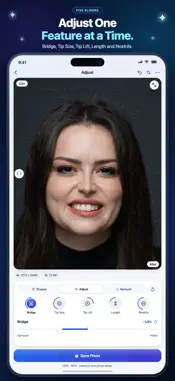
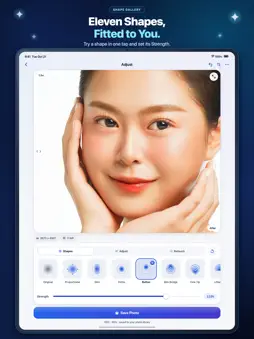
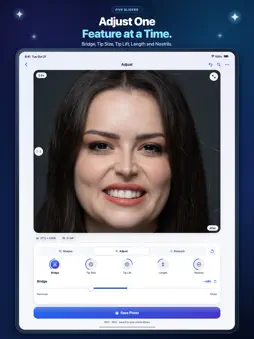
Nose Editor: Reshape & Retouch is a dedicated photo editor for iPhone and iPad that lets you explore subtle nose adjustments and skin retouching in your portraits and group photos. Every edit happens entirely on your device, keeping the surrounding facial features and original skin texture intact. 11 NOSE SHAPES, FITTED TO YOUR FACE Start from your own nose and try eleven distinct shapes in the Shapes gallery. Rather than applying a rigid preset, Nose Editor measures key proportions of the nose in your photo and scales each shape to fit your features: • Proportional – An adjustment worked out from the measured proportions of the face. • Whole-Nose Styles – Slim, Petite and Button for coordinated adjustments across the bridge, tip and base. • Focused Shapes – Slim Bridge, Fine Tip, Lifted Tip, Short and Narrow Nostrils to adjust one area at a time while keeping neighboring features balanced. • Fuller Shapes – Round Tip and Strong for a fuller or more prominent profile. • Adjustable Strength – Dial any chosen shape from 0% up to 150%, or switch to Adjust to fine-tune individual sliders without losing your custom changes. 5 PRECISION ADJUSTMENT SLIDERS Take manual control in the Adjust tab with five independent, bi-directional sliders (−100% to +100%): • Bridge – Make the bridge narrower or wider from the upper dorsum down. • Tip Size – Scale the tip smaller or larger around its center. • Tip Lift – Rotate the tip higher or lower while keeping nostril geometry balanced. • Length – Make the nose shorter or longer along its axis. • Nostrils – Draw the nostrils and alar wings narrower or wider at the base. Every adjustment uses a confined displacement warp designed specifically for the nose. Eyes, eyebrows, lips, cheeks and the rest of your photograph remain untouched, pixel for pixel. RETOUCH PORES & SPOTS Clean up skin details in the Retouch tab while preserving your skin's own grain and texture: • Pores – Soften blackheads and enlarged pores on the nose with a smooth 0% to 100% slider. • Spots – Tap or brush over spots and small blemishes anywhere on the face to heal them using matching surrounding skin. • One-Tap Automatic – Scan the face to detect and heal candidate spots in a single tap, while leaving freckles and moles alone. • Full Control – Fade healed spots together with the Strength slider, or tap any ring to bring an individual spot back. DESIGNED FOR REAL PHOTOS • Automatic Detection – On-device vision technology locates the face, nose outline and surrounding facial landmarks automatically when you open a photo. • Interactive Before & After – Drag the split-screen wipe handle across the photo at any zoom level, or tap it to compare your edit against the original. • Group Photos – Edit portraits with a single subject or switch between people in group shots using numbered face markers and the Next Face control. • Multi-Step Undo & Reset – Step back through up to 12 actions across shapes, sliders, retouching and face selection, or reset a single tool at any time. • Crop & Rotate – Reframe your photo in 90° steps with locked aspect ratio presets (Original, 1:1, 4:5, 16:9 and 9:16). • Full-Resolution Export – Save directly to your photo library or share in HEIC, JPEG or lossless PNG with adjustable export quality and no watermarks. PRIVATE BY DESIGN Your photos are edited entirely on your iPhone or iPad. Nothing is uploaded to a server, no account is required, and saved photos carry no app watermark or software tag in their metadata. Please note: Nose Editor is a photo editing tool for images. It is not a medical device, does not provide medical or surgical advice, and does not simulate or predict the outcome of rhinoplasty or any cosmetic procedure. Privacy Policy: https://thehelloworld.app/nose-editor-app-privacy-policy.html Terms of Use: https://thehelloworld.app/nose-editor-app-terms-of-use.html
What's New
Version 1.2 2026-10-30
- Fresh new design for a cleaner, more modern experience - Bug fixes and performance improvements Technical Analysis
Package Overview Basic metadata
Bundle ID
app.thehelloworld.noseeditor Current Version 1.2
Minimum iOS 18.6
Package Size App Store Size
Package Metadata 0 / 0 version records
Detailed binary, privacy manifest, framework, and Info.plist results have not been indexed for this package yet. The verified App Store and archive metadata above remains available.
Known Version Records
0 version records with stored package metadata
Stored metadata does not guarantee a package is currently available to download.
| Details | Version / IDs | Version date | Action |
|---|