Preview





Description
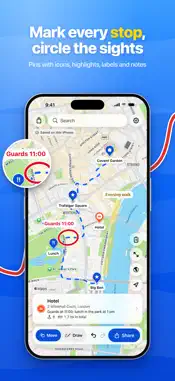
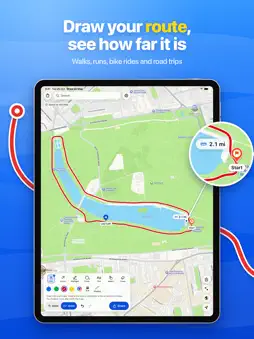
Draw your route on a real map and see how far it is before you set off. Plan a walk, run, bike ride or road trip, mark where you’re heading, and share the whole plan as one clear picture. No sign-up. No ads. No watermark. The people you send it to don’t need the app. PLAN ANY ROUTE OR TRIP • Walking and running routes – draw a loop of just the right length • Bike rides and hikes – plot your way along bike lanes, back roads and trails • Road trips – trace the drive and see the distance of each leg • City trips and vacations – sketch the walk between the sights and keep each day of your itinerary as its own map • Areas to explore – ring the neighborhoods, beaches or parks you’d like to try • Meetups and events – show the way in, the right entrance and where to park SEE HOW FAR IT IS • The distance counts up beside your finger as you draw • Select a line to see its length and a rough journey time – on foot for shorter routes, by bike for longer ones • Places & Routes shows your whole plan at a glance, with the total distance • Show route lengths on the picture you share • Miles or kilometers, to match your region settings START IN ONE TAP • Choose what you’re planning – Walk or Run, Bike Ride, Road Trip, Area, Places or Meet-Up – and the right pen and color are ready, or Search opens so you can find your places • Search for a place or address, or paste coordinates or a map link • Open the app to a blank map and, with your permission, it zooms in on your neighborhood DRAWING THAT JUST WORKS • Draw on Apple Maps in standard or satellite view • Pen and arrow in four bold colors that stand out on either view • Dashed lines for walking paths and “walk this way” • Hold at the end of a line to snap it straight • Hold at the end of a loop to turn it into a neat circle, oval, triangle or rectangle • Your drawing stays on the right streets as you zoom and pan • Move or erase any line, and undo or redo your changes MARK YOUR DESTINATION • Drop a pin and give it one of 16 icons – Stay, Food, Coffee, Sight, Parking, Start Point and more • Search for a hotel, café or museum and the pin picks a matching icon for you • Add a note such as “Tickets at the east gate, lunch at 1 PM” and show it on the picture SHARE YOUR PLAN IN SECONDS • Preview the exact picture before you send it, and fit your whole route in the frame • Add an Apple Maps link to your destination so friends can get directions, plus a Google Maps link if they prefer • Send it with Messages, Mail, AirDrop or any app on your share sheet • Share as often as you like SAVE AND COME BACK • Save your maps, name them and pick up where you left off • Search your saved maps to find a plan in seconds ON THE BIG SCREEN TOO • Works on iPhone and iPad, in any orientation on iPad • Draw with Apple Pencil while your hand rests on the screen • Use a trackpad or keyboard on iPad PRIVATE BY DESIGN • No account needed to draw, save or share • Your maps are stored on your iPhone or iPad • Your location is used to show the map around you, and is shared only if you make it your destination • No ads, no tracking, and your data is never sold Supports light and dark mode, Dynamic Type and VoiceOver. Distances and times are estimates to help you plan. The routes you draw are your own sketches, not turn-by-turn navigation, so always follow local signs and conditions. Terms of Use: https://www.thehelloworld.app/draw-on-map-terms-of-use.html Privacy Policy: https://www.thehelloworld.app/draw-on-map-privacy-policy.html
Technical Analysis
Package Overview Basic metadata
Bundle ID
app.thehelloworld.drawonmap Current Version 1.0.0
Minimum iOS 18.6
Package Size App Store Size
Package Metadata 0 / 0 version records
Detailed binary, privacy manifest, framework, and Info.plist results have not been indexed for this package yet. The verified App Store and archive metadata above remains available.
Known Version Records
0 version records with stored package metadata
Stored metadata does not guarantee a package is currently available to download.
| Details | Version / IDs | Version date | Action |
|---|