
Preview






Description
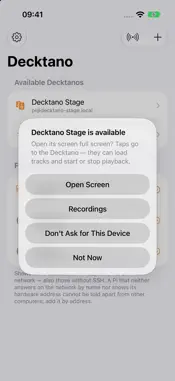
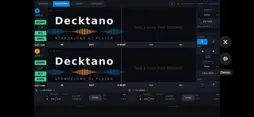
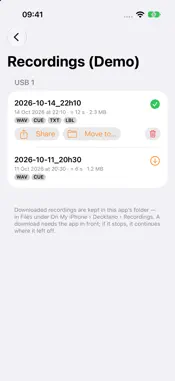
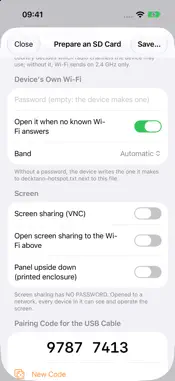
Decktano Manager finds the Raspberry Pis on your network and lets you look after them from your iPhone, iPad or Mac: open a terminal, see and operate the desktop, check the system, restart or shut down. No account, no cloud — the app talks directly to your devices over SSH. It is also the companion app for the Decktano DJ player. FIND YOUR RASPBERRY PIS • Lists the Raspberry Pis on your local network, from the first models to the Zero and the Pi 5 — also those with SSH turned off. A Pi is recognised by its hardware address, its name or its own announcement. • Add a device by name or address when it does not show up by itself. LOG IN ONCE, THEN USE A KEY • Log in once with the user and password you set in Raspberry Pi Imager. The app adds its own SSH key and uses only the key from then on. The password is never stored. • The private key is created on your device, kept in its Keychain and never leaves it. Every Pi is remembered by its fingerprint; the app refuses to connect when it changes. TERMINAL AND DESKTOP • A full terminal with esc, ctrl, arrow and function keys. • See the desktop and operate it with touch, a mouse or trackpad and a keyboard; pinch to zoom in on small controls. • Both run inside the app's encrypted SSH connection, so screen sharing never has to be opened to the network. • See model, system, memory, disk and temperature at a glance; restart or shut down after a confirmation. WHAT IS A DECKTANO? Decktano is a standalone DJ player built on a Raspberry Pi 5. Plug in your DJ controller and your USB stick and play — a tablet or a 10-inch touch panel is the screen, no laptop needed. Learn more at decktano.com. FOR YOUR DECKTANO • Connect by USB cable: plug your iPad or iPhone into the Decktano — no Wi-Fi needed. Pair once with the code from the Decktano's label, and its screen opens right away. • Prepare the SD card for a new Decktano: device name, your Wi-Fi and this app's key, in one file for the first start. The Decktano keeps the pairing code from its label; the app makes a new one only if you ask. • Check its version, network and state; run its checks. • Restart Mixxx or the whole Decktano, shut it down, apply the controller profile, power-cycle the USB ports, eject sticks and more — each action asks first and says what will happen. Nothing changes while a recording is running. • Download your recordings: the WAV with its CUE file and the chapter lists for YouTube (TXT) and Audacity (LBL). A download that stops continues where it left off. Share the files by AirDrop, move them or find them in the Files app. • Use its screen in full screen: fitted to the whole display, in landscape on iPhone, with its recordings one tap away. When the app finds your Decktano with screen sharing on, it offers to open the screen right away; operating it takes one confirmation. TRY IT WITHOUT HARDWARE The built-in demo device shows every screen of the app without a Raspberry Pi or Decktano. REQUIREMENTS iPhone or iPad with iOS / iPadOS 18 or later, or a Mac with Apple silicon. A Raspberry Pi with SSH turned on — or a Decktano with version 0.9.0 or later — in the same network. Connecting by USB cable needs a Decktano with version 0.10.1 or later and an iPhone or iPad. No tracking, no analytics, no advertising. Raspberry Pi is a trademark of Raspberry Pi Ltd. Decktano Manager is not affiliated with Raspberry Pi Ltd.
What's New
Version 1.3.2 2026-11-21
New in this version: • Easy and Advanced: the app now opens in Easy mode, with what you need at the Decktano — its screen, recordings and pairing. The terminal,...New in this version: • Easy and Advanced: the app now opens in Easy mode, with what you need at the Decktano — its screen, recordings and pairing. The terminal, commands and system details are in Settings › Mode › Advanced. • The device list is grouped: connected by cable, available Decktanos, saved Decktanos that are not found right now, other Raspberry Pis, and devices found but not saved yet. • Pairing by cable has its own keypad, with Pair right on it. • Restart and Shut Down for a Decktano with version 0.9.8 or later. The Decktano refuses while a deck is playing or a recording is running, and the app shows its answer. • Tablets with Access (in Advanced, with Decktano 0.10.4 or later): see which tablets and computers may log in to a Decktano, and remove one — for a lost tablet, or before the Decktano changes hands. • Change the address of a saved device: … › Address…. • The Screen view keeps the display on, like full screen (Settings › Keep Display On While a Screen Is Open). • If a computer warns that a device's identification has changed, "Add This App's Key from a Computer" says what to compare and gives the command that removes the old entry. More reliable: • When the cable is unplugged and the Decktano is on the same Wi-Fi, the app carries on over Wi-Fi by itself. If you plug the cable in while a command runs, the app switches to it when the command is done. • The app notices when the connection to a device drops — for example when the Wi-Fi goes away — and says so, instead of showing "Screen sharing is off". • When the cable is unplugged or a device disappears, the app no longer keeps its page open. Devices that went away while the app was in the background no longer show as available. • After a command, the app reads the Decktano's state again a little later, so screen sharing and other settings show what the Decktano really does. • A saved device follows a new name set on the device itself, unless you renamed it in the app. • A recording that starts while Recordings is open now blocks downloads within seconds, without a tap. • Logins that ask for a one-time verification code get a clear message instead of "the device does not know this app's key". • The app keeps listening for the USB cable when you switch back to it quickly. • The recordings list now reads only the "Decktano Recordings" folders on the Decktano's USB sticks, not the whole stick. This is much faster when a stick also holds a large DJ music library. Fixes: • Prepare an SD Card keeps the Decktano's own pairing code (the one on its label) and makes a new one only when you ask. It checks the Wi-Fi password the way the Decktano does and leaves the panel's rotation alone unless you set it. • If you change the name or make a new pairing code after saving, the app shows that the card still holds the saved settings, and "Add to My Devices" uses the name and code on the card. • "Stop Operating" in full screen and "Control" in the Screen view now stay off after switching apps or plugging in the cable. • Closing the screen while a tap is held no longer leaves the Decktano ignoring taps (Decktano 0.10.11 and earlier). • On the Decktano's own Wi-Fi, the network section shows it as "Own Wi-Fi". The wired connection is called "Ethernet". • Hidden "._" files that a Mac leaves on USB sticks no longer show up as recordings. • Errors now say what went wrong in words, instead of a code such as "ConnectError error 2". Technical Analysis
Package Overview Basic metadata
Bundle ID
ch.munro.DecktanoManager Current Version 1.3.2
Minimum iOS 18.0
Package Size App Store Size
Package Metadata 0 / 0 version records
Detailed binary, privacy manifest, framework, and Info.plist results have not been indexed for this package yet. The verified App Store and archive metadata above remains available.
Developer Information
Known Version Records
0 version records with stored package metadata
Stored metadata does not guarantee a package is currently available to download.
| Details | Version / IDs | Version date | Action |
|---|