
Preview




Description
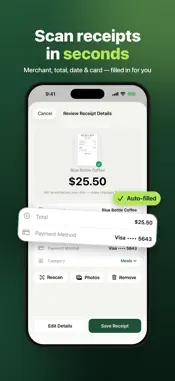
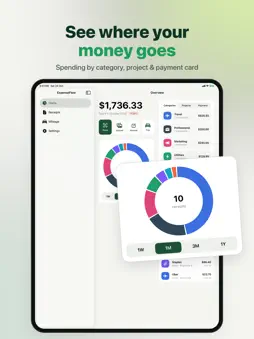
ExpenseFlow is the fastest way for freelancers, contractors and self-employed professionals to scan receipts, track business expenses and mileage, and be ready for tax season — all in one simple app. SCAN ANY RECEIPT IN SECONDS Point your camera at a receipt. ExpenseFlow straightens it and reads the merchant, total, date and even the card used (like "Visa •••• 5643"). Review the details, tap Save — done. Upload receipts from Photos, too. KNOW WHERE EVERY DOLLAR GOES See this week, month, quarter or year at a glance. A clear chart breaks spending down by category, by client project or by payment method, and compares it with the previous period. Set a monthly budget and watch how much is left. LOG BUSINESS MILES AT IRS RATES Record trips in seconds. ExpenseFlow applies the IRS standard mileage rate for the trip date automatically — including the 2026 mid-year change from 72.5¢ to 76¢ per mile — or use your own custom rate. TAX TIME, SORTED Every receipt is mapped to its Schedule C line. The Tax Summary shows potential deductions by tax line plus your vehicle deduction, ready to export as a PDF for you or your accountant. TAX-READY EXPORTS Export everything as a clean PDF report or a CSV that opens in Excel, Numbers or Google Sheets. FIND ANY RECEIPT INSTANTLY Search by vendor, category, project or notes, filter by category, or find receipts straight from iPhone Spotlight search. Start a scan from Siri or the Shortcuts app. PRIVATE BY DESIGN No account. No ads. Your receipts and photos stay on your device. EXPENSEFLOW PRO The free plan includes 2 receipts. Upgrade to Pro for: • Unlimited receipt scans • PDF & CSV exports • IRS mileage log • Schedule C tax summary Pro is available as a monthly or yearly auto-renewing subscription. Payment is charged to your Apple ID at confirmation of purchase. The subscription renews automatically unless cancelled at least 24 hours before the end of the current period. Manage or cancel any time in your App Store account settings. Privacy Policy: https://sites.google.com/view/expenseflow/privacy-policy Terms of Use: https://sites.google.com/view/expenseflow/terms-of-use ExpenseFlow organizes your records and estimates potential deductions; it doesn't give tax advice. Confirm deductions with a tax professional.
What's New
Version 1.1 2026-10-26
A fresh new look, and a lot more power: • Smarter scanning — reads merchant, total, date and payment card • New dashboard with spending chart: week, month, 3 mo...A fresh new look, and a lot more power: • Smarter scanning — reads merchant, total, date and payment card • New dashboard with spending chart: week, month, 3 months or year • Breakdown by category, project or payment method • Monthly budget tracking • Schedule C Tax Summary with PDF export (Pro) • 2026 IRS mileage rates applied automatically • Find receipts from Spotlight; scan from Siri & Shortcuts • Save receipt photos and copy receipt details • Now in English and Spanish • Full iPad layout and many fixes Technical Analysis
Package Overview Basic metadata
Bundle ID
com.uzair.expenseflow Current Version 1.1
Minimum iOS 16.0
Package Size App Store Size
Package Metadata 0 / 1 version records
Detailed binary, privacy manifest, framework, and Info.plist results have not been indexed for this package yet. The verified App Store and archive metadata above remains available.
Known Version Records
0 version records with stored package metadata • 1 known version records
Stored metadata does not guarantee a package is currently available to download.
| Details | Version / IDs | Version date | Action |
|---|---|---|---|
| Not archived | App Store ID: 884643324 | Unknown | Request Version |