
Preview



Description
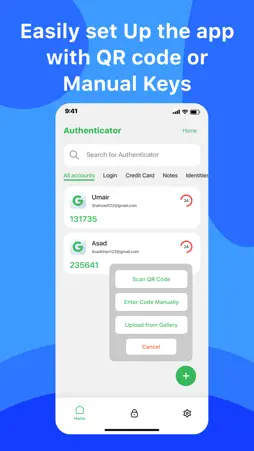
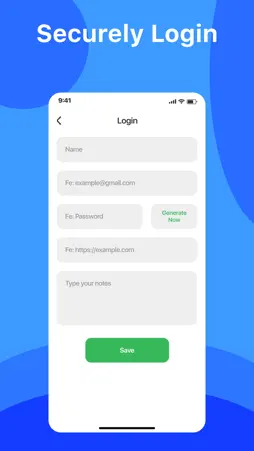
Update your account security with the authenticator app, a mobile application designed to generate one-time passwords (OTPs) or codes for two-factor authentication 2FA. Authenticator Auth Verify App stores and generates secure two-factor authentication codes for your accounts on your device. Users can use 2-factor authentication app to manage multiple accounts in one app, so you don't have to switch between apps every time you need to sign in. Two Factor Authentication: 2FA adds an extra layer of protection to your accounts by requiring not only your password but also a secondary verification code generated by our app. Multi Factor Authentication: MFA with authenticator apps makes unauthorized access much harder because even if someone steals your password, they wouldn't have the temporary code from your phone. Safe and Secure: Your passwords are safe! 2 factor authentication app stores everything on your phone and never sends it anywhere, so only you can access it. Why 2FA Authentication App? Manage codes for all your accounts in one secure authentication app Quick and simple to generate and use codes for logins. Your accounts are more secure with MFA authenticator. How It Works: Once you are enabled for your account, Authenticator and 2FA generate a unique code that changes periodically, providing an additional layer of security beyond just your password. This code, along with your regular password, is required to log in to your account. Authenticator app is trusted by websites, online services, and mobile apps to verify user identity and prevent unauthorized access. Support: For any suggestions, or questions or to report bugs in our authentication app, please contact us here: [email protected].
What's New
Version 1.1 2024-05-18
Minor Bug fixed. Crashes Resolved. Technical Analysis
Package Overview Basic metadata
Bundle ID
lastpass.authenticator.2fa.mfa.secureauth.authyapp.securepass Current Version 1.1
Minimum iOS 17.2
Package Size App Store Size
Package Metadata 0 / 2 version records
0.0 / 5.0 (0 ratings)
Detailed binary, privacy manifest, framework, and Info.plist results have not been indexed for this package yet. The verified App Store and archive metadata above remains available.
Developer Information
Known Version Records
0 version records with stored package metadata • 2 known version records
Stored metadata does not guarantee a package is currently available to download.
| Details | Version / IDs | Version date | Action |
|---|---|---|---|
| Not archived | App Store ID: 865647488 | Unknown | Request Version |
| Not archived | App Store ID: 865330319 | Unknown | Request Version |