
Preview





Description
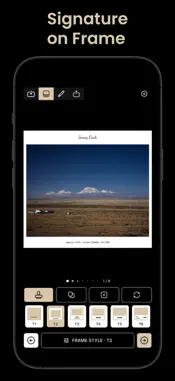
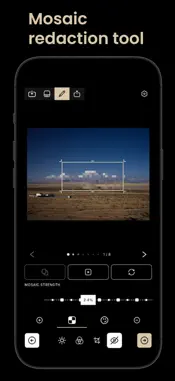
mtFrame is an offline-first photo framing app for iPhone running iOS 17 or later. Import JPEG, PNG, and HEIF/HEIC photos from Photos or Files, then apply one of six adjustable frame templates (T1-T6) or use No Frame. Each photo uses its own camera metadata in the frame. Make essential edits and export one photo or a batch as JPEG at original resolution or a selected long-edge size. FRAMING FOR PHOTOGRAPHERS • Six adjustable T1-T6 photo frame templates for portrait, landscape, and square photos, plus No Frame • Show each photo's own camera, lens, aperture, shutter speed, and ISO when available • Adjust frame and text colors, margins, logo size, text size, spacing, and template-specific logo position or gap controls • Import a logo or create a signature logo • Add mosaic regions and system Emoji overlays • Essential edits: exposure, contrast, highlights, shadows, saturation, vibrance, crop, rotate, and straighten • Available in 30 languages with a focused dark studio interface PRIVATE BY DESIGN • Photo editing and rendering take place on your device • No account or mtFrame cloud service is required • mtFrame does not upload your photos, thumbnails, EXIF data, logos, or edit recipes for processing • GPS information is removed from exported JPEGs by default unless you explicitly choose to keep it BATCH EXPORT • Export multiple photos in one session with per-item status • A failed item does not stop the rest of the batch • Cancel remaining items or retry failed items • Export at original resolution by default, or resize by long edge and choose JPEG quality CREATIVE TOOLS INCLUDED • Every framing, editing, and export feature is available free • An optional one-time purchase removes banner ads only • No subscriptions, paid templates, or export tiers
Technical Analysis
Package Overview Basic metadata
Bundle ID
com.mtdd.mtframe Current Version 1.0
Minimum iOS 17.0
Package Size App Store Size
Package Metadata 0 / 0 version records
Detailed binary, privacy manifest, framework, and Info.plist results have not been indexed for this package yet. The verified App Store and archive metadata above remains available.
Developer Information
Known Version Records
0 version records with stored package metadata
Stored metadata does not guarantee a package is currently available to download.
| Details | Version / IDs | Version date | Action |
|---|