
Preview


Description
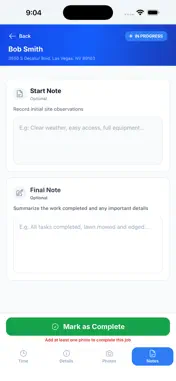
Trakta is the field app for work crews. See the jobs assigned to you, track your hours, and document what you finished — all from your phone, on the job site. This app is for crews whose company already uses Trakta. Your employer creates your account, so there is nothing to sign up for. YOUR DAY, AT A GLANCE Open the app and see the jobs assigned to your crew for today, in the order you will work them. Each job shows the client, the address, the start time and how long it should take. Move between days to check what is coming up or look back at what you finished. Jobs assigned or rescheduled back at the office appear on your phone as they happen — no need to refresh or restart. CLOCK IN AND OUT Clock yourself in with one tap. If you lead a crew, clock the whole team in together, add someone borrowed from another crew, and clock everyone out at the end of the day. Start and end breaks as you take them. The Time Sheets tab keeps a running total for the week, a day-by-day breakdown, and a history you can look back through — so there is no argument about hours at the end of the pay period. DOCUMENT THE WORK Take a before photo when you arrive and an after photo when you finish, plus any extra photos worth keeping. They attach to the job and are visible back at the office straight away. Leave a start note when you arrive and a final note summarizing what you did. Both are saved as you write them. EVERYTHING ABOUT THE JOB IN ONE PLACE Tap a job to see the client, the service, and any special instructions before you start. Tap the address to open directions in your maps app. See who else is assigned and who is on site. Notes from your supervisor — including any photos they attach — show up on the job so you know what is expected before you begin, and if something changes mid-job you will see it. BUILT FOR WORKING OUTSIDE Available in English and Spanish, switchable in Settings. Light and dark themes so the screen stays readable in bright sun or at the end of a long day. Something wrong? Report a problem or send feedback from inside the app and it goes straight to the team. ABOUT ACCOUNTS Trakta accounts are created by your employer, not in the app. If you do not have one, ask your supervisor or office manager. If you have forgotten your password, you can reset it from the sign-in screen.
What's New
Version 1.0.10 2026-11-04
Fixed: tapping Stop Work now clocks the whole crew off the job, not just the person holding the phone. Before, teammates stayed checked in to the job after work... Technical Analysis
Package Overview Basic metadata
Bundle ID
ai.trakta Current Version 1.0.10
Minimum iOS 16.0
Package Size App Store Size
Package Metadata 0 / 0 version records
Detailed binary, privacy manifest, framework, and Info.plist results have not been indexed for this package yet. The verified App Store and archive metadata above remains available.
Developer Information
Known Version Records
0 version records with stored package metadata
Stored metadata does not guarantee a package is currently available to download.
| Details | Version / IDs | Version date | Action |
|---|