
Preview






Description
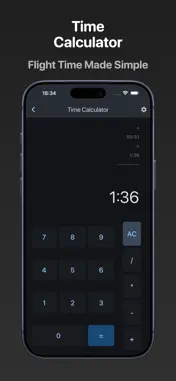
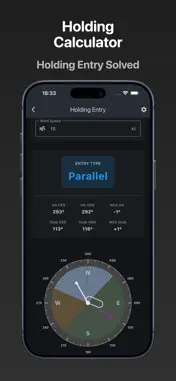
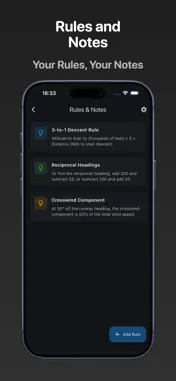
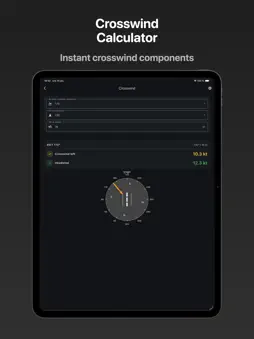
Your Digital Aviation Flight Computer – Designed for Modern Pilots Pilot Converter brings essential aviation calculations to your fingertips. Whether you're planning a cross-country flight, calculating holding patterns, or converting fuel quantities, this app replaces bulky flight computers and paper rulers with fast, accurate digital tools. CORE AVIATION CALCULATORS • Fuel Converter – Instantly convert between liters, US gallons, and fuel weight (Jet A-1 & 100LL). No more manual calculations at the fuel pump. • Time & Distance Calculator – Calculate ground speed, flight time, or distance covered. Enter any two values, get the third instantly. Perfect for flight planning and in-flight calculations. • Crosswind Calculator – Real-time crosswind and headwind/tailwind components. Enter runway heading and wind direction to see crosswind and headwind/tailwind components at a glance. Visual display adapts to your personal crosswind limits. • Climb Performance – Calculate required climb rate (ft/min) from climb gradient (% or ft/NM) and ground speed. Essential for obstacle clearance and departure procedures. • Holding Entry Calculator – Automatically determines Direct, Parallel, or Offset (Teardrop) entry with wind correction angles for both inbound and outbound legs. Visual diagram shows your entry path. • Wind Triangle Calculator – Solve the classic navigation triangle. Enter your true airspeed, desired course, and wind conditions to get your required heading, ground speed, and wind correction angle. Includes visual vector diagram with compass rose. • Pressure & Density Altitude – Calculate pressure altitude and density altitude from QNH and temperature. Supports hPa, inHg, and mmHg. Essential for performance planning in hot weather or high-elevation airports. • Time Calculator – A specialized calculator for time arithmetic in hh:mm format. Add, subtract, multiply, and divide flight times with ease. Perfect for calculating total flight time, fuel endurance, or splitting time across multiple legs. • Velocity & Distance Converters – Quick conversions between knots, mph, km/h, m/s, feet/min, feet, meters, and nautical miles. • Temperature Converter – Celsius, Fahrenheit, and Kelvin conversions. UNIQUE TOOLS • Custom Map Rulers – Two powerful tools in one: - Distance Rulers: Create printable rulers for any map scale (1:50,000, 1:250,000, 1:500,000, etc.) in metric (km) or nautical miles. Perfect for VFR chart work. - Time/Speed Rulers: Add your ground speed to create instant time calculation rulers. Measure distance on your chart and immediately see flight time. Generate PDFs directly from your phone. • Time/Decimal Converter – Switch between hh:mm and decimal time formats for flight logging and calculations. • Personal Rules & Notes – Store your own rules of thumb, memory aids, and flight procedures. Keep important information handy without cluttering your kneeboard. PRIVACY & SIMPLICITY No Ads – Focus on flying, not distractions No Tracking – Your data stays on your device Offline First – Works anywhere, no internet required No Account Needed – Install and use immediately WHO IT'S FOR Whether you're a student pilot learning the basics, a private pilot planning weekend flights, or a professional aviator double-checking calculations, Pilot Converter is built for accuracy and speed. BUILT BY PILOTS, FOR PILOTS We understand that pilots need tools that are reliable, fast, and distraction-free. That's why Pilot Converter focuses on doing the essentials exceptionally well, with a clean interface that works in both light and dark mode. TRY IT FREE 7-day trial with full access to all features. One-time purchase unlocks everything permanently – no subscriptions. ---Download Pilot Converter and simplify your flight planning today.
What's New
Version 1.1.0 2026-01-15
What’s New in this Version • Wind Triangle Calculator – Heading, ground speed, and wind correction angle with visual vectors. • Pressure & Density Altitude – Q... Technical Analysis
Package Overview Basic metadata
Bundle ID
se.mpktec.pilotconverter Current Version 1.1.0
Minimum iOS 13.0
Package Size App Store Size
Package Metadata 0 / 2 version records
Detailed binary, privacy manifest, framework, and Info.plist results have not been indexed for this package yet. The verified App Store and archive metadata above remains available.
Known Version Records
0 version records with stored package metadata • 2 known version records
Stored metadata does not guarantee a package is currently available to download.
| Details | Version / IDs | Version date | Action |
|---|---|---|---|
| Not archived | App Store ID: 881503775 | Unknown | Request Version |
| Not archived | App Store ID: 881180457 | Unknown | Request Version |