
Preview





Description
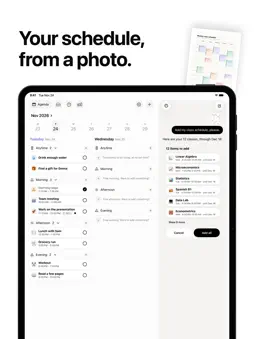
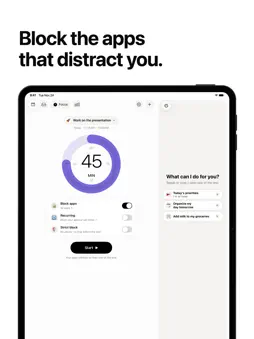
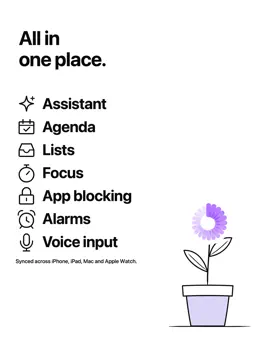
Scalyx keeps your days well in hand. Say what you need to do, out loud or by typing, and the assistant takes care of it: it creates your tasks, puts them on your agenda, files the rest into your lists and moves whatever needs to move. SAY IT. IT’S PLANNED “Tomorrow: gym at 7, finish the report by noon, call Mom at 6 pm, and add milk to my groceries.” One sentence, four actions, all done at once. The assistant understands a time, a deadline or a day with no set time, repeats a task every Monday or every other week, and breaks a big task into small steps. It answers your questions (“what do I have tomorrow?”) and offers to reschedule what didn’t get done the day before, no guilt involved. Don’t like its last action? Undo it with one tap. Have a goal, like running 10K? It turns it into a program around your free time, then tracks your progress. YOUR SCHEDULE, FROM A PHOTO Snap your class or work schedule, or send a screenshot or a PDF: everything that repeats each week becomes a recurring task, at the times shown. YOUR DAY, AT A GLANCE Anytime, morning, afternoon, evening: your day reads in four parts. Every task gets an emoji and can have a time, a deadline or no time at all. Events from your calendars (Apple, Google, Outlook and more) show up and stay up to date. CLEAR YOUR HEAD, SORT IT LATER Anything without a date goes to the Inbox or your lists: Groceries, Home, Work, or your own. And “lasagna for four” fills your grocery list, quantities included. FOCUS AND APP BLOCKING Pick a task, set the time and start a focus: the timer keeps running on the Lock Screen and in the Dynamic Island. Meanwhile, Scalyx can block the apps that distract you with Screen Time, and they unblock on their own at the end. And a real alarm, for what can’t slip. YOUR PROGRESS The Progress page shows your day streak, the tasks you’ve completed, your focus time and the app opens you avoided. TALK TO SCALYX Put “Talk to Scalyx” on the Action button, the Lock Screen or Control Center: you speak, and your tasks are created without opening the app. Dictation recognizes the language you speak. ALL IN ONE PLACE Your tasks follow you across iPhone, iPad, Mac and Apple Watch through your iCloud. On iPad and Mac, several days side by side; on your wrist, your day and your lists. SCALYX PREMIUM The agenda, Inbox and lists, reminders, alarms, focus and app blocking are free. So is the assistant: 15 messages to start, then 3 a week. Scalyx Premium, a monthly or yearly subscription, adds the assistant every day, your schedule from a photo, “Talk to Scalyx”, step-by-step goals, blocking at set times and Strict block. YOUR DATA Everything is kept in your private iCloud and is still there if you reinstall the app. A backup is made every day, and you can export it to a file. When you use the assistant, your message, anything you attach (photo, PDF, file) and the content of your agenda and lists (titles, times, notes, events from your calendars) are sent to an AI service to build the reply. The titles you type when adding a task and the names of your lists are sent too, to suggest subtasks and ideas. When you dictate, your voice is sent to a transcription service. App blocking uses Apple’s Screen Time: Scalyx never sees the names of the apps you block, or what you do in them. MAKE IT YOURS 7 accent colors plus one of your own, 9 app icons, light and dark mode. The app is in English and French. Terms of Use: https://scalyx.app/conditions Privacy Policy: https://scalyx.app/confidentialite Scalyx is not a medical tool: it doesn’t diagnose anything and doesn’t replace professional support.
What's New
Version 3.1 2026-11-25
FOCUS AND APP BLOCKING A new Focus page, behind the stopwatch at the top of the screen: pick a task and a duration, then get going. During a focus, Scalyx can ...FOCUS AND APP BLOCKING A new Focus page, behind the stopwatch at the top of the screen: pick a task and a duration, then get going. During a focus, Scalyx can block the apps that distract you with Screen Time; they unblock on their own at the end. With Premium, block them at set times too, or with Strict block: no pause and no stopping before the end. YOUR PROGRESS The new Progress page: your day streak, the tasks you’ve completed, your focus time and the app opens you avoided. A FINISHED DAY Check off the last task of the day: a shower of bubbles celebrates everything you did. AND ALSO A new opening screen, the mic next to the assistant bar, a clearer Premium screen, and the time left in the Dynamic Island no longer loses its first digit. Technical Analysis
Package Overview Basic metadata
Bundle ID
com.scalyx.app Current Version 3.1
Minimum iOS 26.5
Package Size App Store Size
Package Metadata 0 / 3 version records
Detailed binary, privacy manifest, framework, and Info.plist results have not been indexed for this package yet. The verified App Store and archive metadata above remains available.
Developer Information
Known Version Records
0 version records with stored package metadata • 3 known version records
Stored metadata does not guarantee a package is currently available to download.
| Details | Version / IDs | Version date | Action |
|---|---|---|---|
| Not archived | App Store ID: 885691314 | Unknown | Request Version |
| Not archived | App Store ID: 885528275 | Unknown | Request Version |
| Not archived | App Store ID: 885237864 | Unknown | Request Version |