
Preview







Description
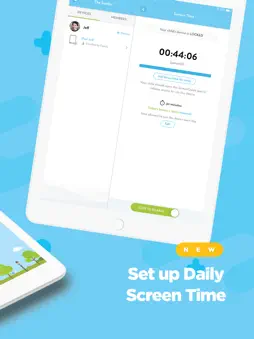
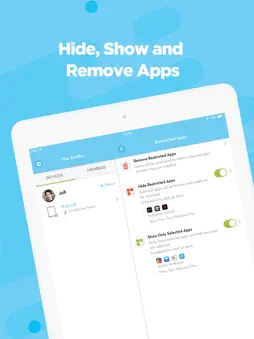
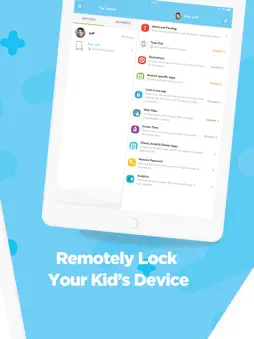
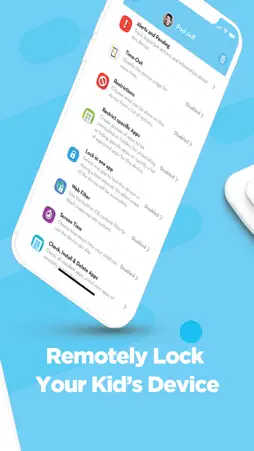
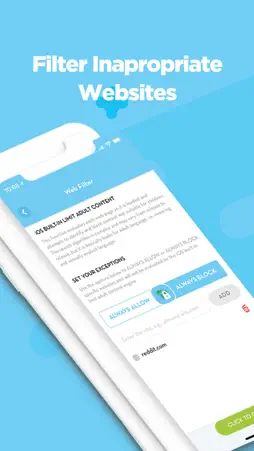
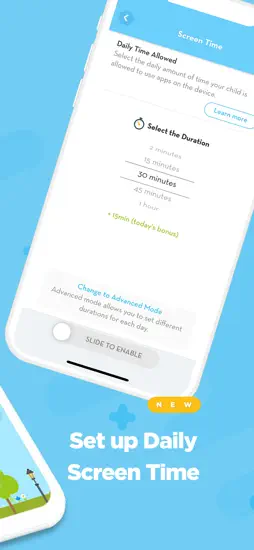
Monitor and control your kid's iPhones and iPads using these powerful parental controls! Set up daily screen time, configure the app blocker, restrict access to inappropriate websites and lock completely the device at any time and from anywhere. Be empowered by a quick and simple parental control app with great features like Internet filtering, list of selected apps to be hidden or accessible to children, and much more. Create your family and easily add your child’s devices to be able to control it. By using the Daily Screen Time feature, parents can configure the amount of time children will be allowed to use their iPhones, iPads and/or iPods during the day! Parents are also able to add bonus time to the day for children and set a list of always allowed apps! Lock the device using the Time-Out feature and ensure kids will not be distracted with digital devices when they should be studying, sleeping or having fun with family and friends. CONFIGURE RULES FOR THE SAFE USE OF IPHONES AND IPADS: • Set up Daily Screen Time • Hide Restricted Apps from your children • Set a list to Show Only Selected Apps • Lock the device in one App, avoiding distractions during homework • Block all apps • Remotely install applications • See all the apps installed on child’s devices • Learn more about the apps your children are using PROTECT YOUR CHILD: • Block Facebook, SnapChat, Instagram, Twitter, or any other social media app • Internet filtering to limit access to inappropriate content • Completely block Internet by hiding app browsers • Receive alerts about potential risks on children’s devices • Remotely delete inappropriate apps • Do not allow kids to install new apps or some deleted apps • Prevent erotic and explicit content in iTunes and iBook Store • Control the use of FaceTime and iMessage apps SET RESTRICTIONS: • Remove the password when you have to get access to children’s devices • Block in-app purchasing • Block the Camera • Block Game Center • Block the Apple ID from being changed • Block any changes to Cellular Data settings • Block any changes to Passcode. ScreenGuide Premium: Unlock the full parental control experience Upgrade to Screen Guide Premium to monitor all family’s devices and schedule device rules to keep children safe and healthy! Premium parental control features: • Add up to 10 child’s devices; • Schedule Time-Out • Schedule App Lists for your children: Hide Restricted Apps, Show Only Selected Apps, Lock the device in one App You can be a premium user of the ScreenGuide App by auto-renewing your subscription, which will be charged to the associated iTunes Account at confirmation of purchase. The monthly subscription is US$2.99 per month. The 6-months subscription is US$2.42/month billed in one payment of US$14.49. The one-year subscription is US$2.08 per month billed in one payment of US$24.99. Prices are in US dollars, may vary in countries other than the US, and are subject to change without notice. Subscription will auto-renew unless turned off 24-hours prior to the end of the current period. Auto-renewal may be turned off at any time by going to your settings in the iTunes Store after purchase. If you don’t choose to purchase ScreenGuide Premium, you can simply continue using ScreenGuide for free. Privacy policy: http://screen.guide/legal/privacy Terms of use: http://screen.guide/legal/terms
What's New
Version 2.5.1 2018-07-07
This update from Apple will improve the functionality of this app. No new features are included. *NEW: Set a list of always allowed apps during Screen Time Now... Version 2.5.0 2018-07-03
*NEW: Set a list of always allowed apps during Screen Time Now you can set a list of the applications that will never be blocked when Screen Time feature is ena... Version 2.4.1 2018-05-11
Hey! Thanks for using ScreenGuide! We update the app regularly so we can continue to make it the best parental control app for you. In this version: - New Term... App Store User Reviews
cxnt/rax 2019-03-11
Confused...
I need to regulate my nieces screen time on an old phone of mine that she uses to play games. The only option I’m given as far as what kind of device I want to ...
JoeLee 2018-11-27
App not reliable. Too many glitches
This app has been glitchy from the start but I gave it more than 6 months. There were sync errors, and many other glitches. Getting customer support was terribl...
ScreenGuide 2018-06-30
Glitchy but good
Before the was working just fine. Now, I don’t know why but the app isn’t even appearing on the iPad. The device has a time limit and it is not locked. Since it...
mdonahue09 2018-04-05
Works Great!
Loving this solution so far. This is pretty much exactly what I was looking for. I looked at things like Disney Circle and similar products, but those simply ...
serway03 2018-07-30
Amazing app!
This app is absolutely amazing and exactly what I was looking for! I wanted to limit screen time for my kids without paying money and this app allowed me to do...
davidkevinjones 2018-02-02
Fantastic App!
Screen guide helps you PROTECT your children...not CONTROL them! You can keep them from seeing adult content, limit the time they spend on their device...it jus...
Stevarino420 2018-09-24
Easy Management
Screen Guide gives me everything I need to manage all our iOS devices. I can set schedules, allow certain apps only and even give my teenager the freedom to cho...
Truidao 2017-09-13
Best innovation ever for our family!
With ScreenGuide I can fully manage my kids devices, not only on the network level, but at the very device level - which allows for control over most features o...
Scoottar 2018-04-03
Wonderful and Excellent App
After tons of research I found ScreenGuide and it is absolutely the most powerful and flexible Parental Control app on the market. Just use Apple’s Configurat...
otrig001 2018-08-12
Best app ever!
Got a little nine-year-old girl, loves her iPad. The fact that I can control the iPad remotely and blocked off her access gives me a great feeling as a parent t...
Technical Analysis
Package Overview Basic metadata
Bundle ID
com.mosyle.ios.screenguide Current Version 2.5.1
Minimum iOS 9.0
Package Size Latest Recorded Package Size
Package Metadata 1 / 22 version records
Detailed binary, privacy manifest, framework, and Info.plist results have not been indexed for this package yet. The verified App Store and archive metadata above remains available.
Related Apps


More by Mosyle


Developer Information
Known Version Records
1 version record with stored package metadata • 22 known version records
Stored metadata does not guarantee a package is currently available to download.
| Details | Version / IDs | Version date | Action |
|---|---|---|---|
 27.44 MB | v2.5.1 App Store ID: 841598874Build: 157 | 2021-04-19 02:22:26 | Get Version |
| Not archived | v2.5.1 App Store ID: 827773694Build: 2.5.1 | 2018-07-07 22:45:54 | Request Version |
| Not archived | v2.5.0 App Store ID: 827676193Build: 2.5.0 | 2018-07-03 21:09:49 | Request Version |
| Not archived | v2.4.1 App Store ID: 827091463Build: 2.4.1 | 2018-05-11 14:53:48 | Request Version |
| Not archived | v2.4.0 App Store ID: 826651137Build: 2.4.0 | 2018-04-13 15:02:29 | Request Version |
| Not archived | App Store ID: 826339193 | Unknown | Request Version |
| Not archived | v2.3.1 App Store ID: 826190917Build: 2.3.1 | 2018-03-18 20:52:45 | Request Version |
| Not archived | v2.0.3 App Store ID: 825826672Build: 2.0.3 | 2018-02-02 12:09:13 | Request Version |
| Not archived | v2.0.2 App Store ID: 824696221Build: 2.0.2 | 2017-12-07 23:38:26 | Request Version |
| Not archived | App Store ID: 823920208 | Unknown | Request Version |
| Not archived | v2.0 App Store ID: 823412574Build: 2.0 | 2017-09-12 13:37:28 | Request Version |
| Not archived | v1.1.7 App Store ID: 823276885Build: 1.1.7 | 2017-08-14 15:26:39 | Request Version |
| Not archived | v1.1.6 App Store ID: 821371409Build: 1.1.6 | 2017-03-21 20:25:20 | Request Version |
| Not archived | v1.1.5 App Store ID: 820234783Build: 1.1.5 | 2016-12-20 00:25:42 | Request Version |
| Not archived | v1.1.4 App Store ID: 820030118Build: 1.1.4 | 2016-12-15 12:10:29 | Request Version |
| Not archived | v1.1.3 App Store ID: 819155854Build: 1.1.3 | 2016-10-10 10:46:20 | Request Version |
| Not archived | v1.1.2 App Store ID: 818550398Build: 1.1.2 | 2016-08-23 14:49:24 | Request Version |
| Not archived | v1.1.1 App Store ID: 818438214Build: 1.1.1 | 2016-08-11 21:51:34 | Request Version |
| Not archived | v1.1 App Store ID: 818128569Build: 1.1 | 2016-07-18 14:02:49 | Request Version |
| Not archived | v1.0.2 App Store ID: 817860157Build: 1.0.2 | 2016-06-27 00:19:46 | Request Version |
| Not archived | v1.0.1 App Store ID: 817734354Build: 1.0.1 | 2016-06-14 19:26:31 | Request Version |
| Not archived | v1.0 App Store ID: 817395766Build: 1.0 | 2016-06-08 15:04:17 | Request Version |