Preview





Description
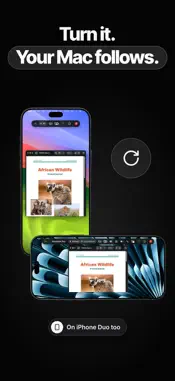
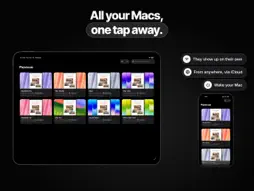
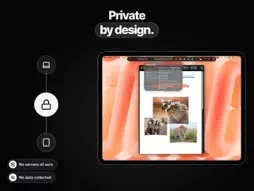
Panevue puts your Mac on your iPad and iPhone, in real time. Not a picture that stutters along: your Mac's screen, sharp and smooth, with a mouse and keyboard that respond right away. YOUR MAC, MADE TO FIT Panevue can create a display on your Mac with the exact shape of your iPad or iPhone: no black bars, every pixel used. Turn your device, open or close iPhone Duo, put Panevue next to another app: your Mac follows on its own. (The made-to-fit display comes with the Mac app from panevue.com; the Mac App Store app uses the Mac's own screen.) FAST AND SHARP With the Panevue app for Mac, the screen streams in HEVC with full color (4:4:4), so text stays as crisp as on the Mac itself. On Macs with Max and Ultra chips, two video engines encode the screen together for even lower latency. If the network drops something, Panevue repairs it without stopping. AT HOME AND AWAY The Macs on your network show up on their own. With Tailscale you connect from anywhere, encrypted, with nothing to set up on your router. Mac asleep? Panevue can wake it. THE WAY YOU'RE USED TO • Touch: tap to click, two fingers to right-click and scroll, pinch to zoom. • Magic Keyboard, trackpad and mouse: pointer, clicks, smooth scrolling and every Mac shortcut. • An on-screen keyboard with Esc, Tab, Control, Option, Command, arrows and function keys. • Write or dictate with your device's autocorrect, then send it all to the Mac. EVERYTHING YOU NEED • Shared clipboard: text and images, both ways. • Send files to your Mac and receive files from it. • Your Mac's sound on your device. • Picture in Picture while you use other apps. • External display: your Mac goes on the display, your iPad becomes its trackpad. • Single App: Panevue follows the window in front. • Privacy: hide your Mac's screen from anyone near it while you use it from afar. • Your Mac password, kept in the Keychain and entered after Face ID or Touch ID. • A Live Activity with the session's status. SECURE You confirm the first connection by comparing a code on your Mac and on your device. The stream is encrypted and travels only between your own devices: Panevue has no servers and collects no data. EVEN WITHOUT THE MAC APP Panevue also works with macOS Screen Sharing and with any VNC server on Windows, Linux and Raspberry Pi. Real-time streaming requires the Panevue app for Mac (macOS 26 or later), free on the Mac App Store and at panevue.com.
What's New
Version 1.0.1 2026-11-16
• Your Mac from anywhere: once paired at home, tap it from any network. Your iCloud is the meeting point; the connection is direct and encrypted, with no Panevu...• Your Mac from anywhere: once paired at home, tap it from any network. Your iCloud is the meeting point; the connection is direct and encrypted, with no Panevue server. Needs Panevue 1.0.1 on the Mac. • New setup: three simple steps to get your Mac on your iPhone or iPad, and a clearer Add Computer. • If a connection doesn't work, Panevue now tells you why and what to do. • Panevue for Mac is now also on the Mac App Store, free. • The Mac's screen reaches the edges of the iPad again when no keyboard is on screen, and a floating keyboard no longer shrinks it. • On iPhone, the session bar fits the screen in portrait, even with large text. • Closing a session with the X no longer asks whether to reconnect. Technical Analysis
Package Overview Basic metadata
Bundle ID
ai.prisy.vedy Current Version 1.0.1
Minimum iOS 26.0
Package Size App Store Size
Package Metadata 0 / 0 version records
Detailed binary, privacy manifest, framework, and Info.plist results have not been indexed for this package yet. The verified App Store and archive metadata above remains available.
Developer Information
Known Version Records
0 version records with stored package metadata
Stored metadata does not guarantee a package is currently available to download.
| Details | Version / IDs | Version date | Action |
|---|