
Preview






Description
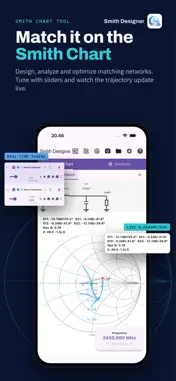
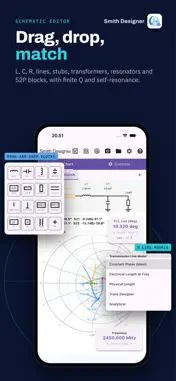
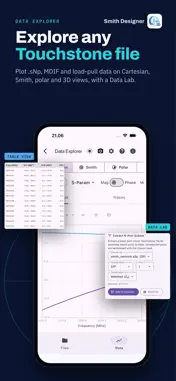
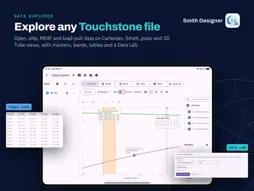
Smith Designer is a powerful and interactive Smith Chart tool for RF and Microwave professionals, students, and hobbyists. Design, analyze, and optimize impedance matching networks directly on your mobile device. A Smith Designer Lite version is available. Whether you are designing an antenna match, an amplifier interstage, or a filter, Smith Designer provides an intuitive interface to visualize impedance transformations in real-time. Key Features: • Interactive Smith Chart: Visualize impedance trajectories as you add components. Toggle between Impedance (Z) and Admittance (Y) grids. • Schematic Editor: Build matching networks using a drag-and-drop interface. Supports Series/Shunt Inductors, Capacitors, Resistors, series and parallel RLC, Transmission Lines (Series and shunt, Open/Short Stubs), Transformers, fixed jX and jB, and S2P blocks. • Real-Time Tuning: Adjust component values using sliders or by dragging points directly on the Smith Chart to see immediate effects. • Auto Match: Automatically synthesize L-network matching circuits to match a source to a load. • Simultaneous Conjugate Matching for unconditionally stable devices, and provisions to help stabilize conditionally stable networks. • Optimization: Built-in gradient descent optimizer to fine-tune component values for the best match. • Frequency Sweeps: Analyze your design over bandwidth. Plot S-Parameters (S11, S21, S12, S22), Gain (Ga, Gp, Gt), Noise Figure, Return Loss, and Group Delay. • Monte Carlo Analysis: Simulate manufacturing tolerances. Define component variations (Uniform, Gaussian, Triangular) and visualize the spread on the Smith Chart to ensure design robustness. • S2P/Touchstone Support including noise data: Import .s2p files for S-parameter blocks and .s1p files for frequency-dependent source/load impedances. • Vendor Libraries: Easily import and use component libraries (supports Murata LPB format, see https://www.murata.com/tool/data/librarydata). • Comprehensive Overlays: Visualize VSWR circles, Constant Q arcs, Stability circles, and Noise circles (requires noise parameters). • Load Pull Contours: Import multi-frequency Load Pull and MDIF files. Frequency interpolation (nearest, linear, cubic spline). Filled contours with 5 color maps. Reference/contour plane transforms through the matching network. • Data Explorer to assess SnP data files, load-pull data files, antenna patterns and more. Advanced Tools: • Trace Designer: Full 2D Boundary Element Method solver for PCB transmission lines — Microstrip, GCPWG, Stripline, Differential, Coated, and Embedded variants. Multilayer substrates, trapezoidal traces, conductor roughness models, impedance synthesis, and experimental E-field visualization. • Analytical Line Models: Closed-form Z₀, loss, and synthesis for Coaxial, Parallel Lines, Twisted Pair, Microstrip, Stripline, Grounded CPW, Rectangular Waveguide, and Circular Waveguide. • Transmission Line Models: Constant Phase, Electrical Length, and Physical models with loss and velocity factor. • Resonator & Attenuator Designers: Built-in calculators for common circuit blocks. Export & Share: • Export professional PDF reports with schematics, charts, and plots. • Export designs as SPICE netlists for further simulation. • Save high-resolution PNG/SVG images. • Share project files to collaborate with others. Perfect for RF engineering coursework, ham radio antenna tuning, and professional circuit design. Unlock the power of the Smith Chart in your pocket! Contact: For support or feature requests, please contact us. (c) A3DComm
What's New
Version 1.5.3562 2026-11-16
• Pin live plots straight from any sweep plot; Open Full Plot goes back • Frequency Band overlay at the last node only • Monte Carlo: tolerance bands, yield and...• Pin live plots straight from any sweep plot; Open Full Plot goes back • Frequency Band overlay at the last node only • Monte Carlo: tolerance bands, yield and corner analysis now vary every part • Auto Match scores load-pull data on networks matched from the source • Corrected grounded CPW and microstrip line models • Safer saving; PDF reports work offline Technical Analysis
Package Overview Basic metadata
Bundle ID
com.a3dcomm.aether.smith Current Version 1.5.3562
Minimum iOS 15.0
Package Size App Store Size
Package Metadata 0 / 0 version records
Detailed binary, privacy manifest, framework, and Info.plist results have not been indexed for this package yet. The verified App Store and archive metadata above remains available.
Known Version Records
0 version records with stored package metadata
Stored metadata does not guarantee a package is currently available to download.
| Details | Version / IDs | Version date | Action |
|---|