
Preview




Description
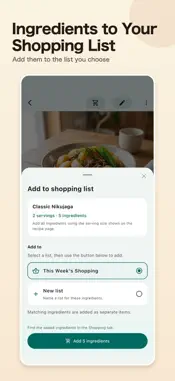
Keep and manage recipes from Instagram, TikTok, YouTube, and the web, plus screenshots and paper recipes, in your own recipe collection. CookDrawer helps you import, edit, and organize recipes, then turn ingredients into shopping lists. Send the link to a recipe page or post to this app from the share menu, then tap Create to make an editable recipe. For screenshots and paper recipes, recognize the text with the camera or an image to import it. You can add ingredients from saved recipes to a shopping list. Keep family favorites and new discoveries ready for the next time you cook. Manually adding, viewing, and editing recipes, organizing with tags, and using shopping lists are free. Eligible devices can try 3 imports as a one-time offer. Optional purchases are Monthly Plus (50 imports each month while active, plus all Plus features), Lifetime Plus features (a one-time payment that does not add any imports), and 10 extra imports. The app is available in English and Japanese. IMPORT RECIPES YOU FIND Create editable recipes from public Instagram and TikTok captions, YouTube descriptions, and compatible webpages. You can send links to this app from the share menu in your browser or social media apps. You can also paste text or recognize recipe text with the camera, an image, or a screenshot. IMPORT NOTES Even public posts may be unavailable because of age verification or access restrictions. YouTube imports use the video description. If recipe text appears in a video or comment, try recognizing it from a screenshot. Review imported content and edit it as needed. For import allowances (3 trial imports on eligible devices) and ways to add more, see FREE FEATURES AND IMPORT ALLOWANCES and OPTIONAL PURCHASES below. REVIEW AND MAKE IT YOURS Preview ingredients and directions before saving. When you import a single recipe, choose Save and edit to adjust its ingredients, steps, and notes right away. FIND RECIPES WITH TAGS AND SEARCH Organize by quick meals, meal prep, favorites, and more. Search your collection and choose a list or grid view. TURN INGREDIENTS INTO SHOPPING LISTS Review the destination list and ingredient count before adding. Create a new list or add everyday shopping items by hand. BACK UP TO ICLOUD DRIVE Back up and restore recipes, tags, and shopping lists. Image files themselves are not included in backups. FREE FEATURES AND IMPORT ALLOWANCES Manually adding, viewing, and editing recipes, organizing with tags, and using shopping lists are free. Eligible devices can try 3 imports as a one-time offer. Registering again or reinstalling the app does not grant another trial on the same device. Camera, image, and screenshot text recognition is free. Creating a recipe from recognized text uses your import allowance. OPTIONAL PURCHASES • Monthly Plus An automatically renewing subscription with 50 imports each month while active, plus all Plus features. Your first purchase permanently unlocks Plus features, which remain available after the subscription ends. The monthly import allowance ends, but unused trial imports and purchased imports remain. • Lifetime Plus features A one-time payment unlocks Plus features permanently, with no automatic renewal. This purchase does not add any imports. • 10 extra imports Buy 10 imports when you need them, with no automatic renewal or expiration. Available to both free and Plus users. Connecting your account with Apple is required before purchasing. This purchase does not unlock Plus features. Plus features include serving-size adjustments (including steps of 0.5), CSV export, color customization, and keeping the screen awake while cooking. See the app for prices and purchase details. Keep every recipe you want to cook again within easy reach.
What's New
Version 1.6.3 2026-11-25
This update makes the app easier to use and fixes several issues. • When you go back from creating or editing a recipe with unsaved changes, the app now asks b...This update makes the app easier to use and fixes several issues. • When you go back from creating or editing a recipe with unsaved changes, the app now asks before discarding them. • You can now close the keyboard by tapping outside a field or dragging the screen, both when creating or editing a recipe and when entering shared text. • Fixed the keyboard closing right after tapping the shared-text field on smaller screens such as iPhone SE. • When a search or filter finds no recipes, the app now says so and lets you clear the search and filters. Spaces before and after search words are now ignored. • The first-run guide no longer appears again after you close it with the tab bar. • In regions that use a comma as the decimal separator, entering "1,5" for an amount or servings no longer saves it as 15. Please edit any amounts that were already saved this way. • Sharing from another app during a backup or restore no longer switches screens. • Fixed recipe edits and shared text sometimes being lost, for example when returning to the app. • Import instructions now match the steps: share a URL, then tap Create. • If your recipe list cannot be loaded, the app now says so instead of showing that you have no recipes. • English text now uses singular forms where appropriate, such as "1 serving" and "1 ingredient." Technical Analysis
Package Overview Basic metadata
Bundle ID
com.reitouhozonn.hidenNoTare Current Version 1.6.3
Minimum iOS 15.0
Package Size App Store Size
Package Metadata 0 / 6 version records
Detailed binary, privacy manifest, framework, and Info.plist results have not been indexed for this package yet. The verified App Store and archive metadata above remains available.
Known Version Records
0 version records with stored package metadata • 6 known version records
Stored metadata does not guarantee a package is currently available to download.
| Details | Version / IDs | Version date | Action |
|---|---|---|---|
| Not archived | App Store ID: 888525091 | Unknown | Request Version |
| Not archived | App Store ID: 884362868 | Unknown | Request Version |
| Not archived | App Store ID: 883252997 | Unknown | Request Version |
| Not archived | App Store ID: 882078297 | Unknown | Request Version |
| Not archived | App Store ID: 881800634 | Unknown | Request Version |
| Not archived | App Store ID: 878372901 | Unknown | Request Version |