
Preview

Description
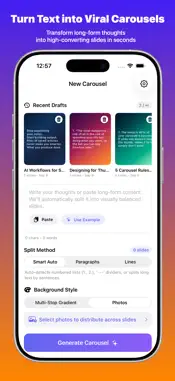
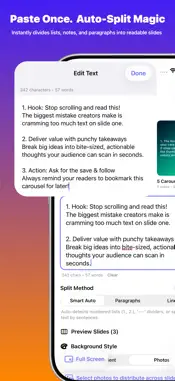
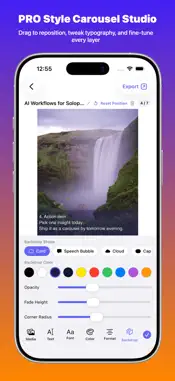
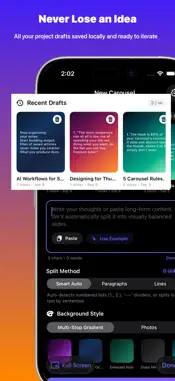
Transform your long text, notes, threads, and ideas into high-converting, aesthetic social media carousels in under 60 seconds. Carousels generate up to 3x to 5x more engagement, saves, and shares on Instagram and LinkedIn than static images. But formatting multi-slide decks in complex desktop tools like Photoshop or Canva is slow, tedious, and frustrating on mobile. Meet Overlaid — the mobile-first carousel design studio built specifically for modern creators, founders, educators, and marketers. Paste your text, select a style, and let our intelligent engine generate a publish-ready carousel instantly. WHY CREATORS LOVE OVERLAID 1-TAP SMART AUTO-SPLIT - Don’t waste time manually copying and pasting text across dozens of slides. Overlaid analyzes your raw thoughts, articles, or tweets and automatically splits them into perfectly digestible slide cards. - Smart Auto: Detects numbered lists (1., 2.), bullet points (•, -), manual slide dividers (---), or intelligently splits walls of text by natural sentence boundaries. - Paragraphs Mode: Breaks slides by clean double line breaks. Lines Mode: Turns each individual line into its own punchy punchline slide. - Live Preview: Review and inspect your slide breakdown before entering the studio. MULTI-STOP AESTHETIC GRADIENTS & BATCH MEDIA - Make your content stop the endless feed scroll. - Curated Multi-Stop Gradients: Choose from handcrafted 4-to-5 color gradient blends (Cosmic Violet, Velvet Sunset, Midnight Ocean, Cyberpunk, Emerald Noir, Slate Minimal) engineered for pristine typography contrast. - 1-Tap Batch Photo Import: Select up to 10+ photos from your library at once. Overlaid automatically distributes them sequentially across your slides. - Granular Media Controls: Easily replace images on individual slides, duplicate a single background across your entire deck, or clear photos to let bold gradients shine. • MOBILE-FIRST STUDIO EDITOR Designed with the speed and ergonomics of modern mobile video editors like CapCut and Instagram Stories: Precision Typography: Handpicked editorial fonts (Montserrat, Playfair Display, Lora, Open Sans, Raleway, and Apple System). Dynamic Layout Engine: Align text to the Top, Center, or Bottom, or fine-tune vertical placement down to the exact point with smooth Y-offset sliders. Smart Backdrop & Gradient Fades: Adaptive dynamic shadows and contrast backdrops ensure your words remain 100% legible over any busy photo background. Slide Management: Add, duplicate, or delete slides on the fly with our horizontal thumbnail timeline. • MULTI-PLATFORM EXPORT READY FOR ALGORITHMS Export your carousels in native dimensions optimized for each platform’s recommendation engine: - LinkedIn Document (PDF): Export seamless, multi-page vector-quality PDF documents that drive massive reach on LinkedIn. - Instagram Post (4:5 / 1080x1350): The gold-standard portrait aspect ratio that dominates mobile screen real estate. - Square Posts (1:1 / 1080x1080): Classic feed format for versatile social sharing. - Stories & Vertical (9:16 / 1080x1920): Formatted for Instagram Stories, TikTok slide decks, and Reels. • RECENT DRAFTS & AUTO-SAVE Never lose your creative spark. Every change, photo swap, and layout adjustment is automatically saved locally to your device. Browse your recent projects right from the home screen, jump back into editing anytime, and manage your library with safe deletion confirmations. WHO IS OVERLAID FOR? Thought Leaders & Founders sharing insights and building personal brands on LinkedIn and X. Content Creators & Influencers repurposing newsletters and tweets into viral Instagram carousels. Educators & Coaches delivering bite-sized visual masterclasses and step-by-step guides. Digital Marketers looking to boost organic dwell time and engagement rates without a graphic designer. Turn your thoughts into beautiful visual stories today with Overlaid. Privacy Policy and Terms and Conditions: https://momentarium.app/legal
Technical Analysis
Package Overview Basic metadata
Bundle ID
com.momentarium.Overlaid Current Version 1.0
Minimum iOS 26.5
Package Size App Store Size
Package Metadata 0 / 0 version records
Detailed binary, privacy manifest, framework, and Info.plist results have not been indexed for this package yet. The verified App Store and archive metadata above remains available.
Developer Information
Known Version Records
0 version records with stored package metadata
Stored metadata does not guarantee a package is currently available to download.
| Details | Version / IDs | Version date | Action |
|---|