
Preview

Description
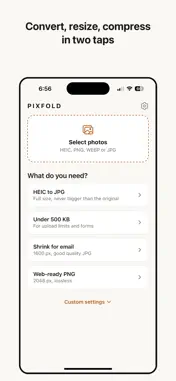
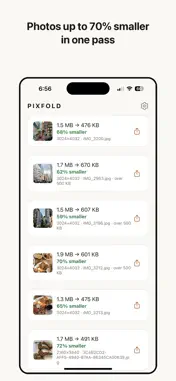
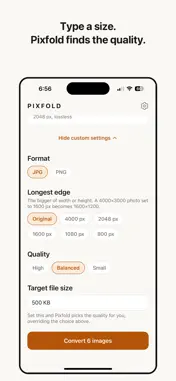
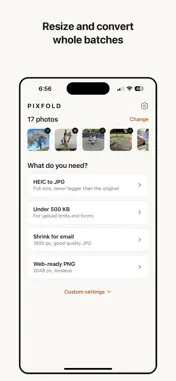
Convert HEIC, PNG and WEBP photos to JPG or PNG, resize them, and compress them down toward a file size you choose, all on your iPhone. Nothing is uploaded, and there is no account to create. Need a photo under 500 KB for a form or an upload limit? Type the size and Pixfold searches for the quality that fits, instead of leaving you to guess with a slider. PICK A JOB, NOT A SETTING Start from what you actually need — HEIC to JPG, Under 500 KB, Shrink for email, Web-ready PNG — and Pixfold applies the right format, size and quality. Every control is still there under Custom settings when you want it. CONVERT Read HEIC, PNG, WEBP and JPG. Write JPG or PNG. The HEIC to JPG preset caps output at the size of the original, because a straight conversion at full quality often produces a larger file than the HEIC you started with. RESIZE Set the longest edge — 4000, 2048, 1600, 1080 or 800 pixels — and both dimensions scale together. Photos are never enlarged beyond their original size. COMPRESS Choose a quality step, or type a target file size and let Pixfold find the quality that comes closest. When a target cannot be reached, it tells you rather than pretending. BATCHES Convert a whole selection in one pass. Drop individual photos from the batch before you start, save everything to Photos at once, or share straight from the results. PRIVATE BY DEFAULT Every conversion runs on your device. No uploads, no servers holding your photos, no account, no ads, no watermarks. Location and other EXIF metadata are stripped from saved images. Converting, resizing and compressing all work with no network connection. Pixfold Pro is a subscription: $2.99 per week with a 3-day free trial, or $24.99 per year. Payment is charged to your Apple Account at confirmation of purchase. Subscriptions renew automatically unless cancelled at least 24 hours before the end of the current period. Manage or cancel in Settings → Apple Account → Subscriptions. Terms of Use (Apple standard EULA): https://www.apple.com/legal/internet-services/itunes/dev/stdeula/ Privacy Policy: https://synthika.com/pixfold/privacy
What's New
Version 1.0.1 2026-08-28
Compression that actually hits the number. • The "Under 500 KB" preset now gets there. When quality alone isn't enough, Pixfold reduces the dimensions instead ... Technical Analysis
Package Overview Basic metadata
Bundle ID
com.mhaseeb.pixfold Current Version 1.0.1
Minimum iOS 15.1
Package Size App Store Size
Package Metadata 0 / 0 version records
Detailed binary, privacy manifest, framework, and Info.plist results have not been indexed for this package yet. The verified App Store and archive metadata above remains available.
Known Version Records
0 version records with stored package metadata
Stored metadata does not guarantee a package is currently available to download.
| Details | Version / IDs | Version date | Action |
|---|