
Preview







Description
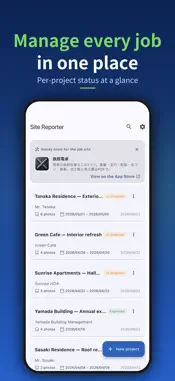
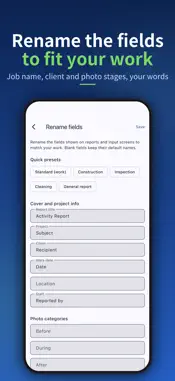
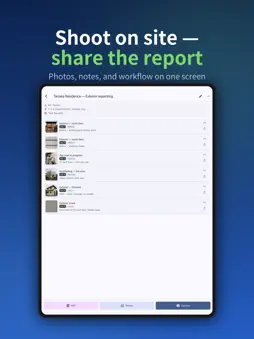
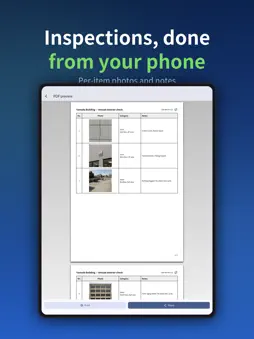
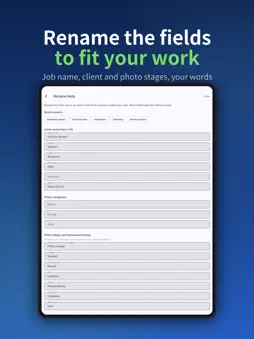
[Sound familiar?] - Photos pile up on your phone and turning them into a report takes forever - Tweaking Excel layouts every time eats into your day - You want a clean handover that shows your work to the client - Most management apps are too heavy for a small crew Site Reporter turns site photos into a polished PDF report — straight from your phone. Shoot, comment, pick a layout, generate the PDF, share. That's it. [Highlights] - 6 report layouts (Standard / Before-After / Inspection / Photo Album / Issue Summary / Photo Ledger) - Photo ledger: a cover page (project, work period, contractor) plus 3 numbered photos per page — the customary construction photo-ledger format (Pro) - Blackboard stamp: overlay a chalkboard-style stamp (project, work type, date, memo) on photos; the original photo stays untouched - Automatic serial numbers (No.1, No.2, ...) that follow your photo order - Tag each photo as Before / During / After / Issue / Other - Per-project photo management - One-tap project duplication, with photos reusable across sites - Save frequent comments as one-tap snippets - One-tap PDF generation and sharing - Per-project export history - Rename report fields (Project, Before/After, photo ledger labels and more) for inspection, cleaning or general reports - Change the cover title for just one PDF right from the PDF screen (site survey report, proposal, or your own wording) - Safety patrol preset for report field names - Leave out the cover page and start from the first photo page (photo ledger too) - Add approval boxes (e.g. Prepared / Checked / Approved) to the top right of the cover for stamps or signatures - Compress photos on the PDF screen for a smaller file - Photos in the "Other" category can have a name of your own (e.g. Replaced parts) - Photo date and time: add the shooting date (or date and time) to the corner of each photo in the PDF — photos from your camera roll keep the time they were taken (the original photo is untouched) - Add or remove blackboard stamps on every photo in a project at once - Rotate or replace photos, zoom in full screen, and print one large photo per page (except the photo ledger) - Customer, location and staff names you've entered before appear as one-tap suggestions - Before / After: set a photo's category to Before or After and the PDF shows them side by side (paired in the order you arrange them). In-progress photos go in between. Select several photos to set their category at once - Drag to reorder photos — the PDF follows the same order - iPhone and iPad: with Pro, iCloud sync keeps your projects in step on both devices (no sign-in required) - Embed your company logo in PDFs (Pro) [Great for] - Sole-prop renovators, exterior painters, roofers - House cleaning and janitorial businesses - Property condition reports, move-out reports - Building and equipment inspections - Showing clients a clear before / after [Privacy and offline use] Your data stays on your device and never goes to our servers (with iCloud sync on, it is kept in your own iCloud). No logins, no ads, and you can record photos and make PDFs on sites with no signal. When online, the app reads our public announcements and other-apps list, and sends anonymous usage analytics and crash diagnostics. Your photos, comments and customer names are not included. Analytics and diagnostics can be turned off in Settings. [Pricing] The free version covers up to 3 projects. The Pro upgrade (one-time, no subscription) removes the project limit and the PDF watermark, unlocks all 6 templates including the photo ledger, and adds the company-logo feature. One payment, lifetime use. A simple report tool that fits on your phone.
What's New
Version 1.1.18 2026-11-19
You can now add approval boxes to the top right of the cover so people can stamp or sign it when the report is passed around. Choose the number of boxes and the...You can now add approval boxes to the top right of the cover so people can stamp or sign it when the report is passed around. Choose the number of boxes and their names (e.g. Prepared / Checked / Approved) in Settings > Approval boxes on the cover. In the Before / After PDF, in-progress photos now sit between the before and after photos (three across, two sets per page). - Reworked how SAMPLE appears on PDFs so the text stays easy to read - Fixed the background color of the photo date and time label in PDFs Technical Analysis
Package Overview Basic metadata
Bundle ID
com.kozawamoeki.genbaReport Current Version 1.1.18
Minimum iOS 15.0
Package Size App Store Size
Package Metadata 0 / 40 version records
Detailed binary, privacy manifest, framework, and Info.plist results have not been indexed for this package yet. The verified App Store and archive metadata above remains available.
Developer Information
Known Version Records
0 version records with stored package metadata • 40 known version records
Stored metadata does not guarantee a package is currently available to download.
| Details | Version / IDs | Version date | Action |
|---|---|---|---|
| Not archived | App Store ID: 894932832 | Unknown | Request Version |
| Not archived | App Store ID: 894561498 | Unknown | Request Version |
| Not archived | App Store ID: 893500043 | Unknown | Request Version |
| Not archived | App Store ID: 893417366 | Unknown | Request Version |
| Not archived | App Store ID: 892873324 | Unknown | Request Version |
| Not archived | App Store ID: 892594516 | Unknown | Request Version |
| Not archived | App Store ID: 892344076 | Unknown | Request Version |
| Not archived | App Store ID: 892134114 | Unknown | Request Version |
| Not archived | App Store ID: 892033517 | Unknown | Request Version |
| Not archived | App Store ID: 891913702 | Unknown | Request Version |
| Not archived | App Store ID: 891765774 | Unknown | Request Version |
| Not archived | App Store ID: 891478836 | Unknown | Request Version |
| Not archived | App Store ID: 891311290 | Unknown | Request Version |
| Not archived | App Store ID: 891137455 | Unknown | Request Version |
| Not archived | App Store ID: 890625397 | Unknown | Request Version |
| Not archived | App Store ID: 889776372 | Unknown | Request Version |
| Not archived | App Store ID: 889071245 | Unknown | Request Version |
| Not archived | App Store ID: 888739067 | Unknown | Request Version |
| Not archived | App Store ID: 888219678 | Unknown | Request Version |
| Not archived | App Store ID: 887942796 | Unknown | Request Version |
| Not archived | App Store ID: 887640532 | Unknown | Request Version |
| Not archived | App Store ID: 887566765 | Unknown | Request Version |
| Not archived | App Store ID: 887400907 | Unknown | Request Version |
| Not archived | App Store ID: 887213670 | Unknown | Request Version |
| Not archived | App Store ID: 886890577 | Unknown | Request Version |
| Not archived | App Store ID: 886617726 | Unknown | Request Version |
| Not archived | App Store ID: 886584282 | Unknown | Request Version |
| Not archived | App Store ID: 886261439 | Unknown | Request Version |
| Not archived | App Store ID: 886055120 | Unknown | Request Version |
| Not archived | App Store ID: 885786067 | Unknown | Request Version |
| Not archived | App Store ID: 885731252 | Unknown | Request Version |
| Not archived | App Store ID: 885652761 | Unknown | Request Version |
| Not archived | App Store ID: 885472500 | Unknown | Request Version |
| Not archived | App Store ID: 885329565 | Unknown | Request Version |
| Not archived | App Store ID: 885199228 | Unknown | Request Version |
| Not archived | App Store ID: 885188043 | Unknown | Request Version |
| Not archived | App Store ID: 885055319 | Unknown | Request Version |
| Not archived | App Store ID: 884979413 | Unknown | Request Version |
| Not archived | App Store ID: 884812583 | Unknown | Request Version |
| Not archived | App Store ID: 884565003 | Unknown | Request Version |