Preview


Description
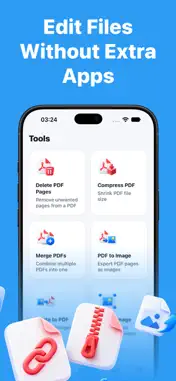
Connect wirelessly to 8,000+ printers and start printing from your iPhone in seconds. No drivers to install, no software to download. Just connect to the same Wi-Fi network as your printer and you're ready to go. PRINT DOCUMENTS Open any file directly from your device storage, iCloud, Dropbox, or Google Drive and send it to your printer without conversion. The app supports PDF, DOCX, images, and 20+ other formats natively. You can also print full-size web pages by entering any URL, or import email attachments through the iOS share sheet and print them on the spot. PRINT PHOTOS Pick your favorite moments from your camera roll, edit them before printing with built-in filters like grayscale, sepia, vivid, and warm tones, and print them in full quality. Crop, rotate, or resize your photos to get the exact framing you want all without leaving the app. PRINT NOTES & TEXT Type or paste any text into the built-in notepad with heading and body formatting, then send it straight to your printer. Great for quick lists, meeting notes, or anything you need on paper fast. SCAN DOCUMENTS Use your iPhone camera to scan contracts, receipts, forms, or any paper document. Intelligent edge detection automatically finds the document corners and corrects the perspective so your scan comes out straight and clean. Apply filters, rotate, or crop your scanned pages, and scan multiple pages in one session to create a single PDF. Share your scans via AirDrop, email, or save them to your files. PDF & IMAGE TOOLS Merge multiple PDFs into a single file, compress large documents to reduce file size before printing or sharing, and delete unwanted pages from any PDF. Convert PDF pages to images for presentations, or turn a set of photos into a multi-page PDF document. Resize images to exact dimensions, crop to any aspect ratio, rotate sideways scans, and apply color filters — all processed locally on your device. ADVANCED PRINT OPTIONS Choose portrait or landscape orientation, set multiple pages per sheet to save paper, switch between color and black & white printing, and select the number of copies. The print preview shows you exactly what will come out before you send the job. PRINTER SUPPORT Compatible with thousands of inkjet, laser, and all-in-one AirPrint-compatible printers from all major manufacturers. The app automatically discovers printers on your Wi-Fi network. If your printer needs manual setup, built-in step-by-step guides walk you through WPS and laptop-based connections. Download now and send your first print job in under a minute. ---- Privacy Poliy: https://useprintplus.com/privacy Terms of Use: https://useprintplus.com/terms
What's New
Version 1.1.1 2026-10-31
Bug fixes and performance improvements. Technical Analysis
Package Overview Basic metadata
Bundle ID
com.mobleaf.printer Current Version 1.1.1
Minimum iOS 16.6
Package Size App Store Size
Package Metadata 0 / 5 version records
Detailed binary, privacy manifest, framework, and Info.plist results have not been indexed for this package yet. The verified App Store and archive metadata above remains available.
Known Version Records
0 version records with stored package metadata • 5 known version records
Stored metadata does not guarantee a package is currently available to download.
| Details | Version / IDs | Version date | Action |
|---|---|---|---|
| Not archived | App Store ID: 884913274 | Unknown | Request Version |
| Not archived | App Store ID: 884740886 | Unknown | Request Version |
| Not archived | App Store ID: 884414171 | Unknown | Request Version |
| Not archived | App Store ID: 884062971 | Unknown | Request Version |
| Not archived | App Store ID: 882904951 | Unknown | Request Version |