
Preview


Description
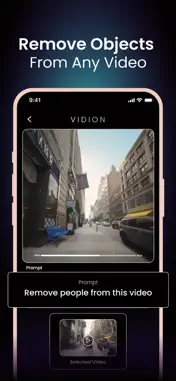
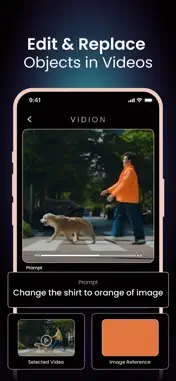
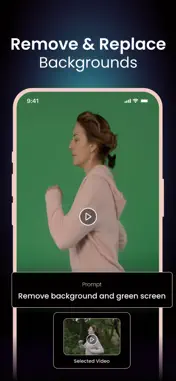
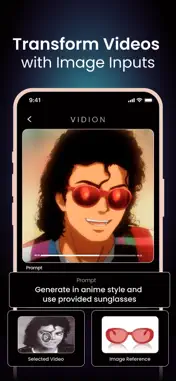
Transform your videos with AI. Vidion makes editing as simple as typing a text prompt. Change backgrounds, restyle in anime or cinematic looks, remove text or watermarks, resize, and more. No complex tools, no learning curve – just instant edits with Runway Aleph. Whether for social media, creative projects, or professional use, Vidion gives you the power to create in seconds. Key Features - AI Edit Video – Edit videos using smart AI prompts.
- Background Changer – Remove, replace, or green screen video backgrounds.
- Restyle with AI – Transform your videos into anime style, cinematic effects, or unique looks.
- Remove Objects & Text – Clean up your videos by erasing unwanted parts.
- Resize & Format – Change video ratio, resolution, and format for any platform.
- Video Speed Control – Adjust speed for slow motion or fast cuts.
- Video Watermark Remover – Instantly remove watermarks with AI precision.
- Video Inpainting – Recreate missing or damaged parts of your footage. How to Use 1- Upload your video or image.
2- Enter a text prompt or choose from editing options.
3- Generate and share your video instantly. Why Vidion? Vidion combines cutting-edge AI editing with Runway Aleph technology, giving you professional-level ai video editing tools without complexity. Create Reels, Stories, or polished edits in seconds. Support: [email protected] About Subscriptions and Terms of Use: - For Unlimited Features of Vidion AI Video Generator, some Premium subscriptions are needed. - Payment will be made from your iTunes account after you confirm the purchase. - Subscriptions will auto-renew at the end of each term if it is not canceled 24 hours before the end of the purchasing term. - The user can manage subscriptions. Auto-renew can be turned off from iTunes account settings. - You can cancel your subscriptions by entering: http://support.apple.com/en-us/HT202039 - Privacy Policy: https://sites.google.com/view/vidionai/privacy-policy - Terms of Use: https://sites.google.com/view/vidionai/terms-of-use
What's New
Version 1.1 2025-10-28
-> Minor bug fixes and performance improvements. Technical Analysis
Package Overview Basic metadata
Bundle ID
com.mobileocean.vidion Current Version 1.1
Minimum iOS 13.0
Package Size App Store Size
Package Metadata 1 / 2 version records
Detailed binary, privacy manifest, framework, and Info.plist results have not been indexed for this package yet. The verified App Store and archive metadata above remains available.
Developer Information
Known Version Records
1 version record with stored package metadata • 2 known version records
Stored metadata does not guarantee a package is currently available to download.
| Details | Version / IDs | Version date | Action |
|---|---|---|---|
| 119.75 MB | v1.1 App Store ID: 879143696Build: 1.1 | 2025-10-28 22:45:39 | Get Version |
| Not archived | App Store ID: 878223158 | Unknown | Request Version |